96
B. Operating Mode
1. Home Screen
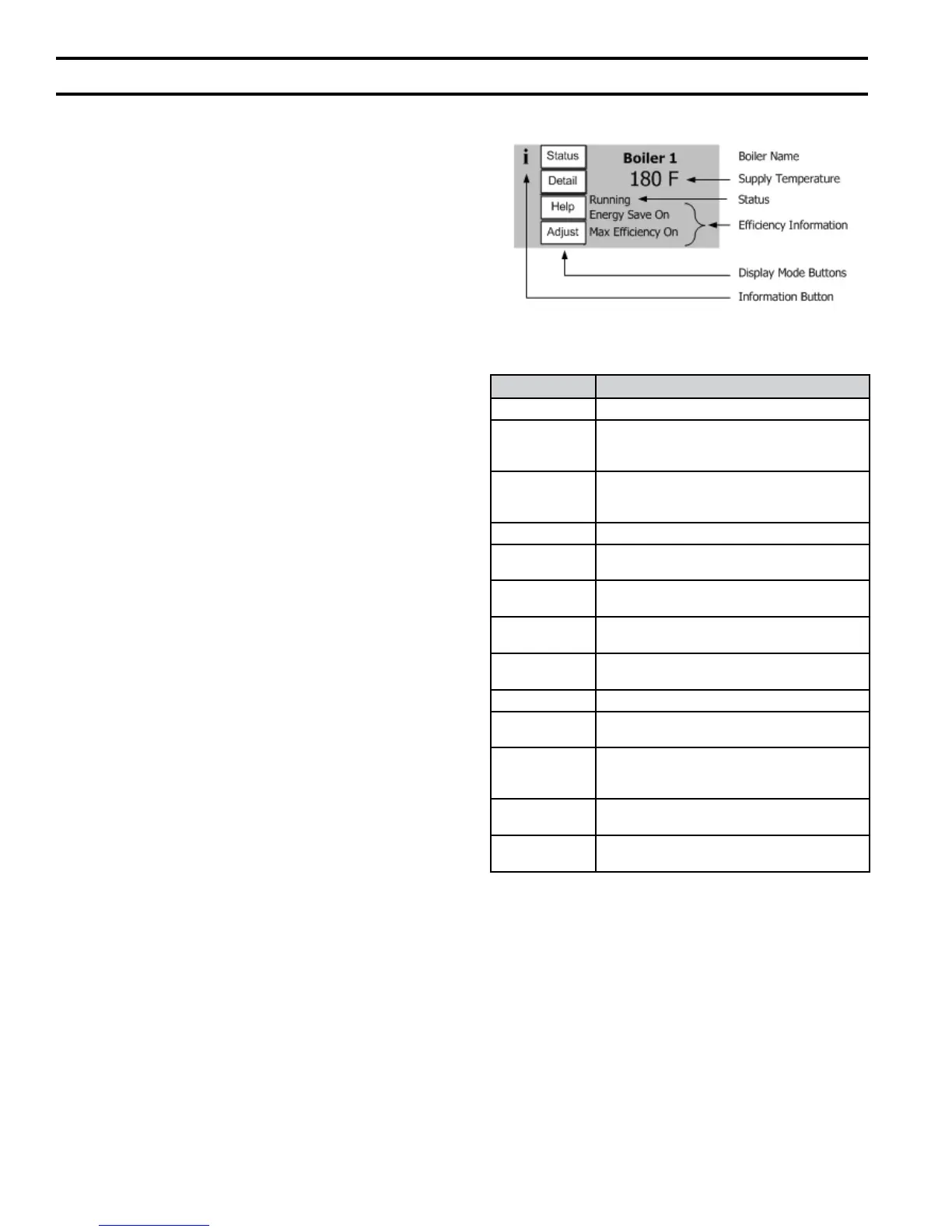
Under normal conditions, the boiler display shows
the “Home” screen and the display looks like that
shown in Figure 54. The temperature value shown
is the boiler’s supply temperature. Boiler status is
shown below the supply water temperature. The
“Home” screen provides the following “Buttons”
and information:
a. Status Button
Displays boiler’s current status including
measured temperatures, setpoint, ring rate,
current boiler demands, pump status and helpful
real time trends.
b. Detail
Button
Displays additional boiler status information.
Detail screens provide in depth operating
parameter status such as active differentials,
sensor and setpoint sources.
c. Help Button
Describes active faults, lockout history and
provides service contact information.
d. Adjust Button
This control mode allows the user to view
and change Sage2.1 control parameters.
Password protection is provided to discourage
unauthorized or accidental changes to settings.
e. Efciency information
“Ener
gy Save On” – appears when the
outdoor reset or setback has lowered the central
heat setpoint based on outside measured air
temperature or time of day.
“Max Efciency On”- appears when the boiler
return temperature is low enough to cause ue
gas condensation.
f. Boiler Status
When there is no call for heat this line shows
“standby”.
Table 28 shows each possible status
and the control action taken during the condition.
XII. Operation (continued)
Figure 54: Home Screen
Status Control Action
Initiate Power-up
Standby Delay This state is entered when a delay is needed
before allowing the burner control to be
available and for sensor errors.
Standby Boiler is not ring. There is no call for heat or
there is a call for heat and the temperature is
greater than setpoint.
Safe Startup Tests ame circuit then checks for ame signal.
Drive purge Driving blower to purge rate setting and waiting
for the proper fan feedback.
Prepurge Purge the combustion chamber for the 10
second purge time.
Drive light-off Driving blower to light-off rate setting and
waiting for the proper fan feedback.
Pre-ignition test Test the safety relay and verify that
downstream contacts are off.
Pre-ignition Energize the igniter and check for ame.
Direct ignition Open main fuel valve and attempt to ignite the
main fuel directly from the ignition source.
Running Normal boiler operation. Modulation rate
depending on temperature and setpoint
selections and modulating control action.
Post-purge Purge the combustion chamber for the 30
second purge time
Lockout Prevent system from running due to a detected
problem and record fault in Lockout History.
Table 28: Boiler Status


 To Next Page