79
Select “Status” button on home screen (when sequencer
Master is enabled) to view:
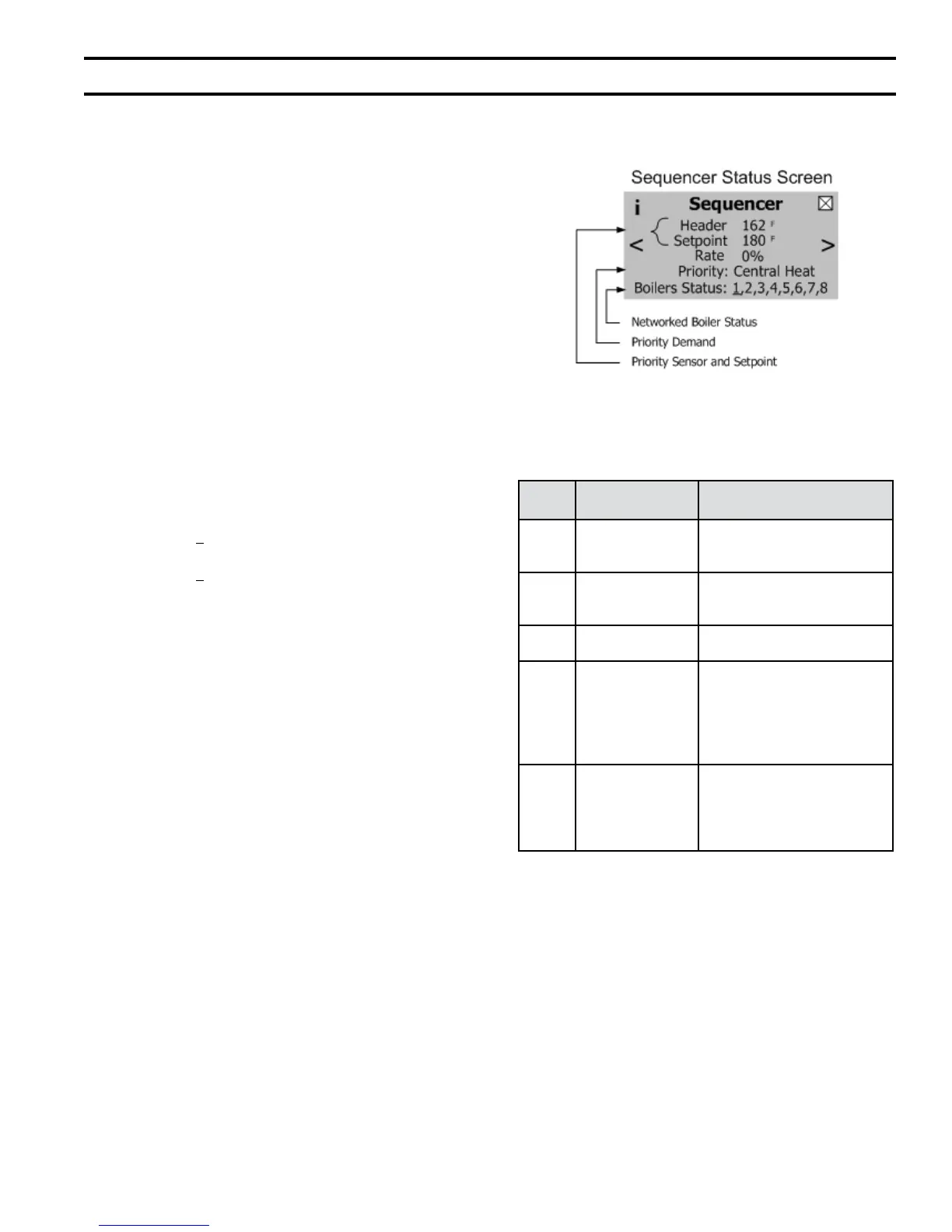
Figure 46: Sequencer Status Screen
Priority
Order
Status Screen
Display “Priority”
Boiler Responding to:
1
st
Domestic HW
DHW demand has been
received and selected as the
priority demand.
2
nd
Central Heat
Central Heat call for heat is
on and has been selected as
priority.
3
rd
Frost Protection
Frost Protection is active and
there is no other call for heat.
4
th
Warm Weather
Warm Weather Shutdown
(WWSD) is active and the
boiler will not respond to
central heat demands. DHW
demand is not blocked by
WWSD.
Last Standby
Boiler is not ring. There is
no call for heat or there is a
call for heat and the sensed
temperature is greater than
setpoint.
2. Operating Mode
a. Sequencer Status Screen
The “Sequencer Status” screen, shown in Figure
46, appears on the Sage2.1 Controller when the
Sequence Master is enabled and the “Home”
screen “Status” button is selected. The screen
is added to the existing status screens already
offered by the Sage2 controller. The following
information is provided on this screen:
i. Networked Boiler Status
“Boiler Status” shown on the Sequencer
Status Screen provides connected, start
sequence and ring rate status information
for all connected boiler addresses. The
boiler number is underlined if the boiler
is running and blinks if the boiler has the
start sequence in progress. For example the
status for boiler address 1 is provided as
follows:
“Boiler Status” Display:
1 - Boiler 1 is connected
1 - “Blinking underline” -boiler 1 is
starting
1 - “Solid underline” -boiler 1 is running
ii. Priority Demand
The Sage2.1 accepts a call for heat (demand)
from multiple places and responds to
each demand according to it’s relative
importance. When multiple demands are
present at one time, the more important
demand is selected as the “priority” demand
and is used to operate the networked boilers.
The selected Priority Demand is shown
on the “Sequencer Status” screen (Figure
46). Table 22 provides a list of demands in
priority order.
iii. Priority Sensor and Setpoint
The Sequencer Master Priority Sensor is
the header sensor. In the event that the
header sensor fails, the lead boiler supply
sensor is used as the Priority Sensor. The
Priority Setpoint is the setpoint for the
active priority, such as central heat or DHW
setpoints.
X. Modular Installation (continued)
G. Modular Boiler Operating Information (continued)
Table 22: Sequence Master Priority


 To Next Page