EasyManua.ls Logo

Canon Canovision8 E50E - Page 141

Canon Canovision8 E50E
179 pages
Print Icon
To Next Page IconTo Next Page
To Previous Page IconTo Previous Page
Loading...
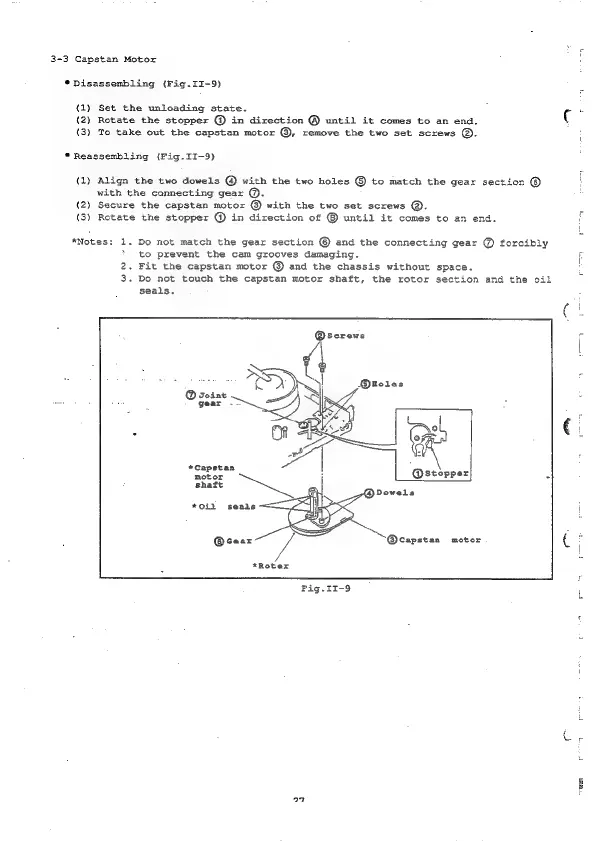
3-3
Capstan
Motor
*
Disassembling
(Fig.II-9)
(1)
Set
the
unloading
state.
(2)
Rotate
the
stopper
@
in
direction
@
until
it
comes
to
an
end.
(3)
To
take
out
the
capstan
motor
@,
remove
the
two
set
screws
@.
*
Reassembling
(Fig.II-9)
{1)
Align
the
two
dowels
@
with
the
two
holes
©
to
match
the
gear
section
©
with
the
connecting
gear
@.
(2)
Secure
the
capstan
motor
@
with
the
two
set
screws
®.
(3)
Rotate
the
stopper
@
in
direction
of
®
until
it
comes
to
an
end.
*Notes:
1.
Do
not
match
the
gear
section
©
and
the
connecting
gear
@
forcibly
*
to
prevent
the
cam
grooves
damaging.
2.
Fit
the
capstan.
motor
@
and the
chassis
without
space.
3.
Do
not
touch
the
capstan
motor
shaft,
the
rotor
section
and
the
oil
seals,
@screws
*Capstan
motor
shaft
*Oiil
seals
@Gear
@capstan
motor
*Roter
Fig.II-9
27
RE

Table of Contents

Related product manuals