EasyManua.ls Logo

Canon Canovision8 E50E - Page 152

Canon Canovision8 E50E
179 pages
Print Icon
To Next Page IconTo Next Page
To Previous Page IconTo Previous Page
Loading...
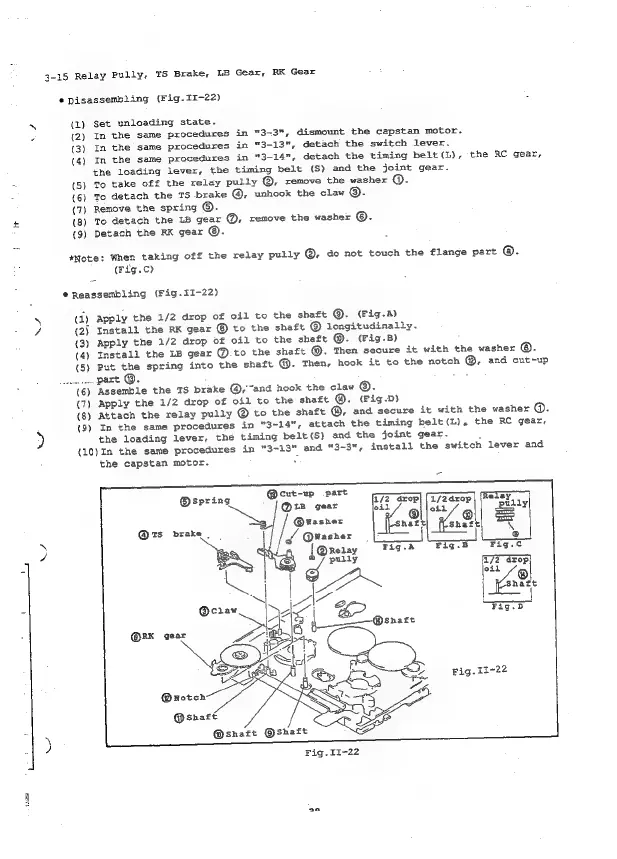
3-15
Relay
Pully,
TS
Brake,
LB
Gear,
RK
Gear
®
Disassembling
(Fig-II-22)
N
q)
{2)
(3)
(4)
.
(5)
.
(6)
(7)
£
(8)
{9)
Set
unloading
state.
In
the
same
procedures
in
"3-3",
dismount
the
capstan
motor.
In
the
same
procedures
in
"3-13",
detach
the
switch
lever.
In
the
same
procedures
in
"3-14",
detach
the
timing
belt(L),
the
RC
gear,
the
loading
lever,
the
timing
belt
(S)
and the
joint
gear.
mo
take
off
the
relay
pully
@,
remove
the
washer
@.
To
detach
the
TS
brake
@,
unhook
the
claw
@.
Remove
the
spring
©.
To
detach
the
LB
gear
@,
remove
the
washer
©.
Detach
the
RK
gear
©.
«Note:
When
taking
off the
relay
pully
@,
do
not
touch
the
flange
part
®.
(rig.c)
@Reassembling
(Fig.1I-22)
qy
(2)
(3)
(4)
(5)
Le
(6)
(7)
(8)
(9)
Apply
the
1/2
drop
of
oil
to
the
shaft
©.
(Fig.A)
Install
the
RK
gear
©
to
the
shaft
@
longitudinally.
Apply
the
1/2
drop
of
oil
to
the
shaft
@.
(Fig.5)
.
Install
the
LB
gear
@.to
the
shaft
@.
Then
secure
it
with
the
washer
©.
Put
the
spring
into
the
shaft
@.
Then,
hook
it
to
the
notch
@,
and
cut-up
part
@.
‘Assemble
the
TS
brake
@,~and
hook
the
claw
©.
Apply
the
1/2
drop
of
oil
to
the
shaft
@.
(Pig-D)
Attach
the
relay
pully
®
to
the
shaft
@,
and
secure
it
with
the
washer
@.
In
the
same
procedures
in
"3~14",
attach
the
timing
belt
(L),
the
RC
gear,
the
loading
lever,
the
timing
belt
(S)
and
the
joint
gear.
(10)In
the
same
procedures
in
"3-13"
and
"3-3",
install
the
switch
lever
and
jg
cmos
wv
the
capstan
motor.
@®spring
@Washer
@ts_
brake
|
ey
Q@washer
[@xeray
Fig.A
fig.8
“Fig.c
E
ae
a
7)
o
oil
Ie
|
|
io
Shaft
GN
@craw
Ae
>
Ger
Wie
ce
:
>
fay
4
@
snare
<a
WAG
SS
ne

Table of Contents

Related product manuals