DC10 E, DC20 E
DISASSEMBLING
39
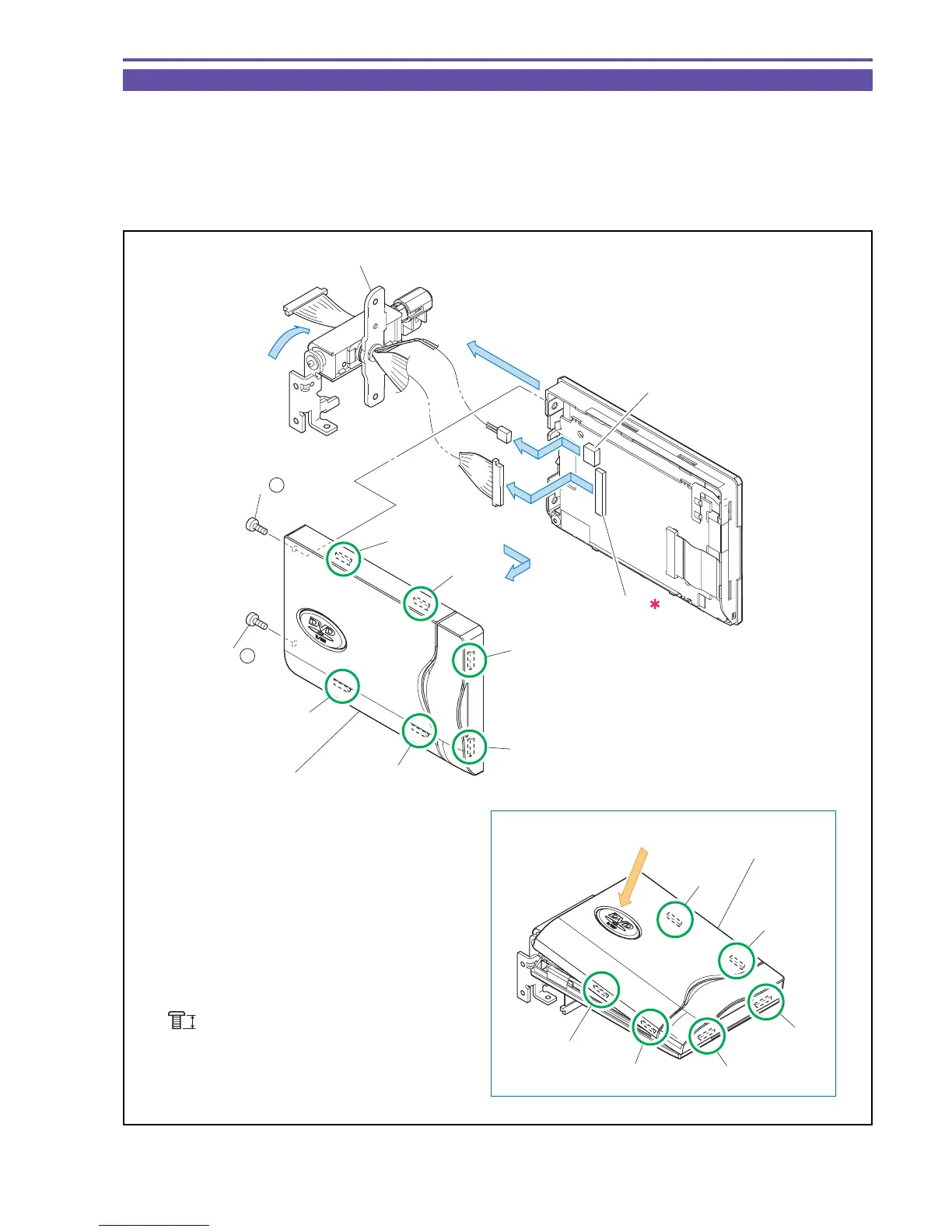
1-21 Disassembly of LCD Unit - 1
(1) Turn the LCD Hinge Ass'y in the direction indicated in the figure shown below, and then remove two screws (d × 2).
(2) Disengage claws A, B, C, D, E, and F (six positions), and detach the LCD Top Cover Ass'y.
(3) Disconnect the CN901 and the CN903, and detach the LCD Hinge Ass'y.
<Note on Reassembling>
(1) To attach the LCD Top Cover Ass'y, insert the Claws E and F first, and then the Claws D, B, C, and A in this order.
Fig. 36
d
3mm
Metal
M1.7
Note on Reassembling (1)
(3)
(3)
(1)
(3)
CN903
CN901
(2)
LCD Top Cover Ass'y
LCD Top Cover Ass'y
LCD Hinge Ass'y
(1) - d
(1) - d
Claw A
Claw B
Claw C
Claw D
Claw E
Claw F
Claw A
Claw B
Claw C
Claw D
Claw E
Claw F



 To Next Page