DC10 E, DC20 E
DISASSEMBLING
17
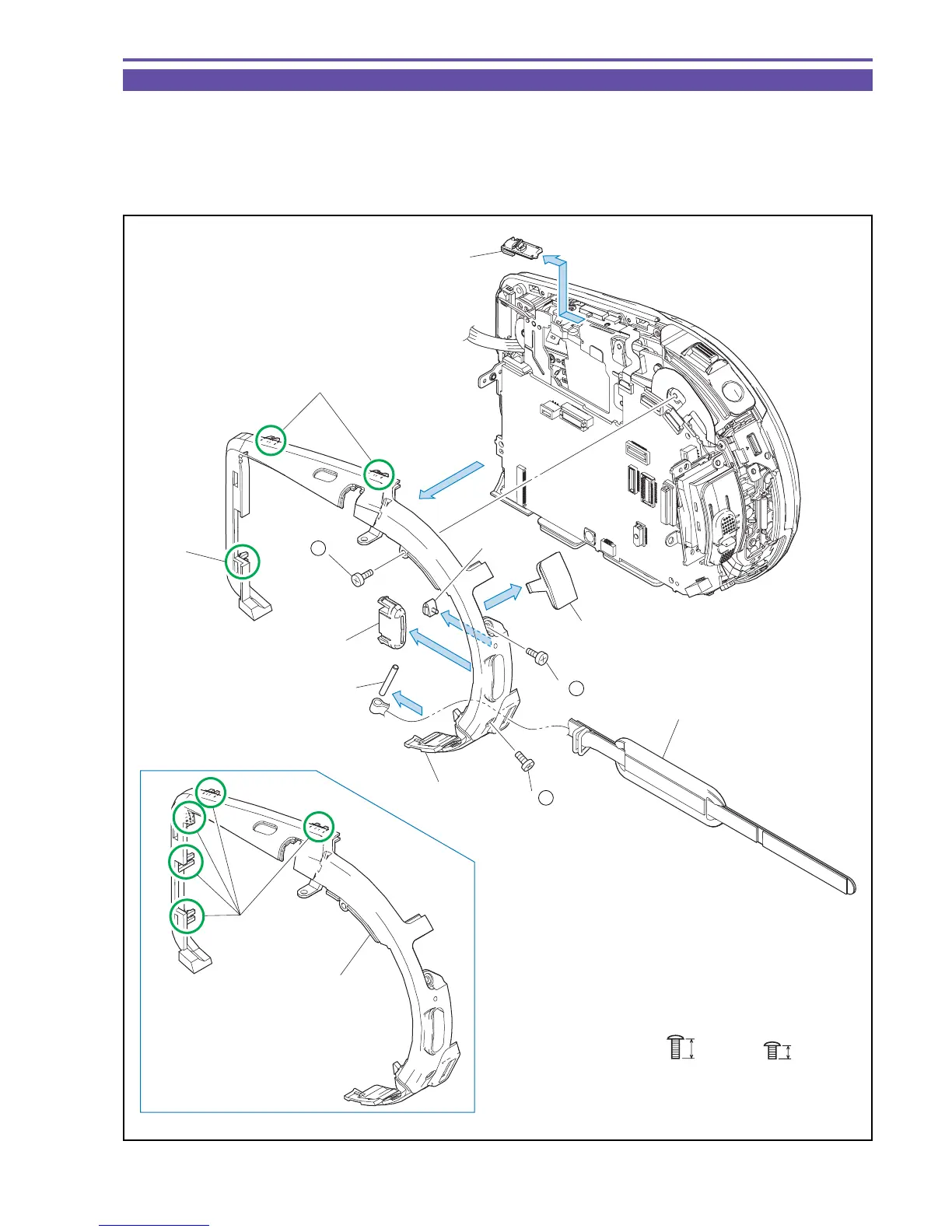
1-10 Separation of Center Cover
(1) Open the Multi Jack Cover, and remove three screws (t × 1, u × 2).
(2) Remove three claws (five claws for DC10 E) , and detach the Center Cover, the Mode Switch, the Start/Stop Button, and the Multi
Jack Cover.
Note : When detaching the Center Cover, take care not to damage the claws part.
(3) Detach the LED window, the Grip Belt Pin, and the Rear Grip Belt from the Center Cover.
Fig. 14
t
u
3mm
4.5mm
Metal
M1.7
Metal
M1.7
(2)
(2)
(2)
(2)
(3)
(3)
Mode Switch
Multi Jack Cover
LED Window
Start Stop
Button
Center Cover
Center Cover
Rear Grip Belt
Grip Belt Pin
Claws
Claw
Claws
DC10 E only
(1) - u
(1) - u
(1) - t



 To Next Page