DC10 E, DC20 E
DISASSEMBLING
14
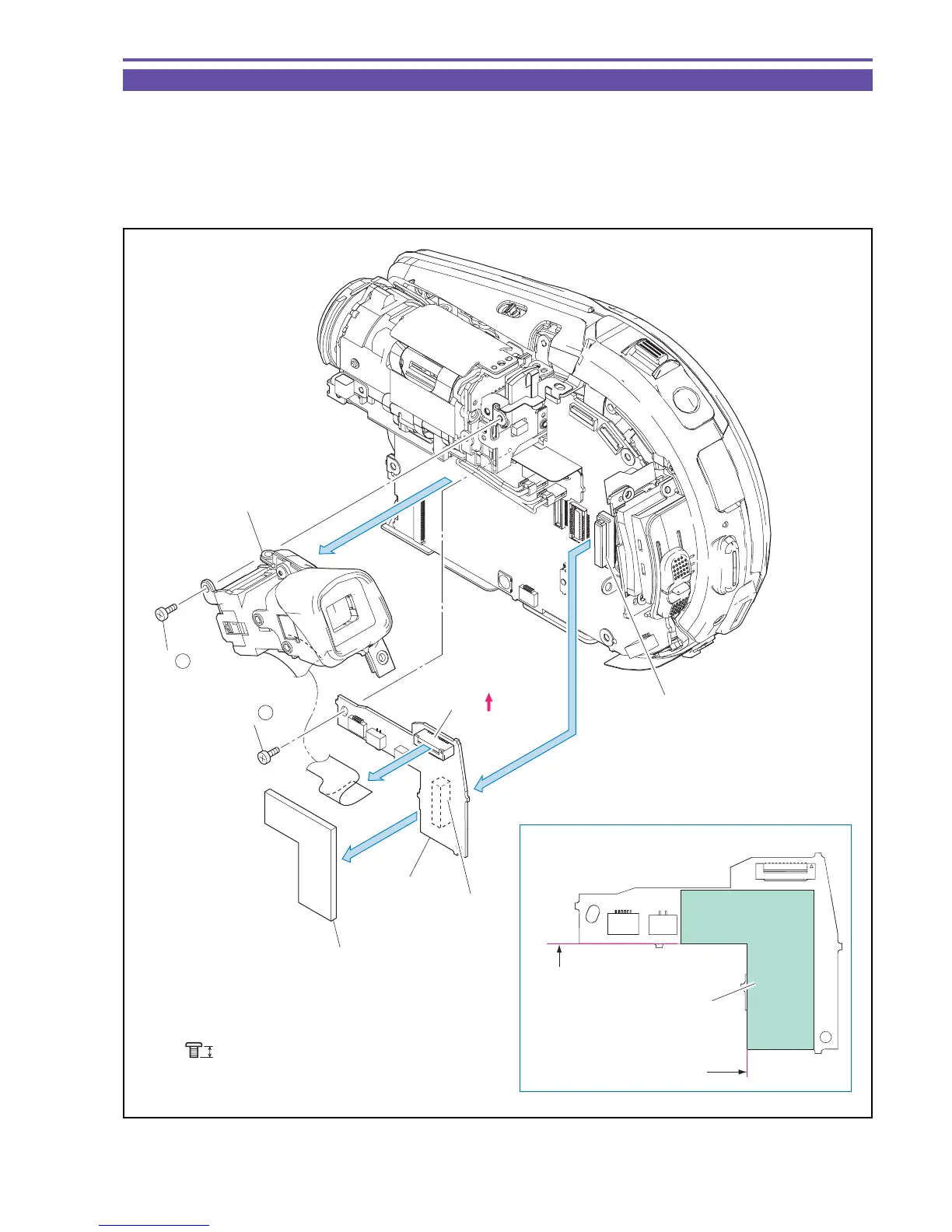
1-7 Separation of CVF Unit, SUB PCB
(1) Remove one screw (a × 1), disconnect the CN1501, and demount the CVF Unit.
(2) Remove one screw (a × 1), disconnect the CN2901 and the CN2905 (B to B), and detach the SUB PCB.
(3) Detach the SUB PCB Form.
<Note on Reassembling>
(1) Attach the SUB PCB Form to the position indicated in the figure below.
Fig. 11
Metal
M1.7
a
2.5mm
Note on Reassembling (1)
CVF Unit
SUB PCB
SUB PCB Form
SUB PCB Form
(1) - a
(2) - a
(1)
(1)
(2)
CN1501
CN2901 (B to B)
CN2905
(B to B)
(3)
Attachment
reference
Attachment
reference



 To Next Page