DC10 E, DC20 E
DISASSEMBLING
6
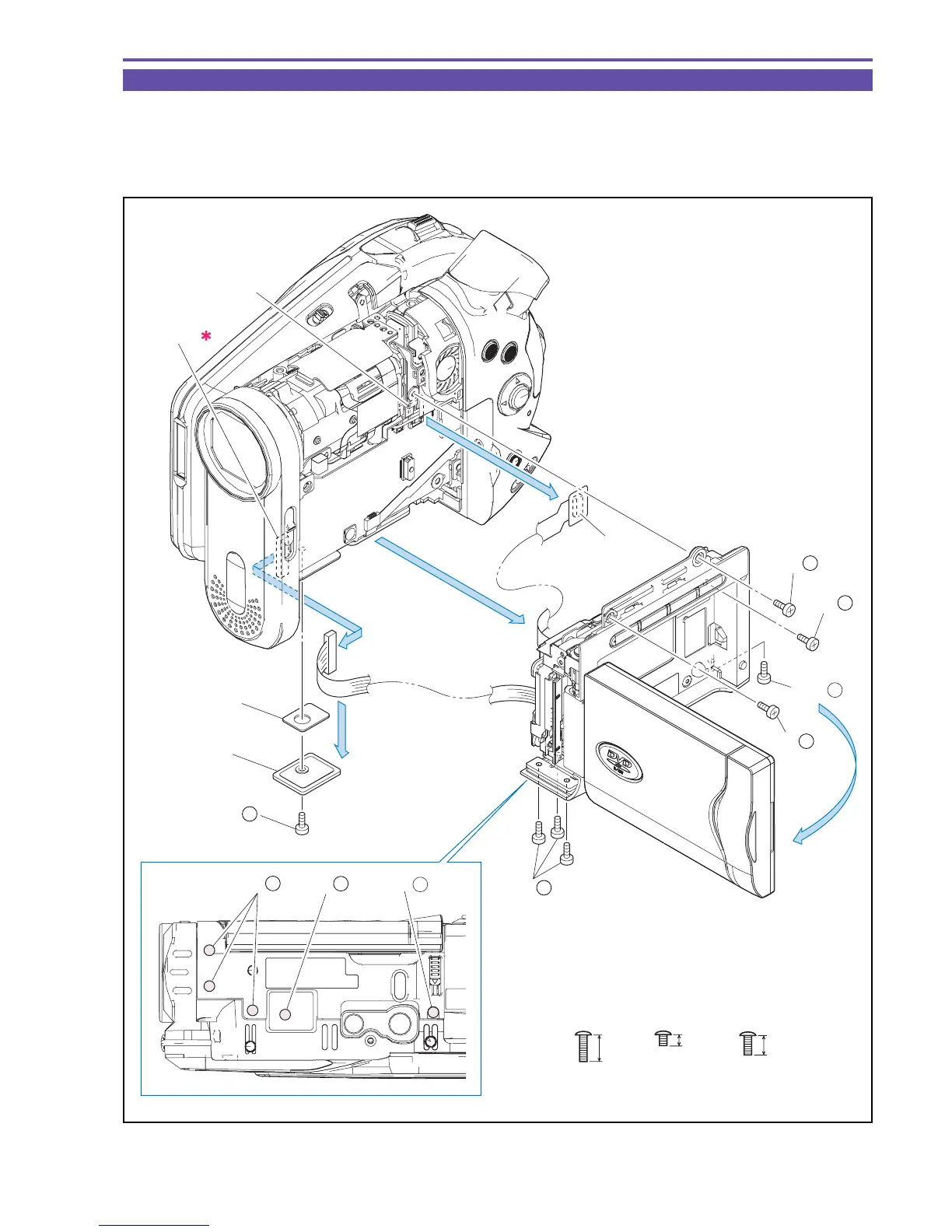
1-3 Separation of R-LCD Unit
(1) Open the LCD, and remove eight screws (c × 1, s × 3, t × 4).
(2) Disconnect the CN104, the CN100 (B to B) , and the CN901, and detach the R-LCD Unit.
Note : Take care not to damage the flexible cable.
(3) Detach the Lid Bottom and the Bottom Radiative Rubber.
Fig. 3
t
s
2.5mm
4.5mm
Metal
M1.7
Metal
M1.7
c
6mm
Metal
M1.7
(1) - c
CN104
(B to B)
CN901
Lid Bottom
(1)
(2)
(2)
(2)
(3)
CN100
(B to B)
Bottom Radiative
Rubber
(1) - c
(1) - t
(1) - t
(1) - t
(1) - s
(1) - s
(1) - s
(1) - s



 To Next Page