DC10 E, DC20 E
DISASSEMBLING
47
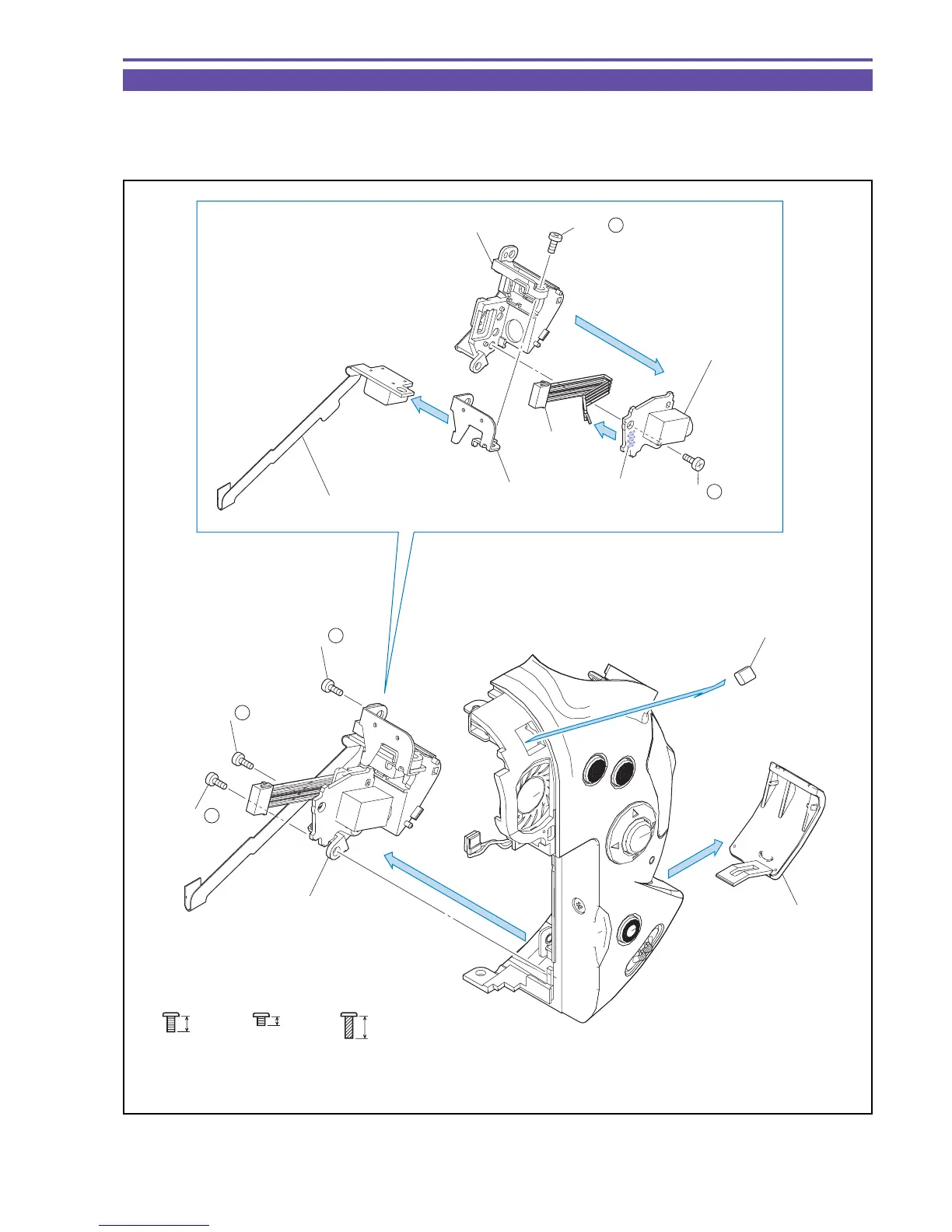
1-26 Disassembly of Rear Cover Unit - 1
(1) Open the Jack Cover. Remove three screws (k × 1, l × 2), and detach the Jack Ass'y, the Jack Cover, and the Right Side Gasket.
(2) Remove one screw (l × 1), unsolder (α), and detach the DC JACK PCB and the DC Wire.
(3) Remove one screw (e × 1), and detach the USB FPC Ass'y and the USB Holder.
Fig. 44
l
5mm
k
2mm
Metal
M1.7
Metal
M1.7
(self tap)
e
3.5mm
Metal
M1.7
(1)
(1)
(1)
Jack Ass'y
Right Side Gasket
Jack Cover
USB FPC Ass'y
USB Holder
DC Wire
DC Jack Holder
DC JACK PCB
(3)
(2)
(2)
(3) - e
(1) - k
(1) - l
(1) - l
(2) - l
Solder α
(Back side)



 To Next Page