DC10 E, DC20 E
DISASSEMBLING
19
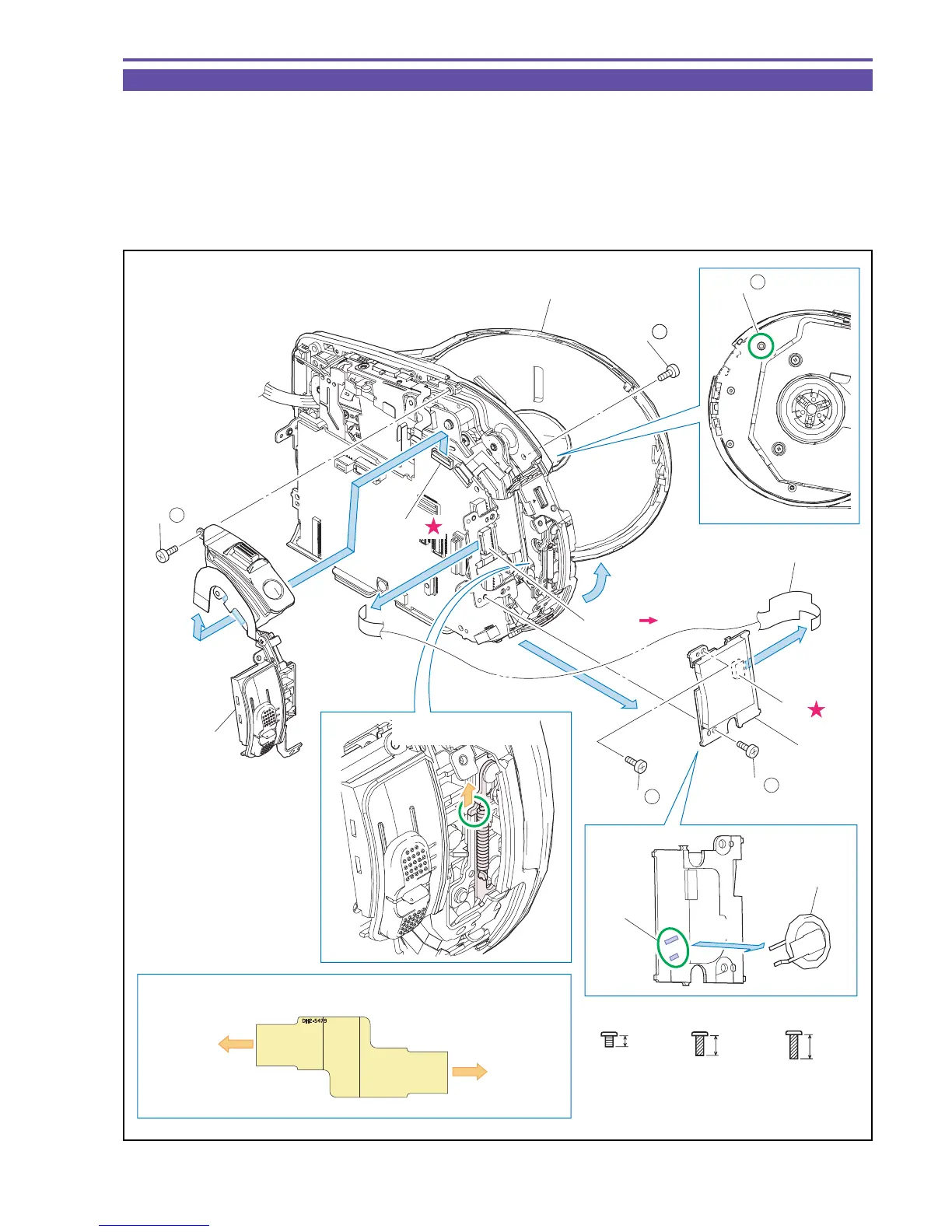
1-11 Separation of Zoom Ass'y, CARD PCB
(1) Open the Disc Cover.
(2) Remove two screws (f × 1, g × 1) , disconnect the CN100, and detach the Zoom Ass'y.
(3) Remove two screws (a × 2) , disconnect the CN50 and CN105, and detach the CARD PCB and the CARD FPC.
(4) Remove solder (α) from the CARD PCB, and detach the LI Battery.
<Note on Reassembling>
(1) Mount the CARD FPC in the orientation indicated in the figure below.
Fig. 16
f
4.5mm
Metal
M1.7
(self tap)
Metal
M1.7
a
2.5mm
5.5mm
Metal
M1.7
(self tap)
g
Note on Reassembling (1)
MAIN PCB
CN105
CARD PCB
CN50
CARD FPC
LI Battery
Disc Cover
CN105
CN50
CARD PCB
CARD FPC
(3)
(3) - a
(3) - a
(3)
(4)
(1)
(2)
(3)
(2) - f
(2) - f
CN100
(1)
Open the Disc Cover
Zoom Ass'y
Solder α
(2) - g



 To Next Page