DC10 E, DC20 E
DISASSEMBLING
4
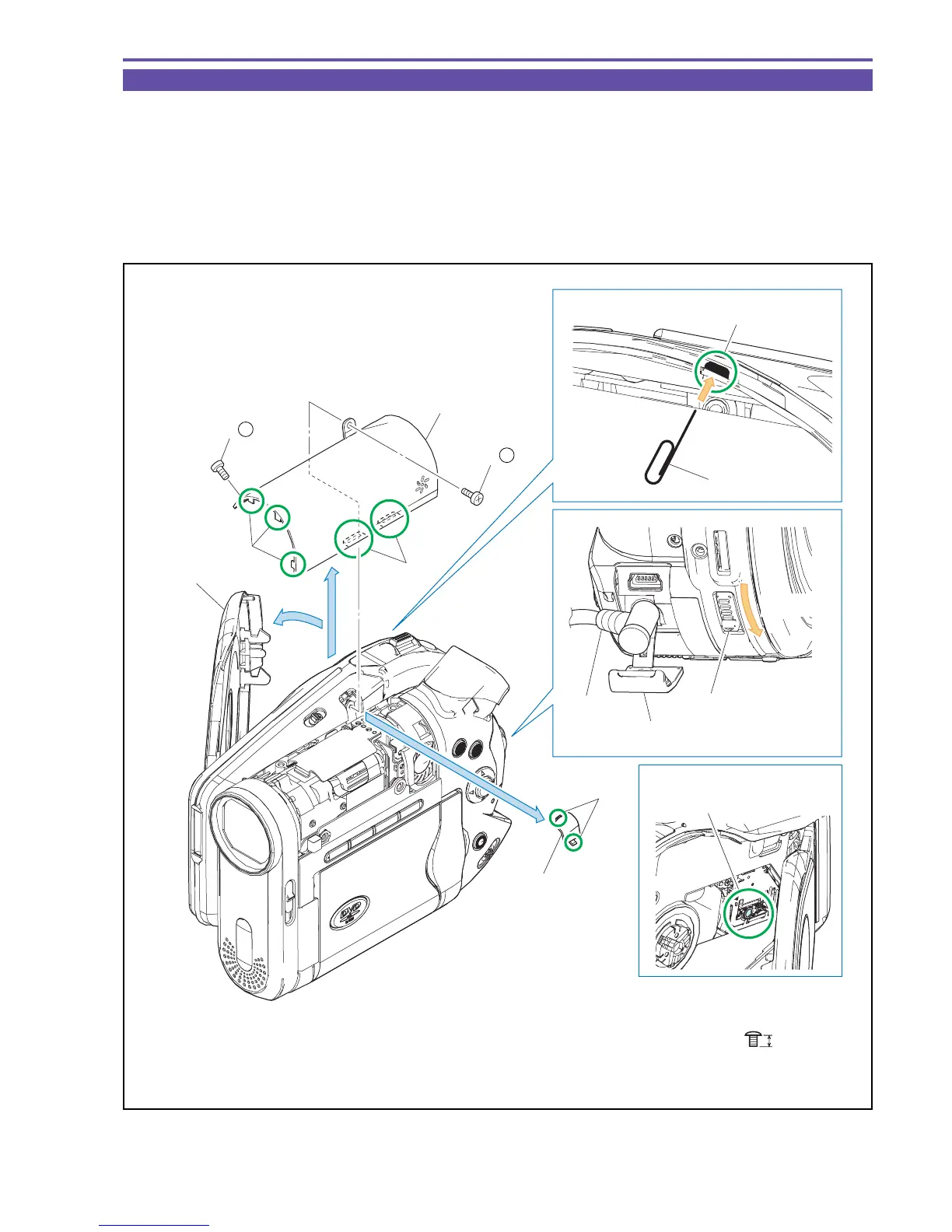
1-2 Separation of R Upper Cover
(1) Connect to the External Power Source, and open the Disc Cover.
Note1 : Never touch the Lens Section of TS Mech Recorder Ass'y.
(2) Insert a clip or the like into the part B from the inside of the camera, disengage two claws C, and then detach the Center Cover Lid.
Note2 : If the Disc Cover does not open because the fuse is blown or power is not supplied, break the Center Cover Lid
to detach the R Upper Cover. When detaching it, be careful not to damage the surrounding covers.
(3) Remove two screws (s × 2). Remove five claws D, and detach the R Upper Cover.
Note3 : When detaching the R Upper Cover, take care not to deform the claws part.
Fig. 1
s
2.5mm
Metal
M1.7
Note 1
(2)
(1)
(1)
(2)
(3)
Claws C
Lens part
R Upper Cover
Disc Cover
Center Cover Lid
Clip
Jack Cover
External
Power
Source
Open Knob
Open the
Disc Cover
Slide
Claws D
Claws D
B
(3) - s
(3) - s



 To Next Page