DC10 E, DC20 E
DISASSEMBLING
26
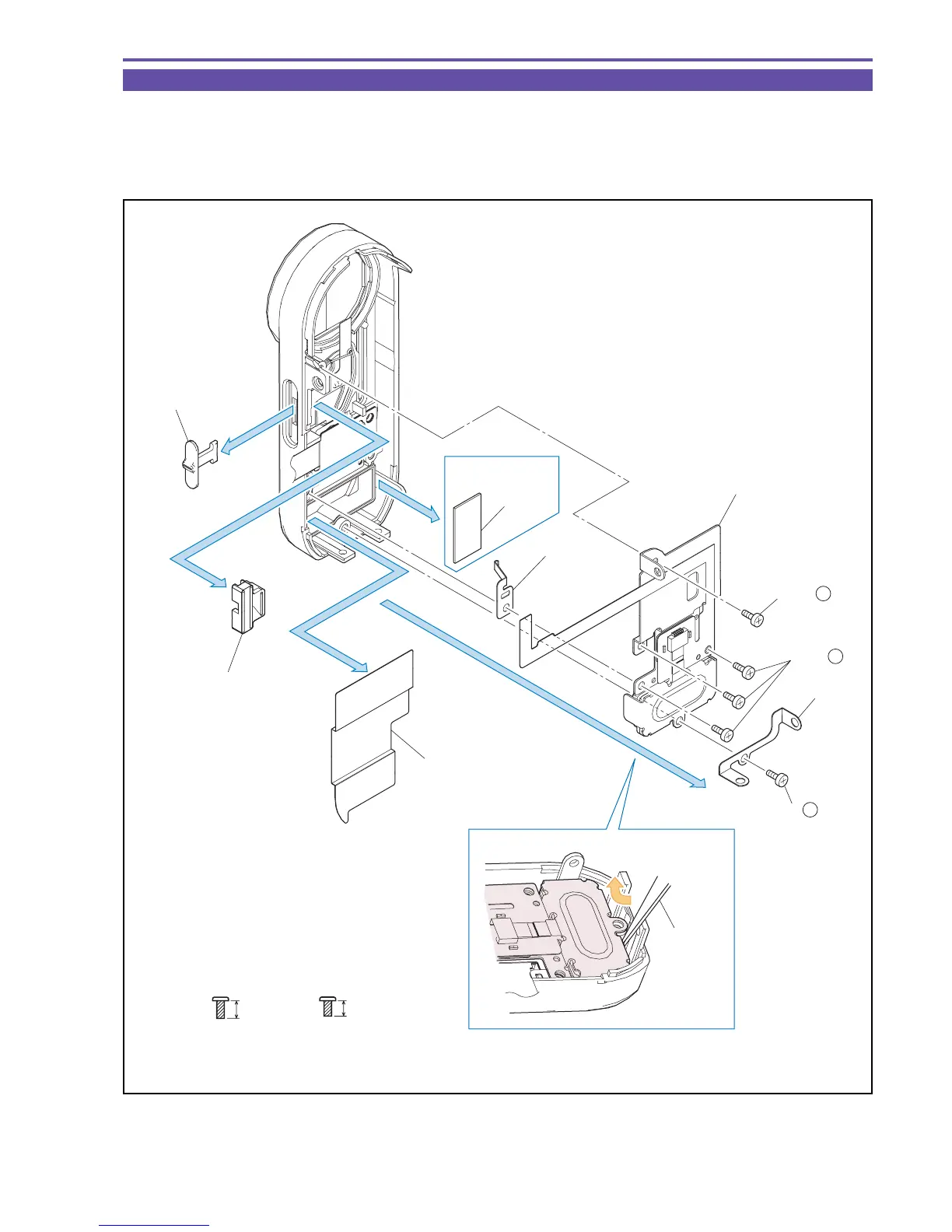
1-15 Disassembly of Front Cover Unit - 1
(1) Detach the Blindfold Sheet.
(2) Remove five screws (i × 4, j × 1), and detach the GND Plate, the Back Barrier Plate section, and the GND Plate Spring.
Note : Take care not to deform the GND Plate Spring.
(3) Detach the Barrier Slide Holder, the Barrier Knob, and the LED Radiator Gum (DC20 E only).
Fig. 23
j
3.5mm
Black
M1.7
(self tap)
i
4mm
Metal
M1.7
(self tap)
(1)
(2)
(2)
(3)
(3)
DC20 E only
Back Barrier Plate section
LED Radiator
Gum
GND Plate
Spring
GND Plate
Barrier Slide Holder
Lift up
Tweezers
(2) - i
(2) - i
(2) - j
(3)
Barrier Knob
Blindfold Sheet



 To Next Page