DC10 E, DC20 E
DISASSEMBLING
25
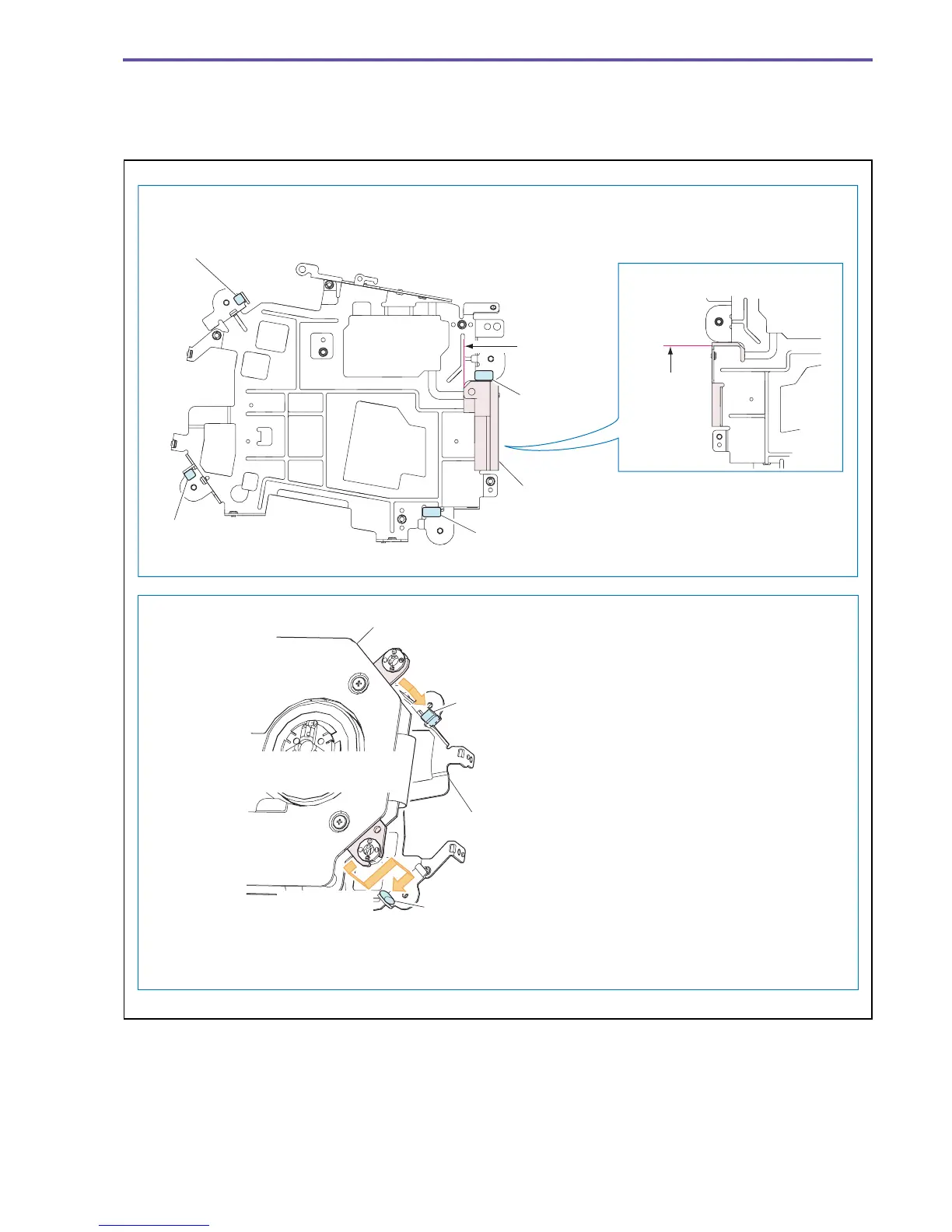
(4) Attach the Gasket and the ST Wire Protector (DC20 E only) to the position indicated in the figure below.
(5) Attach the Main Frame as shown in the figure below.
(6) Do not reuse the step screws (h × 4) securing the Main Frame, because its tip is applied with adhesive for the prevention of
loosening.
Fig. 22
Note on Reassembling (4)
Note on Reassembling (5)
Gasket
Gasket
Gasket
Gasket
ST Wire Protector
Gasket
Main Frame
Gasket
Press the gasket.
Press the gasket.
Press the gasket in the
arrow direction.
Attachment
reference
Attachment
reference
Back side
DC20 E only
(DC20 E only)
TS Mech Recorder Ass'y
Ensure that the four gaskets are securely
pinched between the TS Mech Recorder
Ass'y Frame and the Main Frame.
Place the TS Mech Recorder Ass'y on the two gaskets other
than the one shown above, and pinch them between.



 To Next Page