DC10 E, DC20 E
DISASSEMBLING
44
<Note on Reassembling>
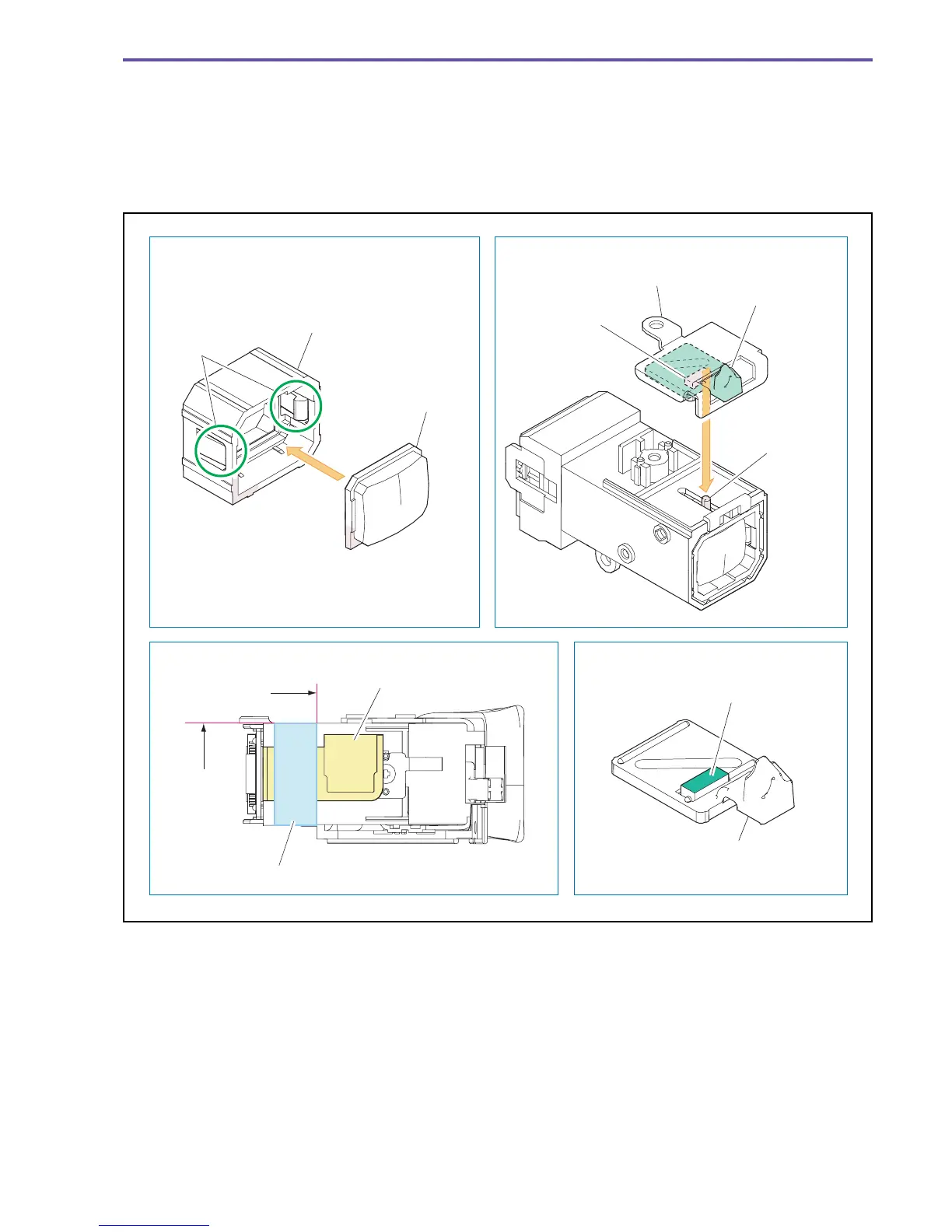
(1) Attach the CVF Lens as shown in the figure below.
(2) Attach the CVF Diop Plate, the CVF Diop Knob, and the CVF Diop Rubber as shown in the figure below.
(3) Attach the UL Tape to the position indicated in the figure below.
<Instruction for Supply>
CVF Diop Rubber sliding surface : Hanarl KS-39M (DY9-3053-000)
Fig. 41
Note on Reassembling (1)
Note on Reassembling (3)
Note on Reassembling (1)
Instruction for Supply
With the angular section
aligned, push into the
claws A.
CVF Lens Holder
CVF Lens Holder
CVF Lens
CVF SUB FPC
CVF Diop Knob
CVF Diop Knob
CVF Diop Rubber
CVF Diop Rubber sliding surface
CVF Diop Plate
UL Tape (7 × 15mm)
Claws A
Attachment
reference
Attachment
reference
Hanarl : KS-39M



 To Next Page