DC10 E, DC20 E
DISASSEMBLING
49
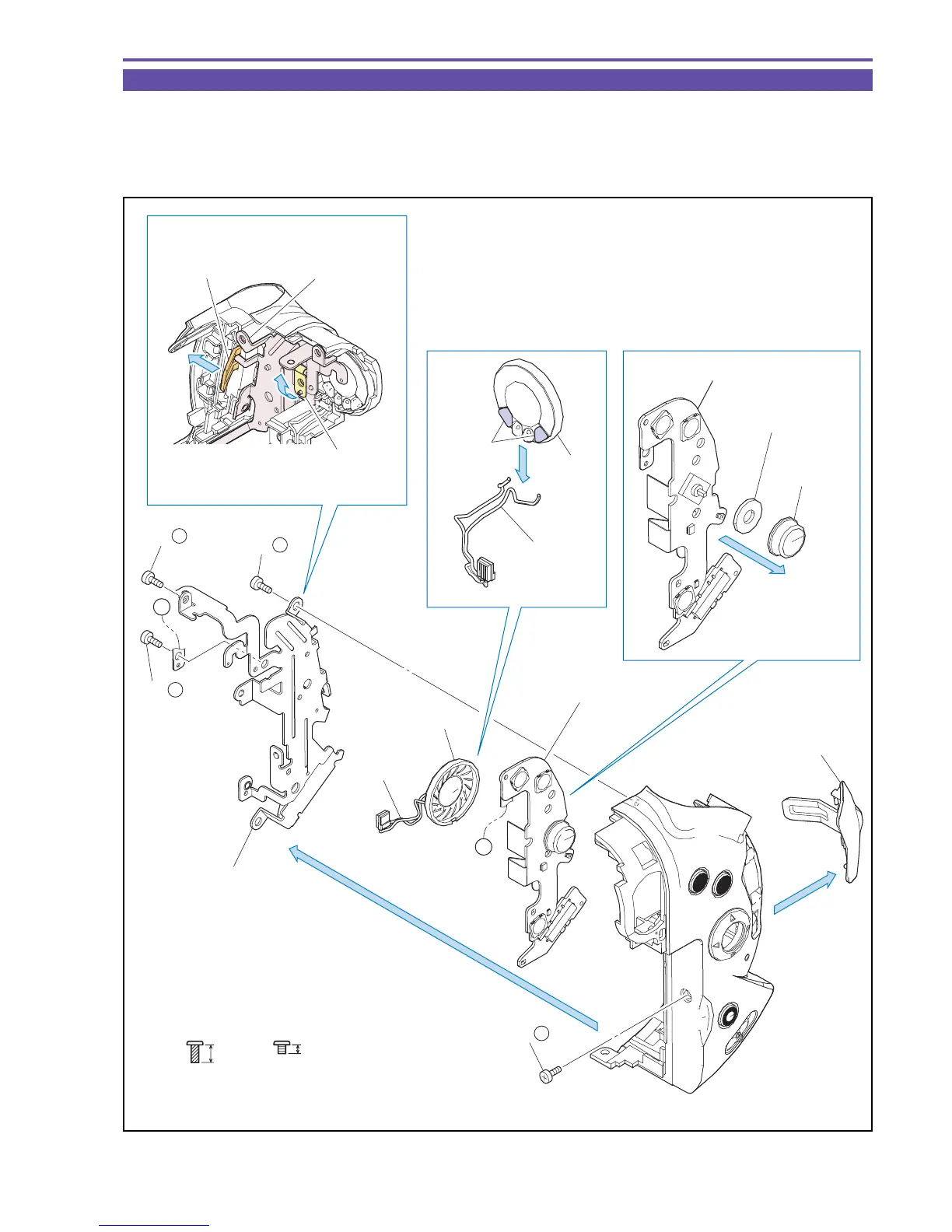
1-27 Disassembly of Rear Cover Unit - 2
(1) Remove four screws (i × 3, k × 1), and detach the Key Frame, the Speaker, and the Rear Key FPC Ass'y.
(2) unsolder (α) at two places, and detach the Speaker Wire.
(3) Detach the Center SW Knob and the Center SW knob Dumper from the Rear Key FPC Ass'y.
(4) Detach the SD Cover.
Fig. 46
k
2mm
Metal
M1.7
i
4mm
Metal
M1.7
(self tap)
(3)(2)
(1)
(1)
(4)
SD Cover
Key Frame
Key Frame
Speaker
Speaker Wire
Speaker Wire
Speaker
Center SW
Knob Dumper
Center SW
Knob
Rear Key FPC Ass'y
Rear Key FPC Ass'y
A
A
Detach the Rear Key
FPC from the dowel
and make it escape.
(3)
(2)
(1) - i
(1) - i
(1) - i
(1) - k
Solder α
Make the SD Cover
Hinge section escape.



 To Next Page