DC10 E, DC20 E
SERVICE HINTS
19
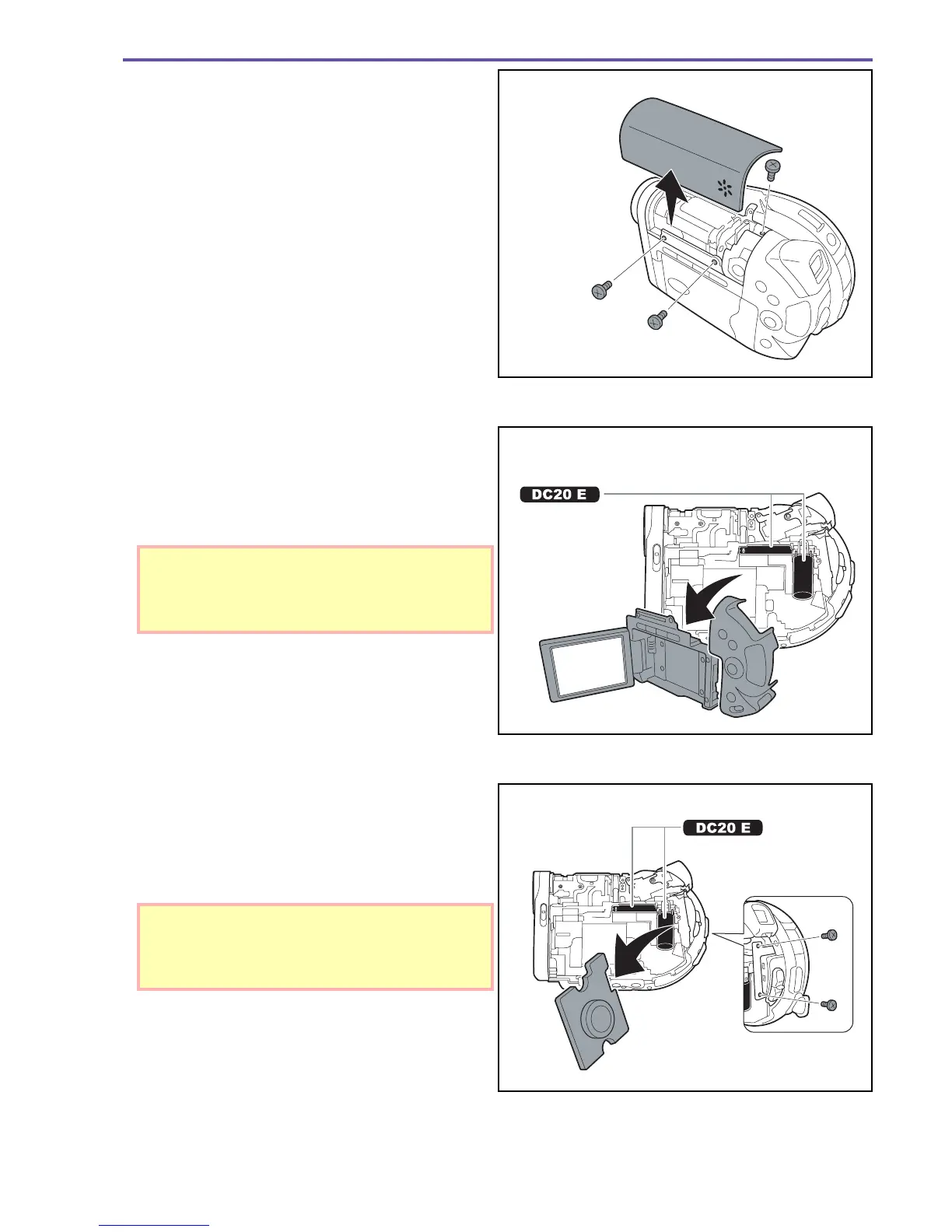
2-1. Remove the top cover
2-2. Remove the additional screws under it.
3-1. Remove the LCD display cover and the back cover.
* Detach the cable connectors with a pair of long-nosed
pliers or simply cut them with a pair of scissors.
3-2. Being careful not to touch the part indicated in the il-
lustration remove the additional screws.
4-1. Grab the battery firmly with an insulated pair of pliers
or a similar tool and twist it repeatedly to detach it from
the board (CARD PCB).
4-2. Be careful not to touch the part indicated in the illustra-
tion.
Fig. 16
<Left side>
Fig. 17
<Left side>
Do not touch
the condenser!
Fig. 18
<Left side>
Do not touch
the condenser!
DC20 E Touching the condenser can present
a serious risk of electrical shock.
DC20 E Touching the condenser can present
a serious risk of electrical shock.



 To Next Page