EasyManua.ls Logo

Canon EOS 50 E - Page 122

Canon EOS 50 E
207 pages
Print Icon
To Next Page IconTo Next Page
To Previous Page IconTo Previous Page
Loading...
Part 3: Repair Information
Al>JuSTMENT:
1.
Flange
Back
1)
Open
the
back
cover
and
set
the
focusing
rails
on
the
focusing rail flat.
Set
the
camera
to
bulb
in
the
manual
mode,
open
the
shutter
and
hold
SW2
down
during
adjustment.
2)
Place
the
dial
gage
on
the
mount
and
measure
the
FFD
at
A,B,C,D,
and
E.
3)
If
it
is
out
of
limit,
change
the
mount
spacer.
4)
Measure
the
four
comers
of
the
pressure
plate
to
check
parallelism. If
it
is
out
of
limit,
change
the
parallelism
adjustment
washers
as
necessary.
2.
Pressure
Plate
Center
1)
Close
the
back
cover,
and
open
the
shutter.
2)
Place
the
dial
gage
on
the
mount
and
measure
the
FFD
to
the
pressure
plate
center
(E.).
3)
If
it
is
out
of
limit,
change
the
pressure
plate.
3.
Pressure
Plate
Center
Depression
From
the
results
of
1.
and
2., figure
the
pressure
plate
center
depression,
and
if
it
is
out
of
limit,
change
the
pressure
plate.
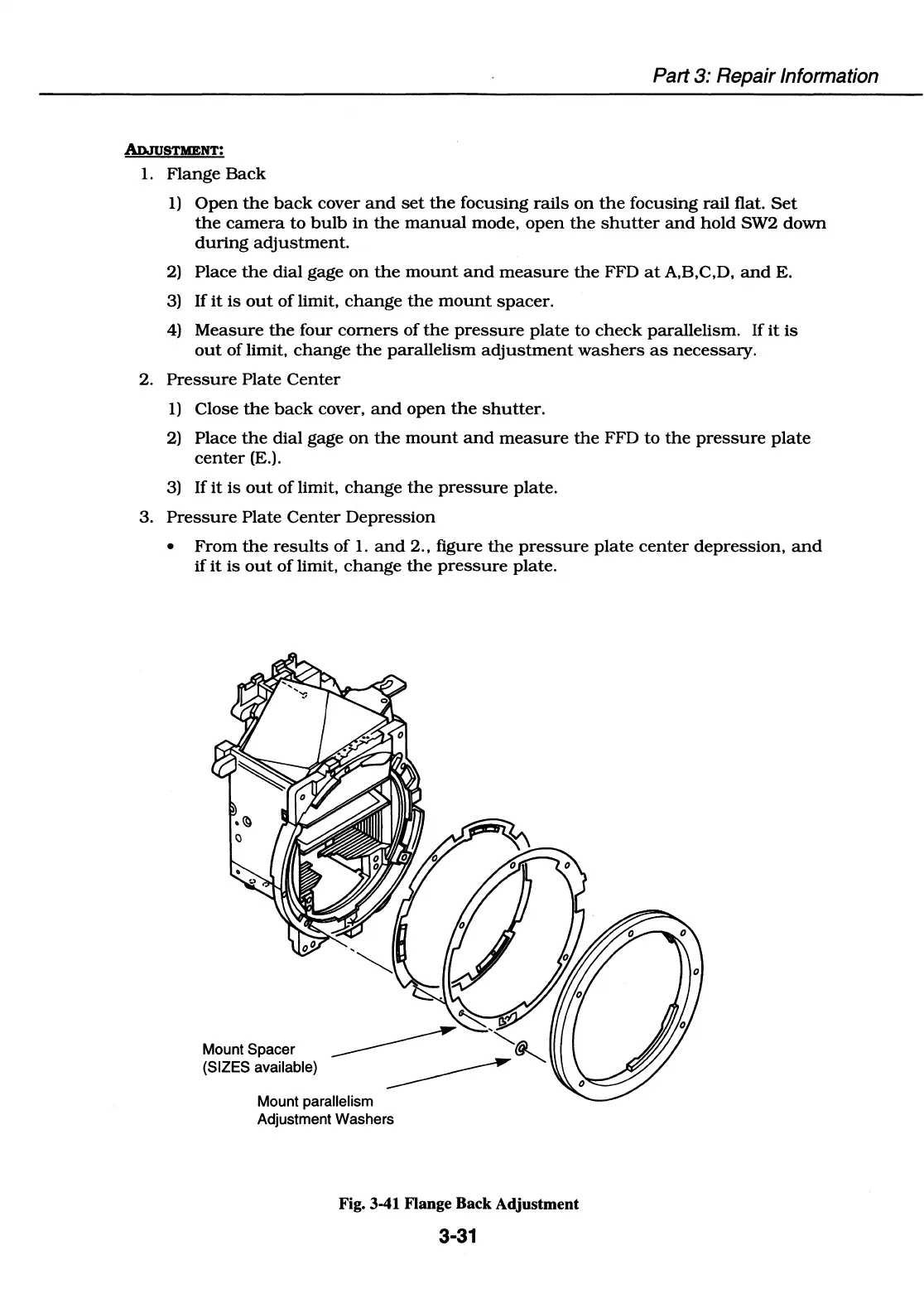
Mount Spacer
(SIZES available)
___________.,.
Mount parallelism
Adjustment Washers
Fig. 3-41 Flange Back Adjustment
3-31

Table of Contents

Related product manuals