EasyManua.ls Logo

Canon EOS 50 E - 3.4 VIEWFINDER FOCUS ADJUSTMENT

Canon EOS 50 E
207 pages
Print Icon
To Next Page IconTo Next Page
To Previous Page IconTo Previous Page
Loading...
Part 3: Repair Information
3.4 VIEWFINDER
Focus
ADJUSTMENT
~---------------------------------------------------------------------------------,
:
lt-J
0
•MH
Be
sure
to
adjust
the
viewfinder focus
after
the
FFD
adjustment.
:
L---------------------------------------------------------------------------------~
PuRPosE:
To
match
the
viewfinder
focus
with
the
film
focus
position.
STANDARD:
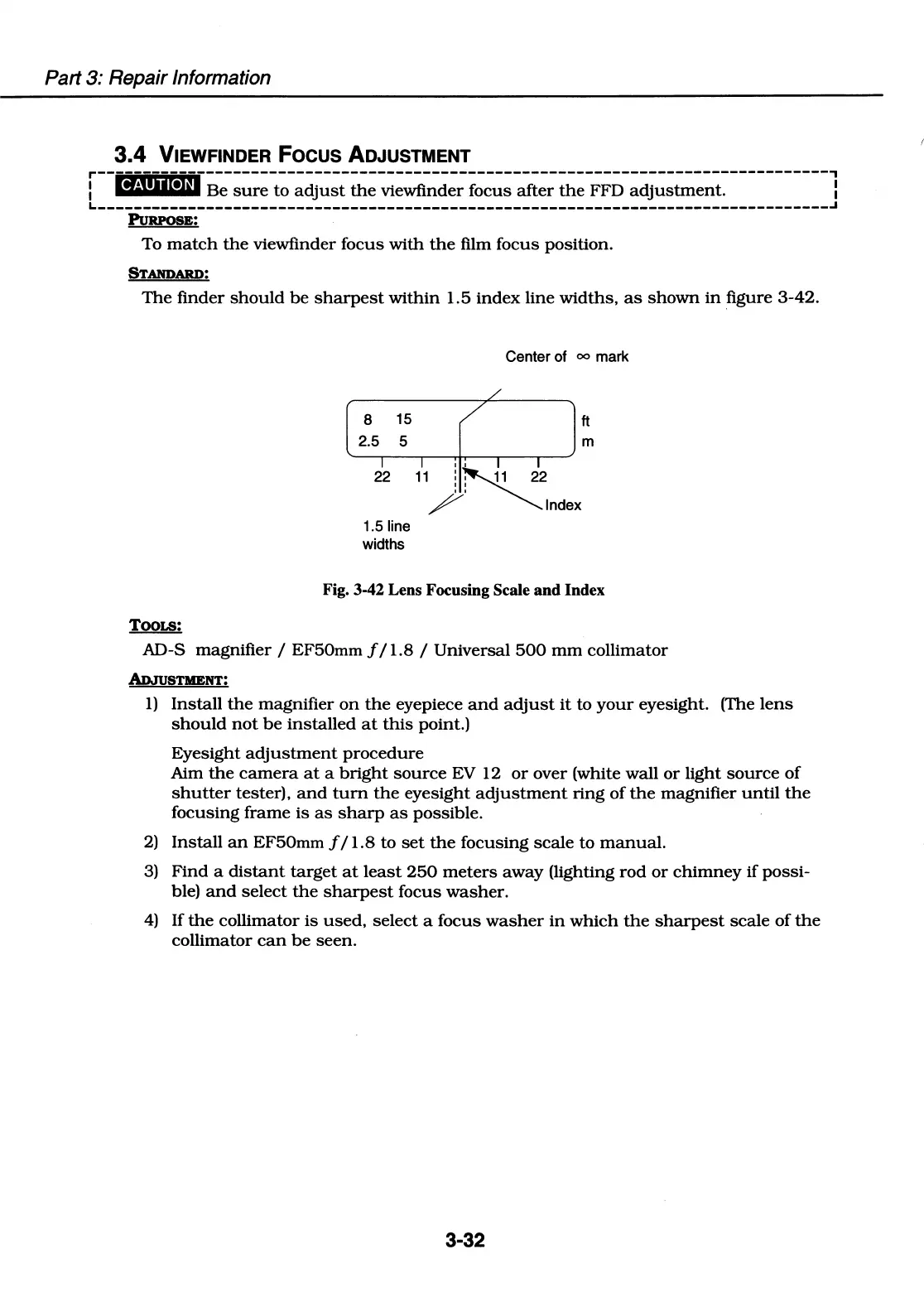
The
finder
should
be
sharpest
within
1.5
index
line
widths,
as
shown
in
figure
3-42.
TOOLS:
8 15
2.5 5
Center of
00
mark
ft
m
22
11
!N'1
22
/;
~Index
1.5 line
widths
Fig. 3-42 Lens Focusing Scale and Index
AD-S magnifier / EF50mm f I 1.8 / Universal
500
mm
collimator
Al>JuSTIIENT:
1)
Install
the
magnifier
on
the
eyepiece
and
adjust
it
to
your
eyesight. (The
lens
should
not
be
installed
at
this
point.)
Eyesight
adjustment
procedure
Aim
the
camera
at
a
bright
source
EV 12
or
over (white wall
or
light
source
of
shutter
tester),
and
tum
the
eyesight
adjustment
ring
of
the
magnifier
until
the
focusing
frame
is
as
sharp
as
possible.
2)
Install
an
EF50mm f I 1.8
to
set
the
focusing
scale
to
manual.
3)
Find
a
distant
target
at
least
250
meters
away
(lighting
rod
or
chimney
if
possi-
ble)
and
select
the
sharpest
focus
washer.
4)
If
the
collimator
is
used,
select
a focus
washer
in
which
the
sharpest
scale
of
the
collimator
can
be
seen.
3-32

Table of Contents

Related product manuals