EasyManua.ls Logo

Canon EOS 50 E - Page 124

Canon EOS 50 E
207 pages
Print Icon
To Next Page IconTo Next Page
To Previous Page IconTo Previous Page
Loading...
Part 3: Repair Information
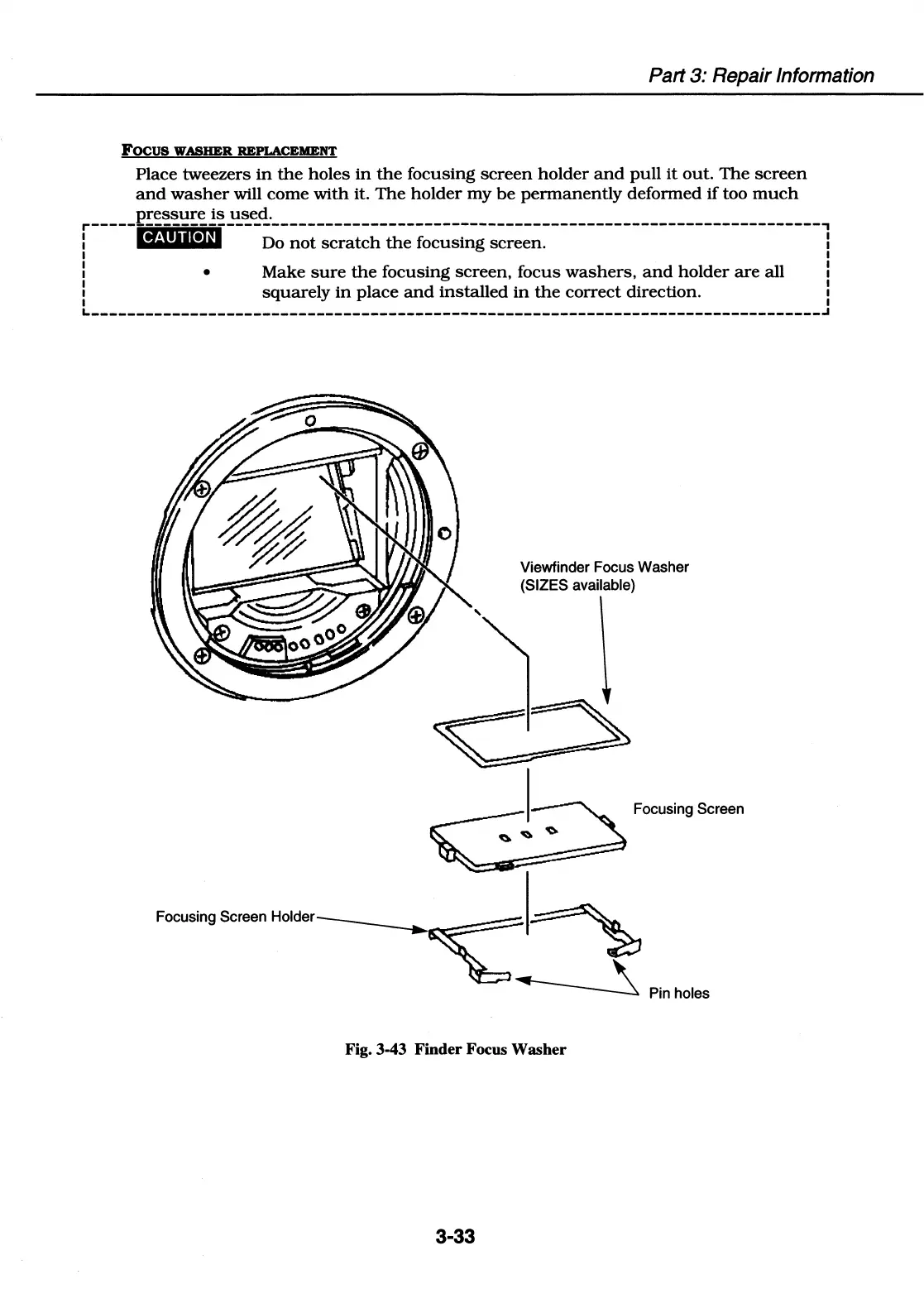
Focus WASHER REPLACEMENT
Place tweezers
in
the
holes
in
the
focusing
screen
holder
and
pull
it
out.
The
screen
and
washer
will
come
with
it.
The
holder
my
be
permanently
deformed
if
too
much
pressure
is
used.
r---------------------------------------------------------------------------------,
I
@4•
11
MH
Do
not
scratch
the
focusing screen. I
I I
I I
, Make
sure
the
focusing
screen,
focus
washers,
and
holder
are
all ,
I I
1
squarely
in
place
and
installed
in
the
correct
direction. 1
I I
L---------------------------------------------------------------------------------~
Viewfinder Focus Washer
(SIZES available)
Focusing Screen
Focu~ngScreen
Holder~~
~
Pin holes
Fig. 3-43 Finder Focus Washer
3-33

Table of Contents

Related product manuals