1-3
Before Using the Machine
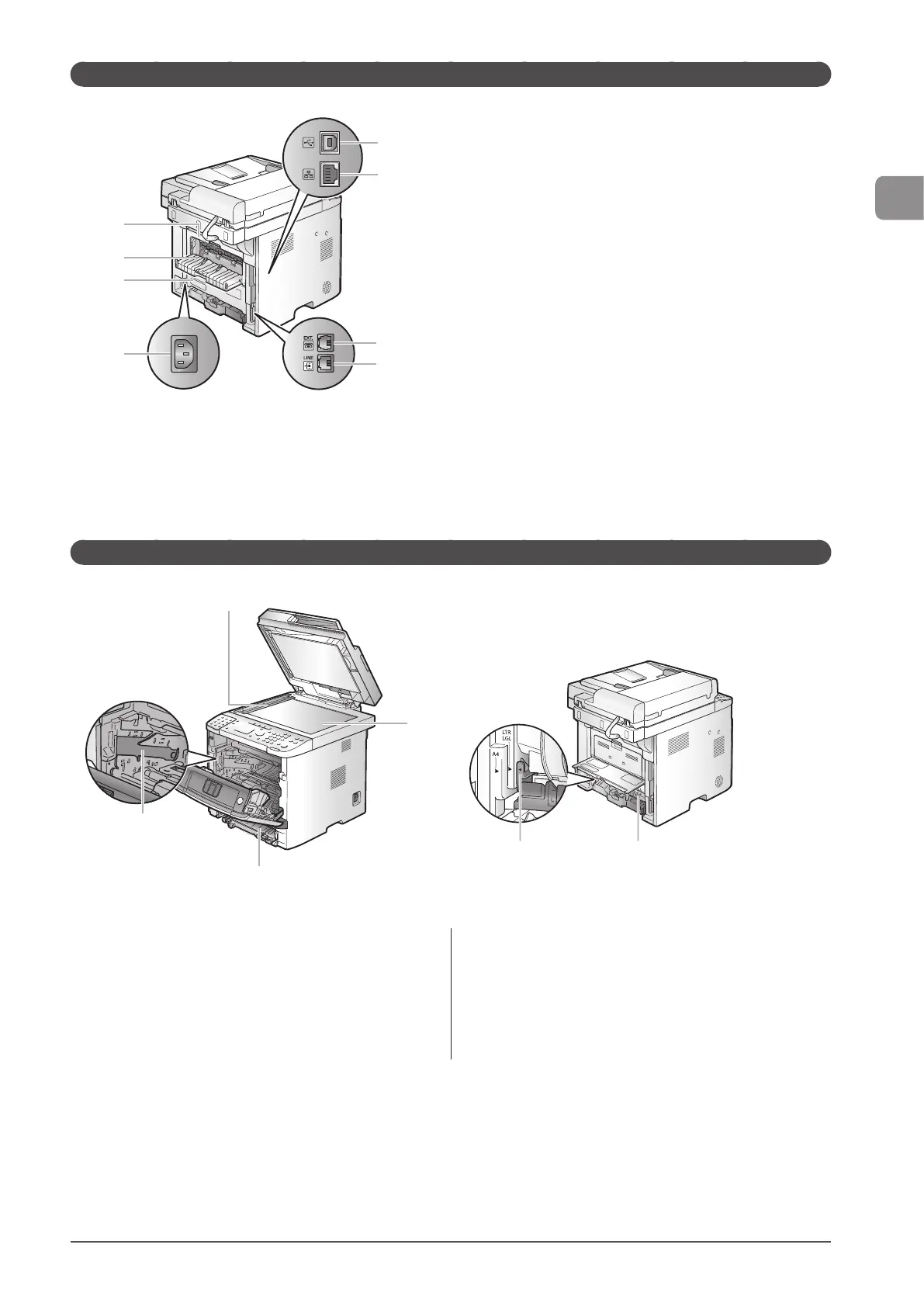
Back Side
(8)
(7)
(6)
(5)
(1)
(2)
(3)
(4)
(1) USB port
Connect the USB cable.
(2) LAN port
Connect the LAN cable.
(3) External telephone line jack
Connect the external telephone.
(4) Telephone line jack
Connect the telephone cable.
(5) Power socket
Connect the power cord.
(6) Lower rear cover
Open this guide to clear paper jams.
(7) Sub-output tray
Printed paper is output to the sub-output tray with the
printed side facing up. Printed paper is stacked in reverse page
order. The sub-output tray is suitable for use when printing
transparencies, labels, or envelopes that curl easily, because the
printed paper remains flat when output.
(8) Back cover
Open this guide to clear paper jams.
Interior
(1) Scanning area
Used to scan documents from the feeder.
(2) Platen glass
Place your documents on.
(3) Toner guides
Used to insert the toner cartridge so that the protrusion on the
side of the toner cartridge fits into these guides.
(4) Duplex unit
Used for 2-sided printing and copying.
(5) Paper size switch lever
Used for 2-sided printing.
(2)
(3)
(4)
(1)
(4)(5)










 To Next Page