5-9
Registering Destinations in the Address Book
You can perform the following tasks.
• Registering group addresses
• Adding destination(s) to a group
• Deleting destination(s) from a group
• Changing the group name
• Deleting group(s)
IMPORTANT
Before registering group addresses
• Register group addresses in unused one-touch keys or coded
dial codes. Leave some one-touch keys or coded dials unused for
group dialing.
• Destinations must be registered in one-touch keys or coded dial
codes before they are added to a group.
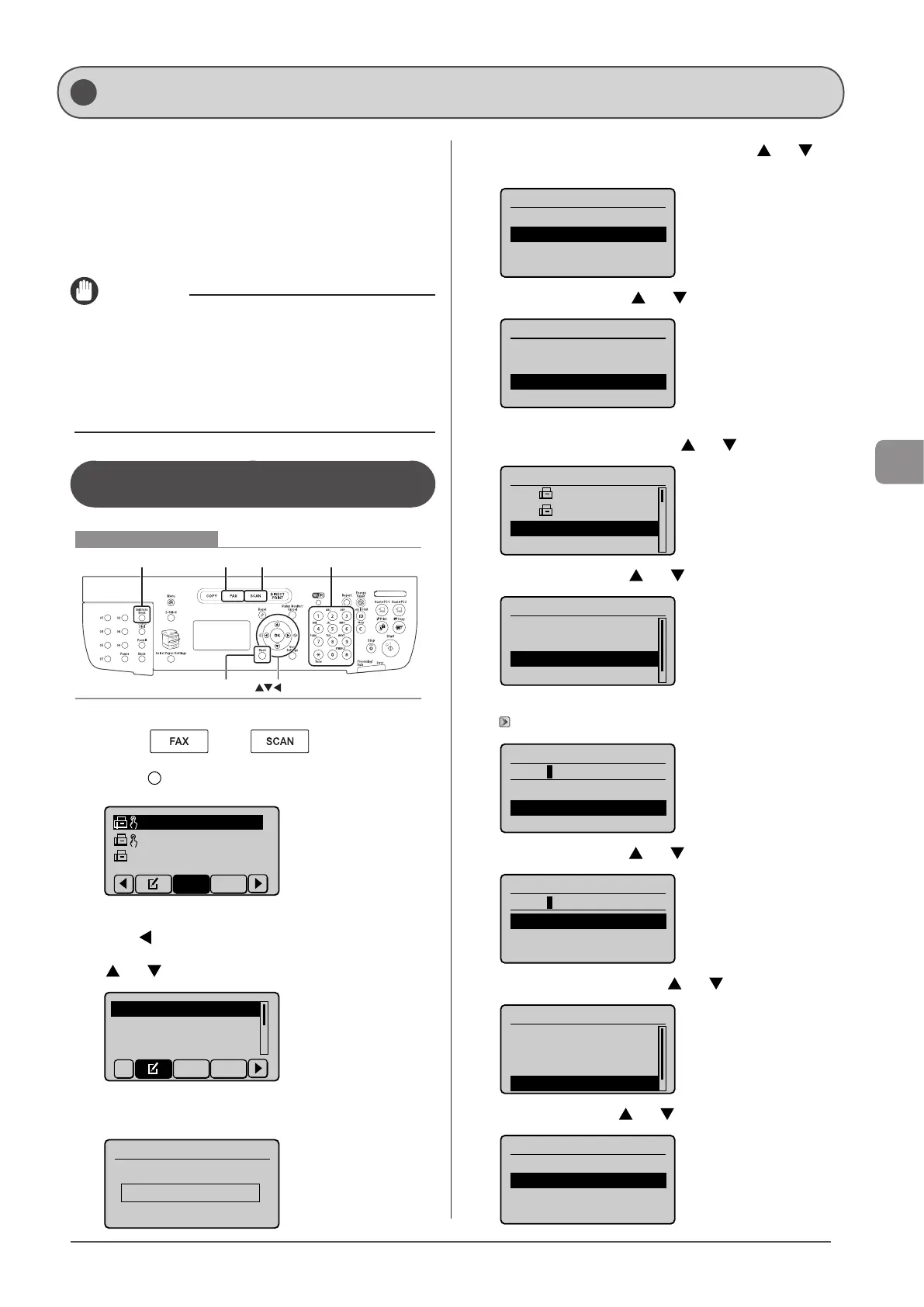
Registering and Editing a Destination
Group from the Operation Panel
Keys to be used for this operation
FAX SCAN Tone, Numeric keysAddress Book
OK
Back
1 Press [ ] or [ ].
2 Press [ ] (Address Book).
CANON01 012345678
CANON02 98765432
...
CANON03 00112233
...
All A-Z
● To register new group addresses
(1) Press [ ].
(2) Select <Register New Destination to Address Book> using
[ ] or [ ] and press [OK].
Register New Destina
Edit Address Book
Address Book Details
All A-Z
When the address book PIN is selected
Use the numeric keys to enter the PIN and press [OK].
Address Book PIN
(Apply: Press OK)
*******
(3) Select <One-Touch> or <Coded Dial> using [ ] or [ ]
and press [OK].
Register Location
Coded Dial
One-Touch
(4) Select <Group> using [ ] or [ ] and press [OK].
Destination Type
Fax
E-Mail
Group
(5) If you selected <One-Touch> in Step (3), select the
number to be registered using [ ] or [ ] and press [OK].
01 CANON01 01234
...
02 CANON02 98765
...
03 Not Registered
04 Not Registered
(6) Select <Name> using [ ] or [ ] and press [OK].
Group
<Apply>
Type: Group
Name:
Destinations: 0
(7) Use the numeric keys to specify <Name>.
“Entering Text” (→P. 1-9)
Name (Max 16 char.)
CANON
<Apply>
Entry Mode: A
(8) Select <Apply> using [ ] or [ ] and press [OK].
Name (Max 16 char.)
CANON
<Apply>
Entry Mode: A
(9) Select <Destinations> using [ ] or [ ] and press [OK].
Group
<Apply>
Type: Group
Name: CANON
Destinations: 0
(10) Select <Add> using [ ] or [ ] and press [OK].
Destination(s)
<Apply>
<Add>
Registering and Editing Destinations for Group Dialing










 To Next Page