Chapter 4
4-22
4.3.10 Purge Unit
0012-6374
b. Removing the purge unit
(1) Switch off the printer and move the carriage to above the platen. See Disassembly/Reassembly > Points
to Note on Disassembly and Reassembly > Opening the Cap/Moving the Wiper Unit.
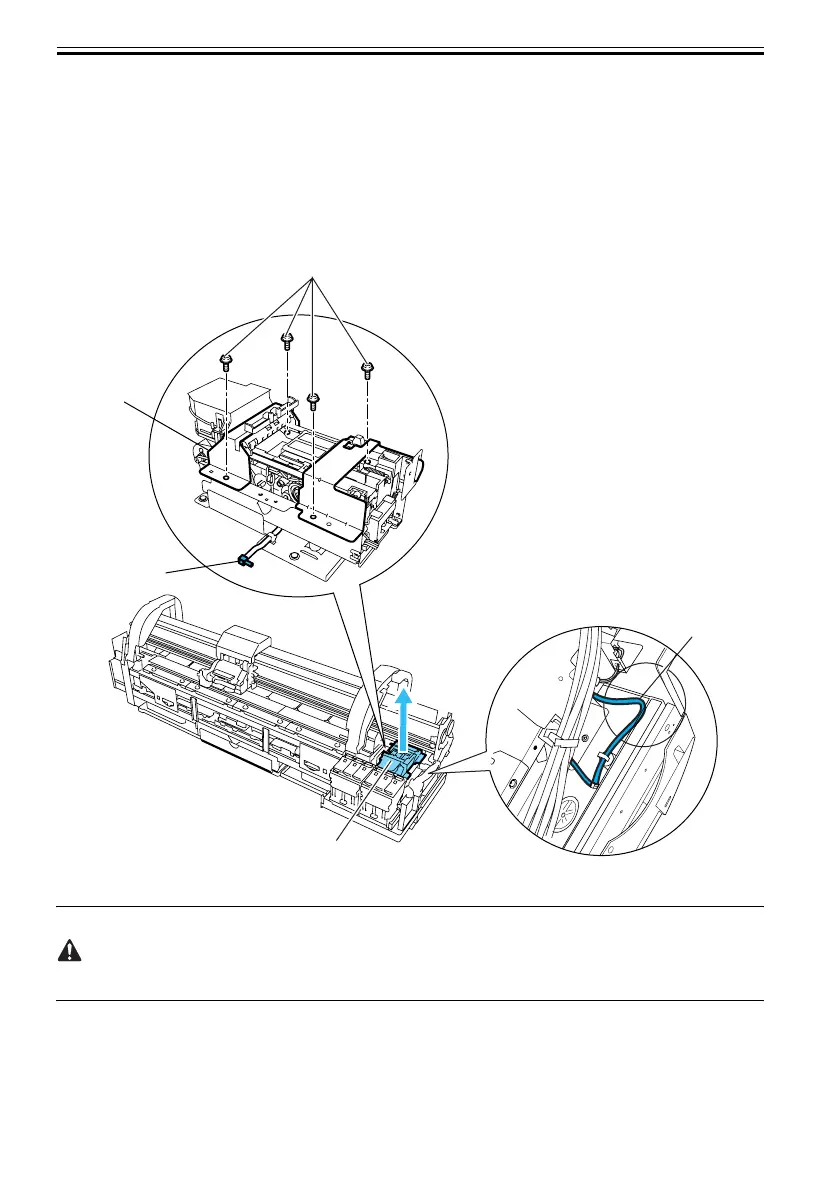
(2) Disconnect the ground wire from the side of the purge unit.
(3) Remove the connector and release the harness from the harness guide.
(4) Unscrew four screws[4] and remove the waste ink tube joint[2], and then remove the purge unit[1].
F-4-29
-Install the purge unit with care not to let the waste ink tube[3] bent.
-Exchange absorbents that exist under the purge unit at the same time when you exchange purge unit.
[1]
[3]
[2]
[1]
[4]













 To Next Page