Chapter 1
1-18
Output :
Differential output voltage: +172mV - +265mV
(4) Interface cable
Twisted-pair shielded cable, 4.5 mm or shorter.
Compliant with the IEEE1394-1995 or (Version 2.0) standard
(5) Interface connector
Printer side: IEEE1394-compliant, 6-pin connector (socket)
Cable side: IEEE1394-compliant, 6-pin connector (plug)
Cable side: Compliant with the ANSI/EIA/TIA-568A or ANSI/EIA/TIA-568B standard, Type RJ-45.
1.5 Names and Functions of Components
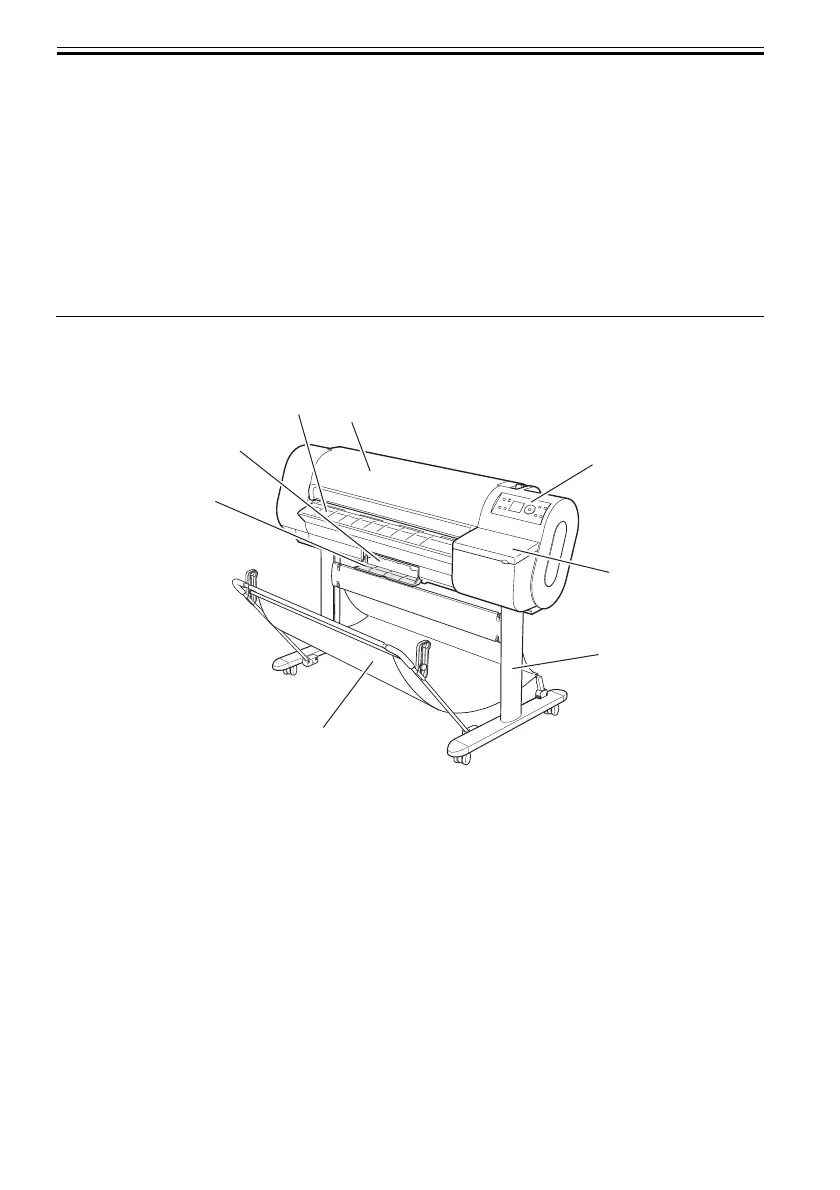
1.5.1 Front
0012-6202
F-1-12
[1] Top cover
Open this cover when installing the printhead, load media and clear jams inside the printer.
[2] Eject guide
Supports ejected media to keep it from floating up.
[3] Maintenance cartridge
Blots excess inks.
[4] Maintenance cartridge cover
Open this cover to replace the maintenance cartridge.
[5] Operation panel
Operate the printer or check its status from this panel.
[6] Ink tank cover
Open this cover to replace ink tanks.
[7] Stand (option)
It is a stand that puts the printer.
[8] Output stacker (included with stand)
It is a stacker made of the cloth that stacks the ejected media.
[2]
[1]
[3]
[8]
[5]
[4]
[7]
[6]













 To Next Page