Chapter 1
1-46
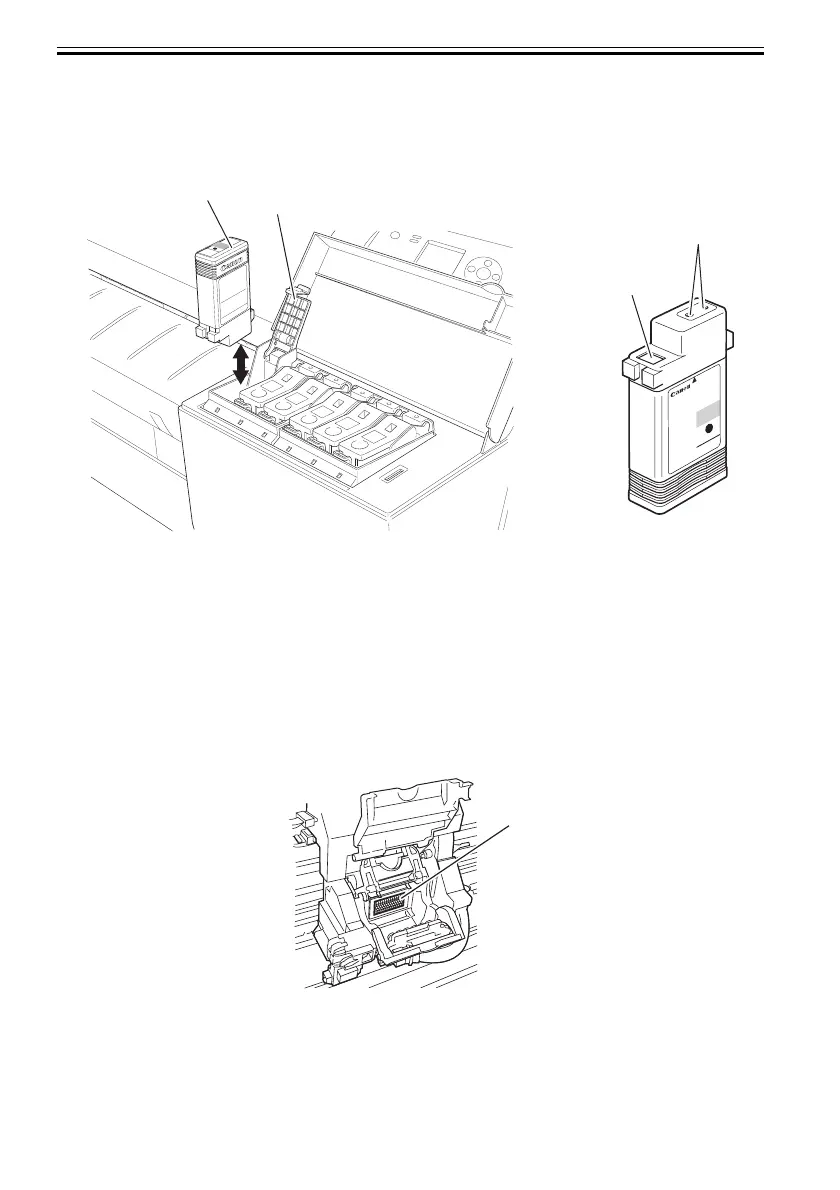
To prevent foreign matter from infiltrating the ink passage to impair ink suction or print quality, never touch
contact [3] or ink port [4] of ink tank [1].
Depressing ink tank cover [2] of the printer would cause a needle to pierce the ink port, linking the ink
passage of linking ink tank [1] to the printer.
Do not lift up and down ink tank cover [2] except for purposes other than replacing ink tank [1].
F-1-21
1.7.2.3 Handling the Printer
0013-1880
a. Protecting against electrostatic breakdowns
Pieces of clothing rubbing each other could build up static electricity, producing static charges in human
bodies to cause harm to an electrical component or corrupt its electrical characteristics.
You are strongly advised never to touch the printhead contact of the carriage.
[1]Contact with the printhead
F-1-22
[4]
[3]
[2]
[1]
[1]













 To Next Page