Chapter 7
7-25
f) SETTING
Make various settings.
1) Pth
Turn on or off the head pulse rank control function.
Default: OFF
2) RTC
Set RTC (real time clock) after replacing the lithium battery on the main controller PCB.
T-7-32
3) PV AUTO JUDGE
Sets ink saver mode.
Default: OFF
g) INITIALIZE
Clear the [DISPLAY] histories, [ADJUST] settings, [COUNTER] values, and other parameters.
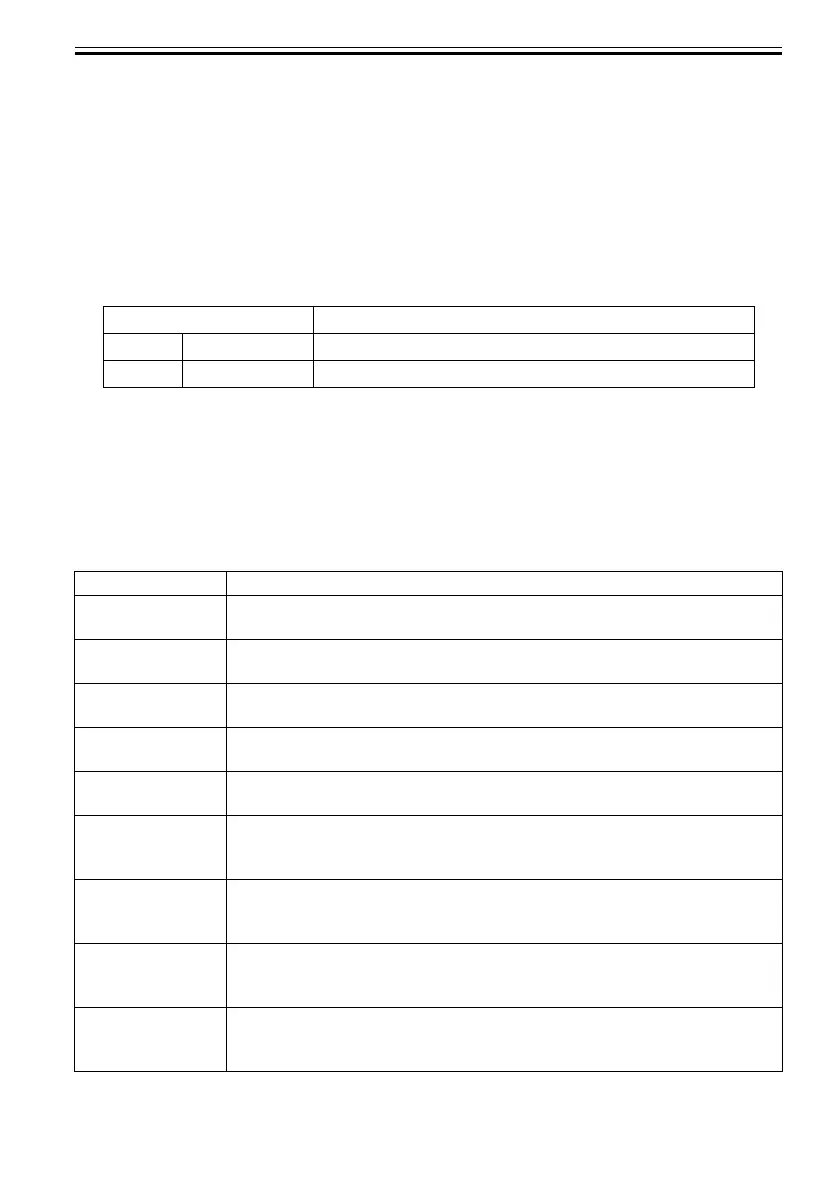
T-7-33
Display Description
DATE yyyy/mm/dd Set date
TIME hh:mm Set time
Display Description
WARNING Initialize the history of WARNING.
(All displayed contents of [DISPLAY] > [WARNING] will be initialized.)
ERROR Initialize the history of ERROR.
(All displayed contents of [DISPLAY] > [ERROR] will be initialized.)
ADJUST Initialize the value of band adjustment (by user) and head adjustment.
The automatically adjusted value will not be initialized.
W-INK Initialize the remaining capacity (%) of the maitenance cartridge.
(Clear [COUNTER] > [PRINTER] > [W-INK])
PURGE Initialize the counter related to purge unit.
(Clear [COUNTER] > [PURGE])
INK-USE CNT Initialize the consumption amount of ink.
(Clear [COUNTER] > [INK-USE2], and count up [COUNTER] > [CLEAR] > [CLR-
INK CONSUME])
CUTTER-CHG CNT Initialize the cutter unit replacement frequency.
(Clear [COUNTER] > [EXCHANGE] > [CUTTER EXC.], and count up [COUNTER]
> [CLEAR] > [CLR-CUTTER EXC.])
W-INK-CHG CNT Initialize the maintenance cartridge replacement frequency.
(Clear [COUNTER] > [EXCHANGE] > [MTC EXC.], and count up [COUNTER] >
[CLEAR] > [CLR-MTC EXC.])
HEAD-CHG CNT Initialize the printhead replacement frequency.
(Clear [COUNTER] > [EXCHANGE] > [HEAD EXC.], and count up [COUNTER] >
[CLEAR] > [CLR-HEAD EXC.])













 To Next Page