Chapter 1
1-37
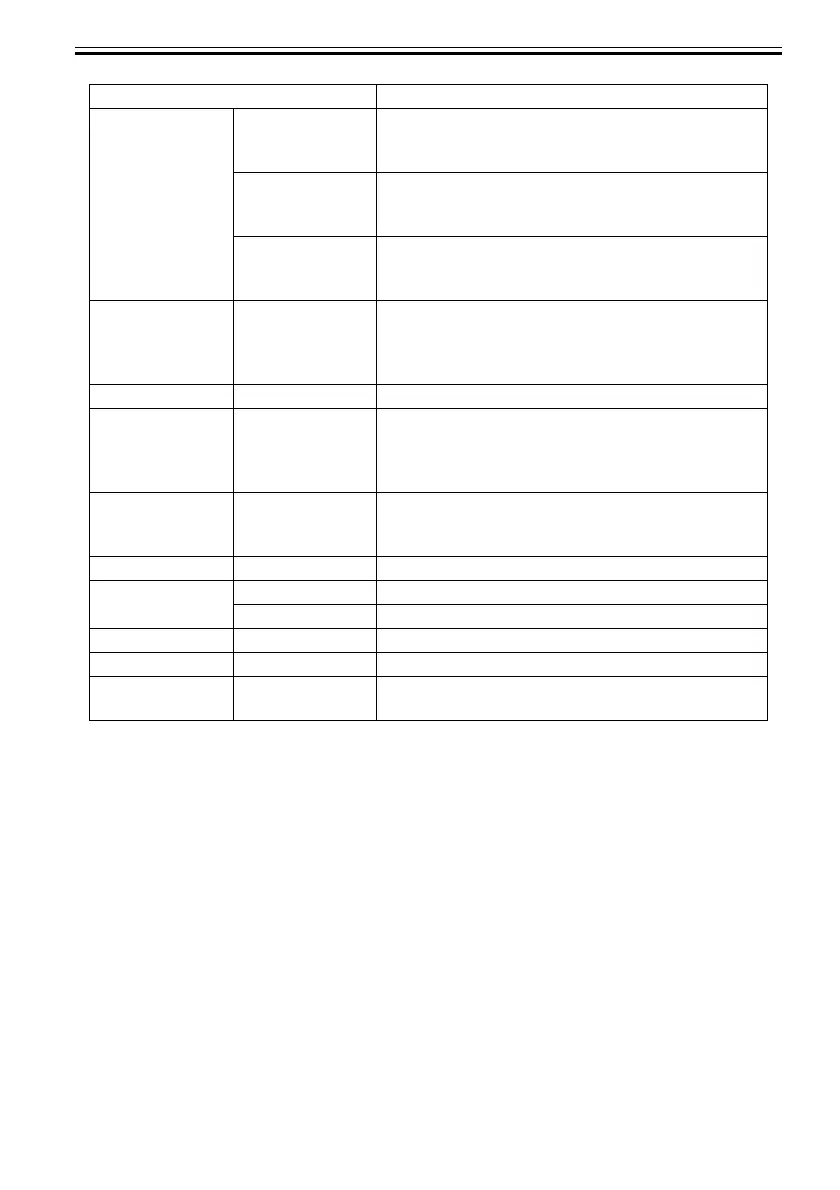
[Roll Selection 1] If roll size detection is activated, choose whether ISO A3
(297 mm) and 300 mm Roll is applied when an inbetween
size is detected.
[Roll Selection 2] If roll size detection is activated, choose whether 10in. (254
mm) or JIS B4 (257 mm) is applied when an inbetween size
is detected.
[Sht Selection 2] Select which size is to be recognized, [ISO B1] or
[28"x40"(ANSI F)], when the detected size of the cut sheet
is between these sizes.
[Noz. Check Freq.] Specify the timing for automatic checks of nozzle clogging.
Choose Off to disable checking. Choose 1 page to check
after each page is printed. Choose 10 pages to check once
after every ten pages are printed.
[Sleep Timer] Specify the period before the printer enters sleep mode.
[Length Unit] Choose the unit of measurement when roll length is
displayed. You can switch the unit displayed for Roll Length
Set and the remaining paper amount displayed in the
submenu.
[Time Zone] Specify the time zone. Time zone options indicate a main
city in this time zone and the difference from Greenwich
Mean Time.
[Date Format] Specify the date format.
[Date & Time] [Date] Set the current date.
[Time] Set the current time.
[Language] Specify the language used on the Display Screen.
[Contrast Adj.] Adjust the contrast of the Display Screen.
[Reset PaprSetngs] Restores settings that you have changed with Media
Configuration Tool to the factory default values.
Setting Item Description, Instructions













 To Next Page