LASER CLASS 730i/720i/710 Chapter 5: Appendix
5-41
(3) Attach the label (to suit your local language).
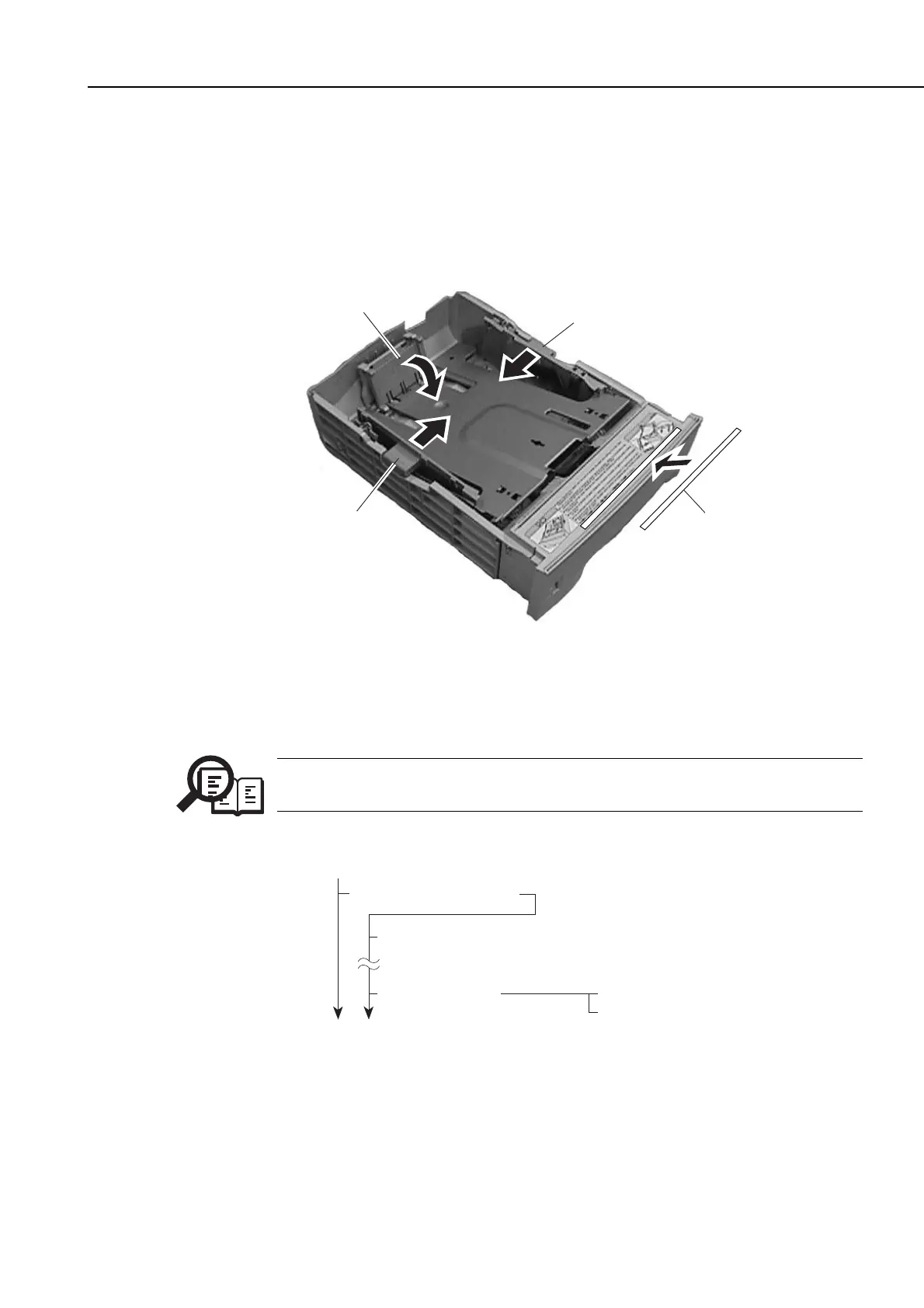
(4) Only if you are using A4 paper,
The paper cassette of the FXL-Cassette Feeder 6 is set to accommodate LTR paper. If
you are using A4 recording paper, slide the right and left side plates of the cassette
toward the center, and shift down the rear edge plate so that the cassette is set for LTR
paper.
Figure 5-46 Cassette Feeder Installation 3
(5) Start [user data registration], and register the size of recording paper you will be using.
NOTE
The fax machine is not equipped with a recording paper size sensor, requiring
you to register the size of recording paper you will be using.
Figure 5-47 Cassette Feeder Installation 4
b-4) Operation Check
Empty all the recording paper other than that in the cassette, make a copy, and check that
the recording paper is picked up correctly.
1. PAPER SETTINGS
Data Registration
1. MP TRAY
4. CASSETTE 3
LTR
A4
Right side plate
Label
Rear edge plate
Left side plate









 To Next Page