- 34 -
5 - b) Setting the ink ribbon
□ When taking out the ink ribbon cartridge before it becomes empty (while LCD panel displays other
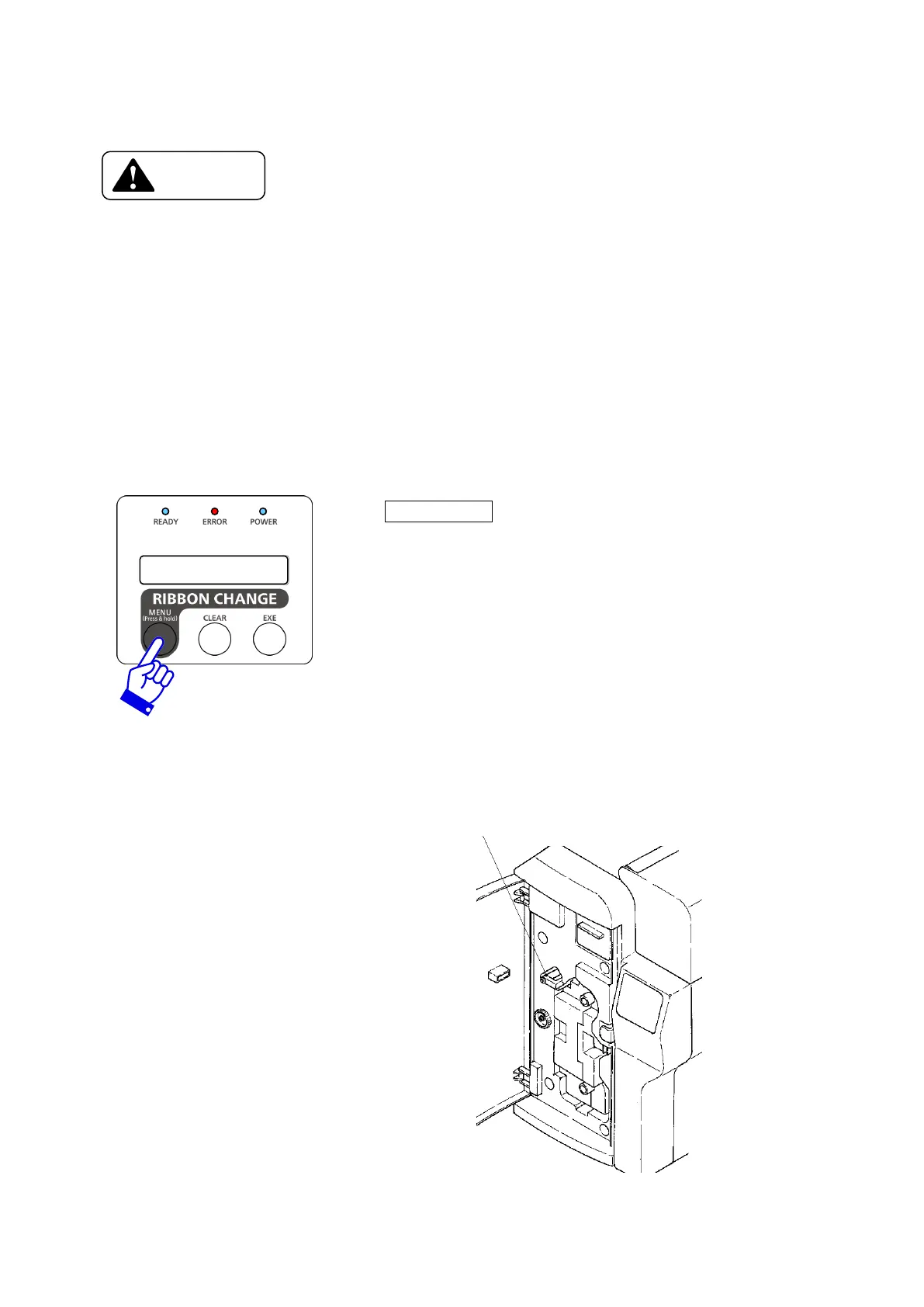
than "Ribbon Empty"), press RIBBON CHANGE key and confirm that the head is lifted.
→ Cartridge cannot be removed with the head at the printing position. The ribbon may be wrinkled
or broken if the cartridge is removed forcibly.
Removing forcibly may cause damage on the printer.
□ Do not attempt to open the Top Cover and take out the Ribbon Cartridge without lifting the
Print Head by pressing RIBBON CHANGE key.
→ Normal print quality of the next printing will not be obtained.
□ Do not leave the ink ribbon cartridge off hand. When loading again, take up the frame which
has been exposed before inserting.
→ Dust on the ribbon or cartridge may cause a trouble on the print head.
Press Ribbon Change key about 1 sec.
Then make sure of the "Removable Ribbon" has appeared on
lower part of operation panel.
Cartridge Retaining Lever
Open the front cover of the printer.
Release the Cartridge Retaining Lever
and pull out the Ink Ribbon Cartridge.









 To Next Page