- 43 -
Section 7: Periodical replacement of parts
This printer offers a superb performance for long period with very high reliability.
But to maintain the performance, some parts need to be replaced periodically. This means the low
running cost.
Replacement can be easily done if the operator has basic knowledge or experience of handling
electronic machinery. Read the instruction and cautions in this manual carefully before performing
the required periodic replacement work.
Input Roller Every 40000 frames N/A
Print Head Every 20000 frames Philips Screw Driver, Loader Application
Number of the printed frames is displayed on the LCD panel
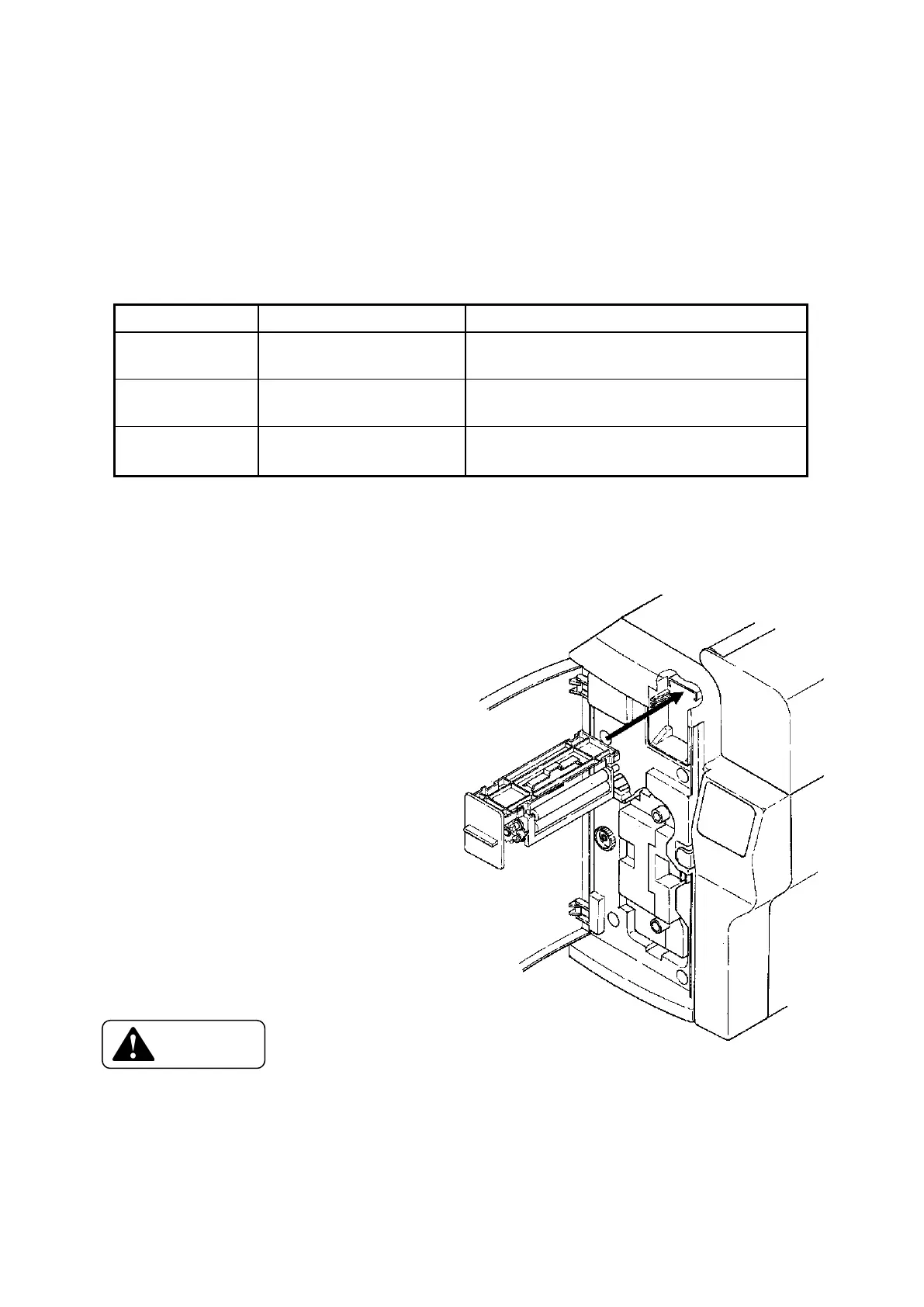
7 - a) Replacing Input Roller
* Hold the tab and pull slightly
till its frame can be hold.
* Hold frame and pull the whole
unit out.
* Before setting the new unit
the rollers on the new unit must
be clean.
* To put the new unit in.
Line it up the slide plate against
guide rail of the printer as shown
on right. and slide the unit in
till to reach it to the stopper.
□ Do not print without the input roller attached.
→ Card jam error will be occurred.
□ Do not pull the unit out with holding only its tab.
→ It may cause the unit fallen down when the moment of the unit comes off.









 To Next Page