2-8
Motion Detection Setting Tool
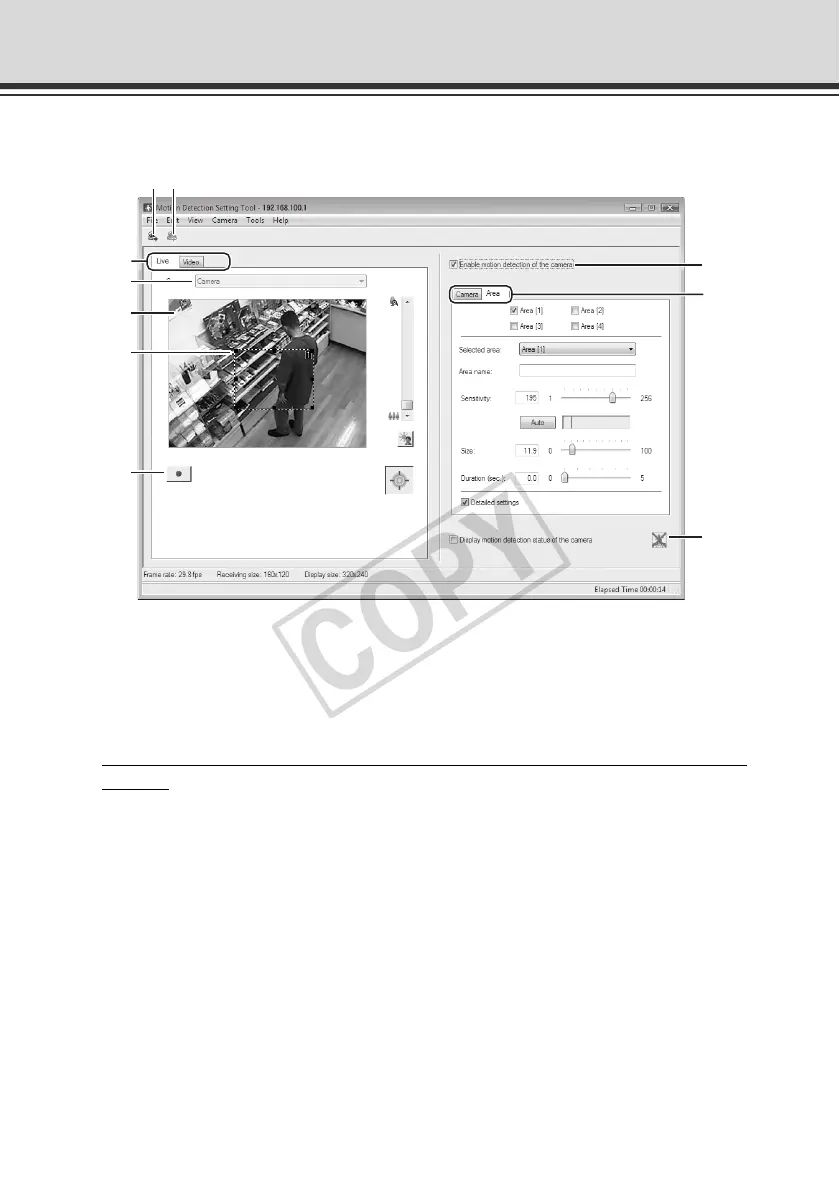
Display Screen of Motion Detection Setting Tool (Live Mode)
(1) [Load Motion Detection Settings] button
Clicking this button loads the current motion detection settings of the camera.
(2) [Save Motion Detection Settings] button
Clicking this button saves the motion detection setting edited by this tool.
If you have set motion detection, be sure to save the settings using [
Save Motion Detection
Settings].
(3) Live mode tab (Live/Record)
•[Live]
Video is displayed and the camera is controlled. The displayed video is also recorded.
• [Video
]
You can set motion detection judgment conditions while playing the recorded video.
For the specific screen views and operating procedures, see P. 2-16.
(4) Camera Selection box
The name of the connected camera is shown.
(5) Viewer
Video is displayed and the camera is controlled.
(2)(1)
(8)
(10)
(4)
(5)
(7)
(3)
(9)
(6)



 To Next Page