2-4
Launching VBAdmin Tools
How to Launch
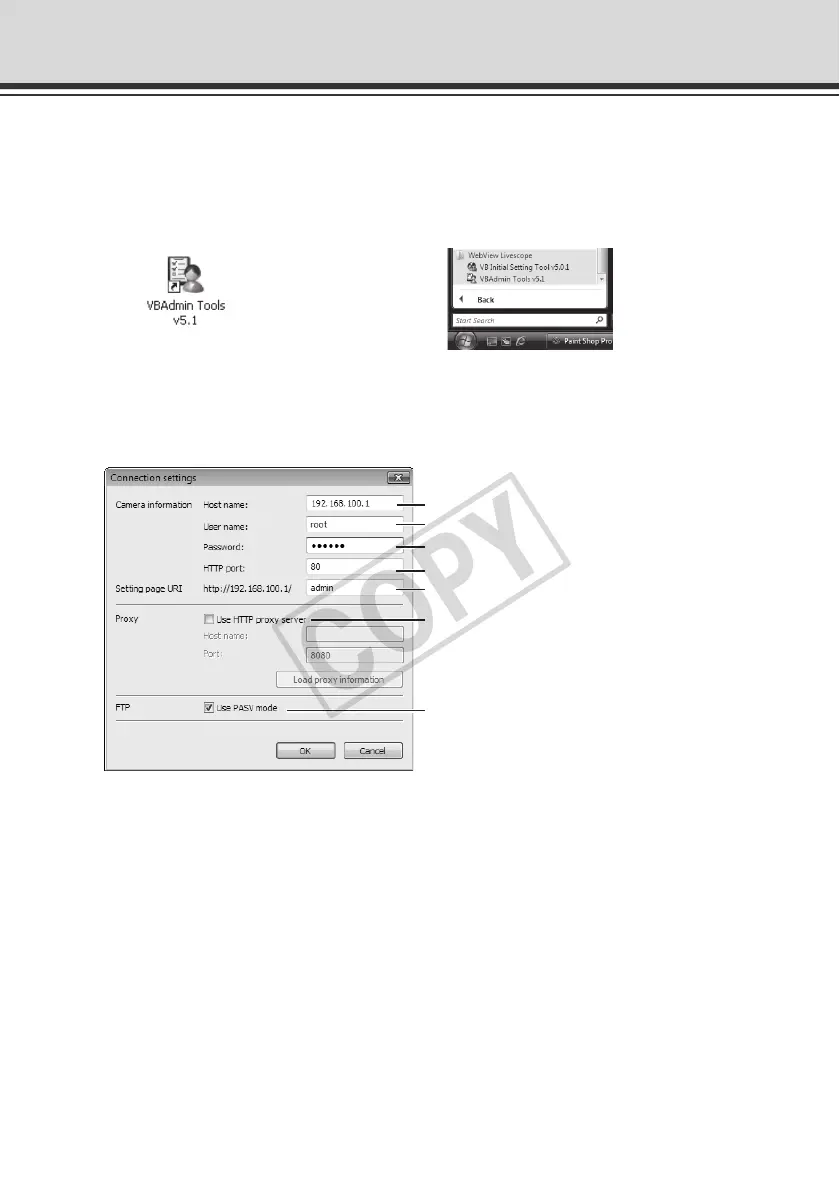
1. Double-click the [VBAdmin Tools v5.1] icon on the desktop, or click the [Start] menu, click
[Programs], click [WebView Livescope], and then select [VBAdmin Tools v5.1].
Starting from the Desktop Icon Or starting from the [Start] menu
2. The dialog box for specifying the camera to connect to appears.
To use VBAdmin Tools, you must connect to the camera first. Enter each item and then click
[OK].
(1)Host name (
P. 1-8, P. 1-10)
Specify the IP address or host name of this camera.
(2)User name
Enter the Administrator account "root" set for the camera.
(3)Password (
P. 1 - 7 )
Enter the Administrator password (the factory setting is "camera").
(4)HTTP port (
P. 1 - 3 1 )
The default is [80].
(5)Setting page URI
The setting URI set for this camera is fixed to "admin" and cannot be changed.
(1)
(4)
(3)
(2)
(5)
(6)
(7)



 To Next Page