2-15
Motion Detection Setting Tool
VBAdmin Tools
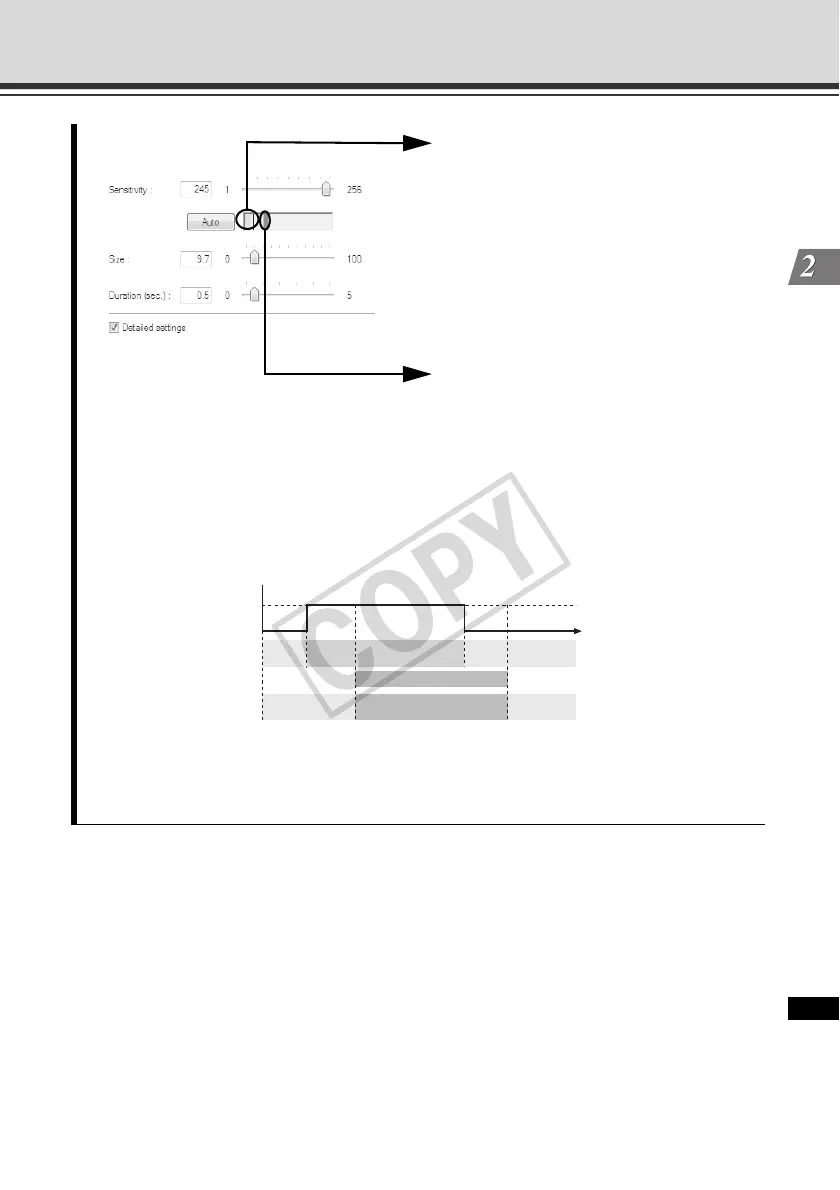
If a change occurred in the image, the
value set in [Size] is shown by a vertical
bar on the indicator. The following two
indicator colors are used.
Green : The area of the motion
detected by the camera does not meet
[Size].
Yellow : The area of the motion
detected by the camera meets [Size].
Peak block
A red peak block will be displayed when
both the [Size] and [Duration] conditions
are satisfied and the camera mode
changes to [Detected]. Set the motion
detection level while checking when a
peak block is actually displayed at a given
level of motion.
If a motion corresponding to [Size] or greater has remained detected for the specified
duration or longer, the mode changes to [Detected] and a peak block is displayed. Even
when the specified size becomes no longer met in the [Detected] mode where a peak block
is still displayed, the [Detected] mode will be maintained for the specified duration.
Detected
(Motion level)
Set value or bigger
Less than the set value
Indicator color
Detection status
Duration Duration
Time
Green Green
Ye l l o w
Peak block display (in red)
Not detected Not detected



 To Next Page