25
▲
▲
❑
PROGRAMMING THE
HOLIDAY PERIOD
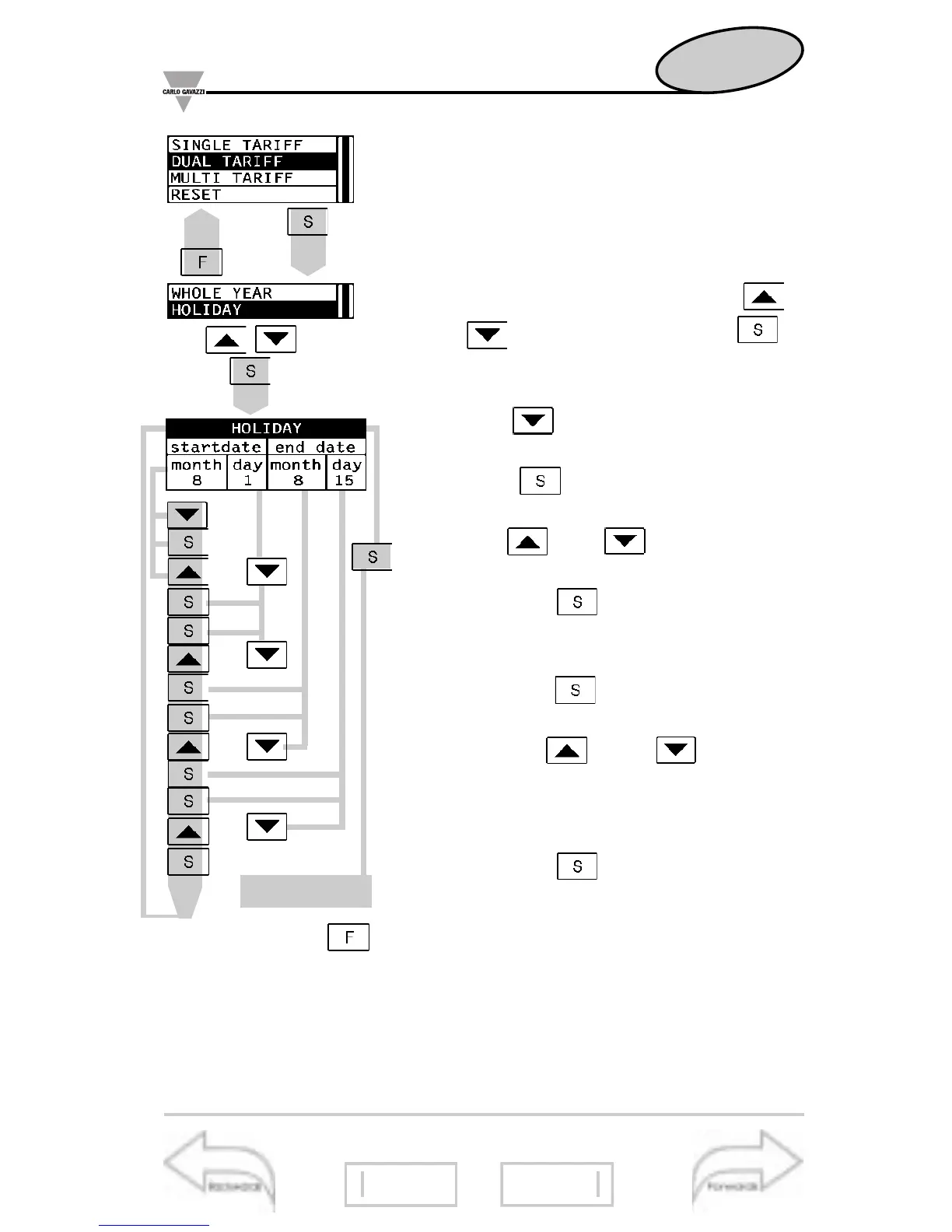
To program the HOLIDAY period,
proceed in the following way.
10- Choose HOLIDAY in the SEA-
SON menu by means of the
and keys and confirm with :
the HOLIDAY menu will be displayed
(see figure on the left);
11-press : the month correspond-
ing to the start date will be highlighted;
12-press : the box for setting the
month will be enabled;
13-use and to select the
desired month (from 1 to 12);
14-press the key to confirm the
selection and move to the next pa-
rameter: day setting;
15-press the key again to open
the box where the day is to be set;
16-use the and keys to
select the desired day (from 1 to 31
depending on the previously selected
month);
17-press the key to confirm the
selection and move to the next pa-
rameter.
1.2..
..2.1
1.2..
..2.1
1.2..
..2.1
1.2..
..2.1
To reset, press
.
On page 26
Energy Meters Management
Dual tariff management
23
21 28
Display of harmonics
29








 To Next Page