3-CONTROLS/INSTRUMENTS
RIGHT-HANDSIDECONTROLS
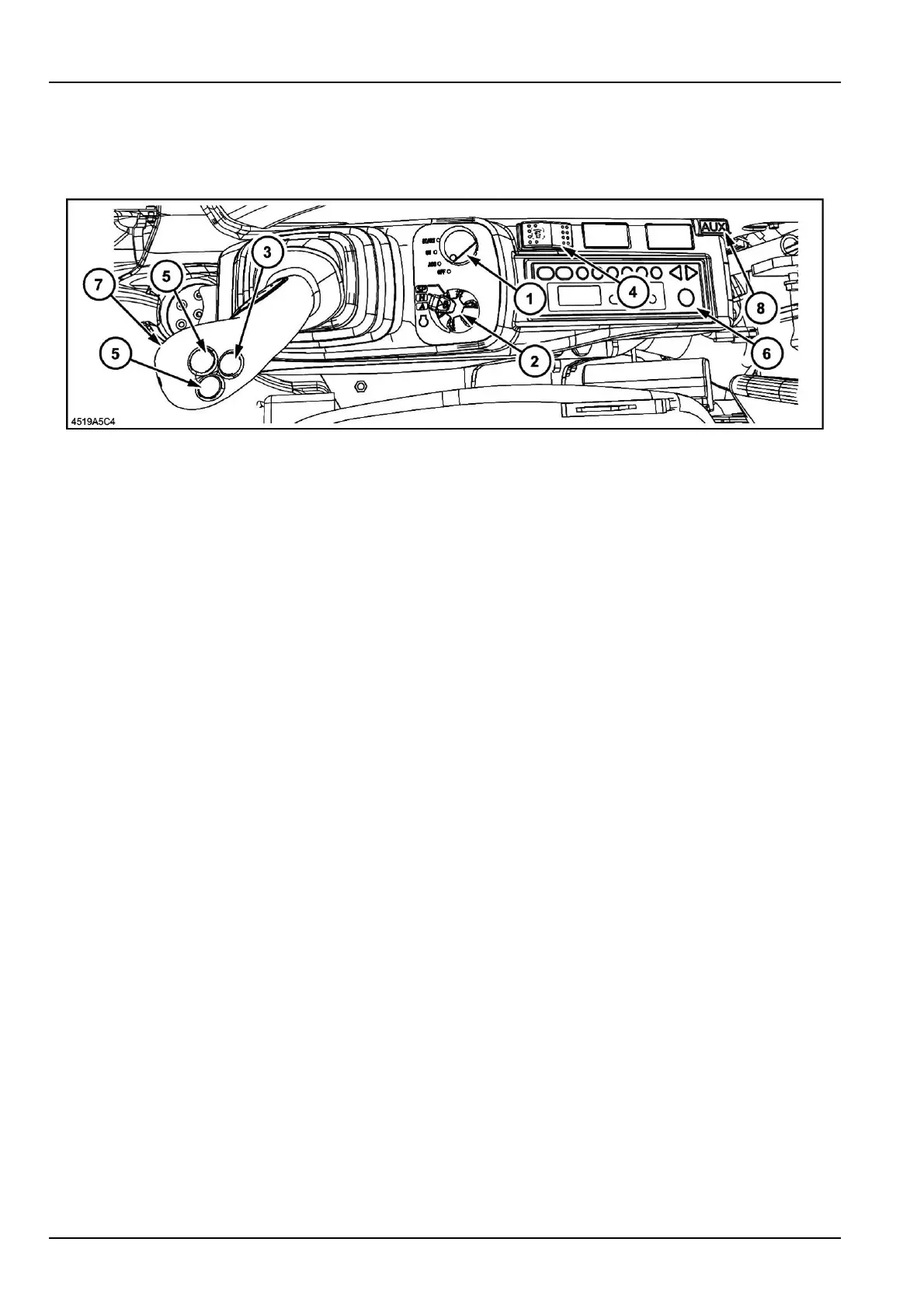
Right-handcontrolarm
4519A5C41
1.Ignitionswitch
Thisswitchhasfourpositions,“On”(contact),“Start”
(engineignition),“Off”(engineshut-down)and“Acc”
(accessorycurrentsupply).
NOTICE:Whentheignitionkeyisin“On”(contact)
position,iftheanti-theftprotectionhasbeenpro-
grammed,thenitwillbenecessarytoenterthecode.
Themessage"Password"willbedisplayed.(Referto
page4-4).
NOTE:Thiskeyisalsousedtolockthecabdoor,the
enginehood,thefrontstoragecompartment,theside
doorsandthefueltankcap.
2.Engineaccelerationbuttonandworkingmodeselec-
tor
Thisbuttonenablesanincreaseorreductioninthe
enginespeed.
Thisbuttoniscoupledwiththethreeworkingmode
selector.
Mode“A”(automatic)whentheenergyoutputhas
priority.
Inthismode,thebalancebetweenthespeedanden-
ergyoutputiscontrolledforeachmovementofthe
controls.
Mode“H”fordifcultexcavationworkoriftheloadin-
creases,andmode“SP”whentheoutputhaspriority.
Eachselectedmode(A,HorSP)isdisplayedonthe
screen.
NOTE:Toselectthe“SP”mode,operatetheindexing
pinwhilerotatingtheaccelerationbuttontotheright.
NOTE:Ifthereisnochangeinenginespeed,press
andreleasetheengineautomaticidlespeedselector.
3.Engineidlespeedselector
Thiscontrolenablesautomaticengineidlewithoutop-
eratingthethrottlebutton.
Toselectidlespeed,pressandreleasethecontrolfor
theengineautomaticallytogointoidlespeed;the"En-
gineidling"iconwillappearonthemessagescreens.
Whenthecontrolispressedandreleasedoncemore
theenginewillreverttoitsoriginalspeedandtheicon
onthesystemsdisplaypanelwilldisappear.
4.Travelcautionalarmswitch
“Cont”positionthealarmsoundswhenthetravelcon-
trolsareactuated.
“Autooff”position,whenthetravelcontrolareactu-
ated,thealarmsoundsfor10secondsandthenstop.
5.Optioncontrol(ifequipped)
6.Cabradio
Tooperatethecabradio.(Refertopage3-60).
7.Wiperswitch
Whentheswitchispressed,thewipermoves.
8.Radioauxiliaryinputport
Thisradioprovidedauxiliaryinputjacksothatportable
audioproductscanbeconnected.
3-58



 To Next Page