EasyManua.ls Logo

Cassese CS969 - Page 23

Cassese CS969
81 pages
Print Icon
To Next Page IconTo Next Page
To Previous Page IconTo Previous Page
Loading...
USER MANUAL
CS969
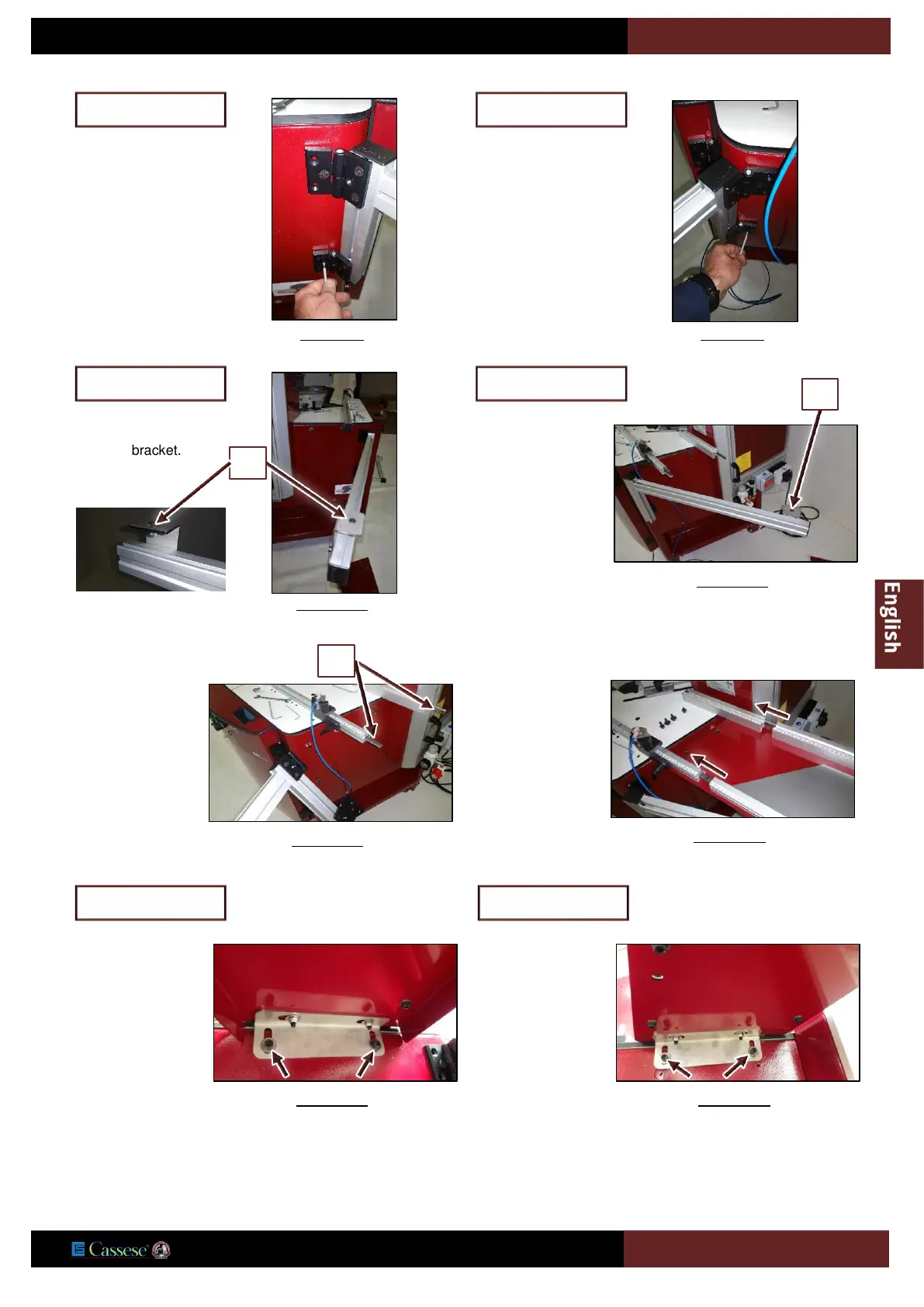
Put in place the left
extension support
bracket, tightening
it with previously
removed screws
(B).
Figure 6-8
Left table side
Put in place the left
extension support
bracket, tightening
it with previously
removed screws
(C).
Figure 6-9
Right table side
Put off the screw (E)
from the bracket.
Figure 6-10
Left table side
E
Put off the screw (F)
from the bracket.
Figure 6-11
Right table side
F
For each side of the
machine, make
sure the splints (G
)
are in place.
Figure 6-12
G
For each side slide
the arm in place.
Figure 6-13
Tighten the arm
with previously
removed screws
(A).
Figure 6-14
(Left table side)
Tighten the arm
with previously
removed screws
(D).
Figure 6-15
(Right table side)

Related product manuals