EasyManua.ls Logo

Ceia CMD - СЕ СМО Detector Т Pep Ud IEEE E IM UU Icr Ne EE; РІС Hotgctor SIBITIID

Ceia CMD
34 pages
Print Icon
To Next Page IconTo Next Page
To Previous Page IconTo Previous Page
Loading...
CEIA
CMD
-
Compact
Metal
Detector
Fl
041
GB
140K5
v2
310
13
4-
CEIA
CMD
Detector
Start-up
4.1.
Detector
start-up
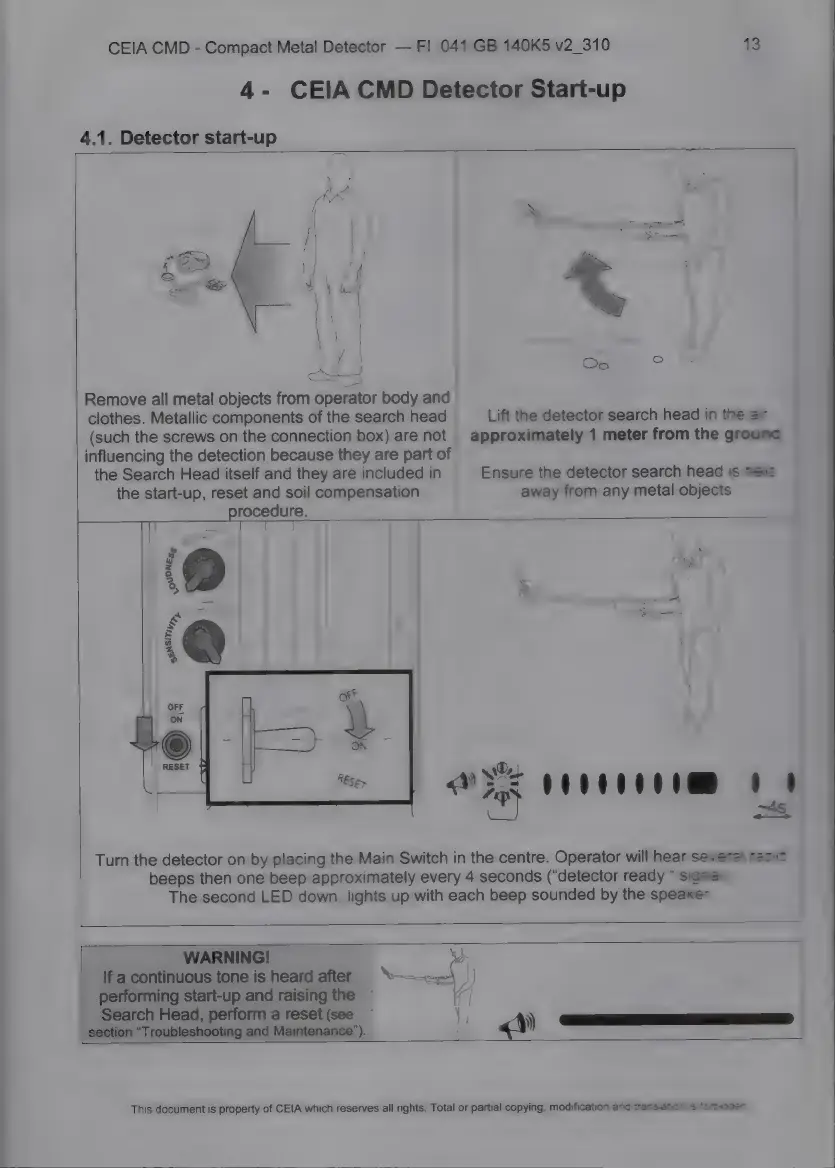
Remove
all
metal
objects
from
operator
body
and
clothes.
Metallic
components
of
the
search
head
Lift
the
detector
search
head
in
the
ar
(such
the
screws
on
the
connection
box)
are
not
|
approximately
1
meter
from
the
ground
influencing
the
detection
because
they
are
part
of
the
Search
Head
itself
and
they
are
included
in
Ensure
the
detector
search
head
is
heic
the
start-up,
reset
and
soil
compensation
away
from
any
metal
objects.
E.
procedure.
ше
——
\OUPNESs
ж
E
NSIT;
E
>.
XL,
us
ІНЕ
dog
24;
Turn
the
detector
on
by
placing
the
Main
Switch
іп
the
centre.
Operator
will
hear
several
rapid
beeps
then
one
beep
approximately
every
4
seconds
(“detector
ready
*
signal).
The
second
LED
down
lights
up
with
each
beep
sounded
by
the
speaker.
WARNING!
>;
If
a
continuous
tone
is
heard
after
^-——
——
|
performing
start-up
and
raising
the
A
Search
Head,
perform
a
reset
(see
||
section
"Troubleshooting
and
Maintenance").
df
«o
This
document
is
property
of
CEIA
which
reserves
all
rights.
Total
or
partial
copying,
modification
and
transiation
is
forbidden

Related product manuals