EasyManua.ls Logo

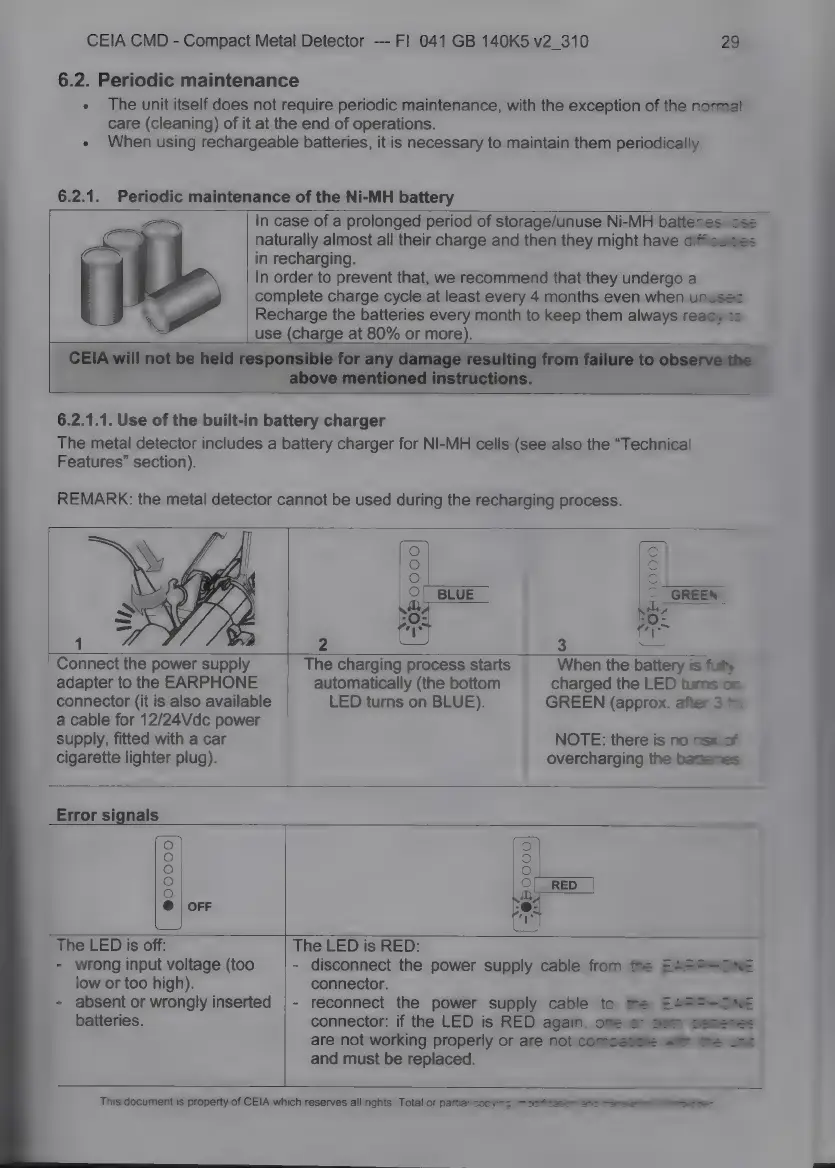
Ceia CMD - Ó- Há- M; Periodic Maintenance of the Ni-MH Battery; 6.2.1.1. Use of the Built-In Battery Charger

Ceia CMD
34 pages
Print Icon
To Next Page IconTo Next Page
To Previous Page IconTo Previous Page
Loading...
CEIA
CMD
-
Compact
Metal
Detector
---
Fl
041
GB
140K5
v2
310
29
6.2.
Periodic
maintenance
The
unit
itself
does
not
require
periodic
maintenance,
with
the
exception
of
the
normal
care
(cleaning)
of
it
at
the
end
of
operations.
When
using
rechargeable
batteries,
it
is
necessary
to
maintain
them
periodically.
6.2.1.
Periodic
maintenance
of
the
Ni-MH
battery
In
case
of
a
prolonged
period
of
storage/unuse
Ni-MH
batteries
lose
naturally
almost
all
their
charge
and
then
they
might
have
difficulties
in
recharging.
In
order
to
prevent
that,
we
recommend
that
they
undergo
a
complete
charge
cycle
at
least
every
4
months
even
when
unusec
Recharge
the
batteries
every
month
to
keep
them
always
ready
to
use
(charge
at
80%
or
more).
CEIA
will
not
be
held
responsible
for
any
damage
resulting
from
failure
to
observe
the
above
mentioned
instructions.
6.2.1.1.
Use
of
the
built-in
battery
charger
The
metal
detector
includes
a
battery
charger
for
NI-MH
cells
(see
also
the
“Technical
Features”
section).
REMARK:
the
metal
detector
cannot
be
used
during
the
recharging
process.
2
3
Connect
the
power
supply
adapter
to
the
EARPHONE
connector
(it
is
also
available
a
cable
for
12/24Vdc
power
supply,
fitted
with
a
car
cigarette
lighter
plug).
The
charging
process
starts
automatically
(the
bottom
LED
turns
on
BLUE).
When
the
battery
is
fully
charged
the
LED
tums
on
GREEN
(approx.
after
3
8
NOTE:
there
is
no
risk
of
overcharging
the
bettenes
Error
signals
@00000
The
LED
is
off:
-
wrong
input
voltage
(too
low
or
too
high).
-
absent
or
wrongly
inserted
batteries.
The
LED
is
RED:
-
disconnect
the
power
supply
cable
from
the
EARPHONE
connector.
reconnect
the
power
supply
cable
to
те
EARPHONE
connector:
if
the
LED
is
RED
again,
one
or
both
Semenes
аге
not
working
properly
or
are
not
compasboie
ж--
The
ux
and
must
be
replaced.
This
document
is
property
of
CEIA
which
reserves
all
rights.
Total
or
partial
copying,
modification
and
tramsiistion
is
toties

Related product manuals