EasyManua.ls Logo

Ceia CMD - 5.5. Summary of the Acoustic and Optical Signals

Ceia CMD
34 pages
Print Icon
To Next Page IconTo Next Page
To Previous Page IconTo Previous Page
Loading...
CEIA
CMD
-
Compact
Metal
Detector
--
Fl
041
GB
140K5
v2
310
25
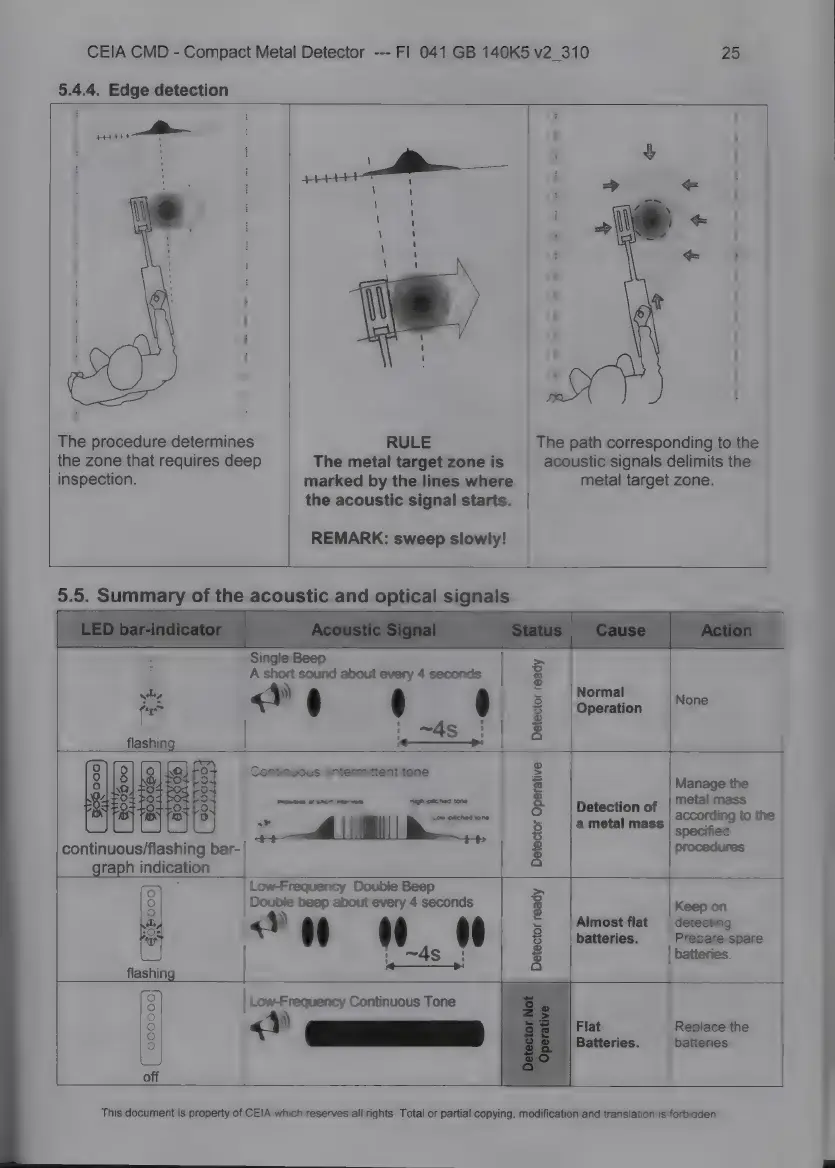
5.4.4.
Edge
detection
!
І
|
I
i
i
І
|
|
|
I
i
|
і
|
i
l
i
i
i
i
I
!
|
|
|
I
|
|
|
The
procedure
determines
RULE
The
path
corresponding
to
the
the
zone
that
requires
deep
The
metal
target
zone
is
acoustic
signals
delimits
the
inspection.
marked
by
the
lines
where
metal
target
zone.
the
acoustic
signal
starts.
|
REMARK:
sweep
slowly!
5.5.
Summary
of
the
acoustic
and
optical
signals
Single
Beep
>
А
short
sound
about
every
4
seconds
|
8
4)
І
=
Могта!
|
$
(i
à
$
Operation
None
|
:
~4s
:
8
£
E
Manage
the
i
8
Detection
of
ев
Sing
to
the
5
a
metal
mass
Meet
continuous/flashing
bar-
3
procedures
graph
indication
|
oy
Low-Frequency
Double
Beep
Ре
о
Double
беер
about
every
4
seconds
g
Keep
on
"
«Y
it
i
%
5
Almost
flat
|
detecting.
|
To
9
batteries.
Prepare
spare
=
i
~4s
'
v
batteries.
>
p
a
flashing
|
рі
Low-Frequency
Continuous
Tone
(0
O
i
2
8
Batteries.
batteries.
off
This
document
is
property
of
CEIA
which
reserves
all
rights.
Total
or
partial
copying,
modification
and
translation
is
forbidden.

Related product manuals