EasyManua.ls Logo

Ceia CMD - Nter SS te Connait ЕЕ

Ceia CMD
34 pages
Print Icon
To Next Page IconTo Next Page
To Previous Page IconTo Previous Page
Loading...
26
CEIA
CMD
-
Compact
Metal
Detector
Fl
041
GB
140K5
v2
310
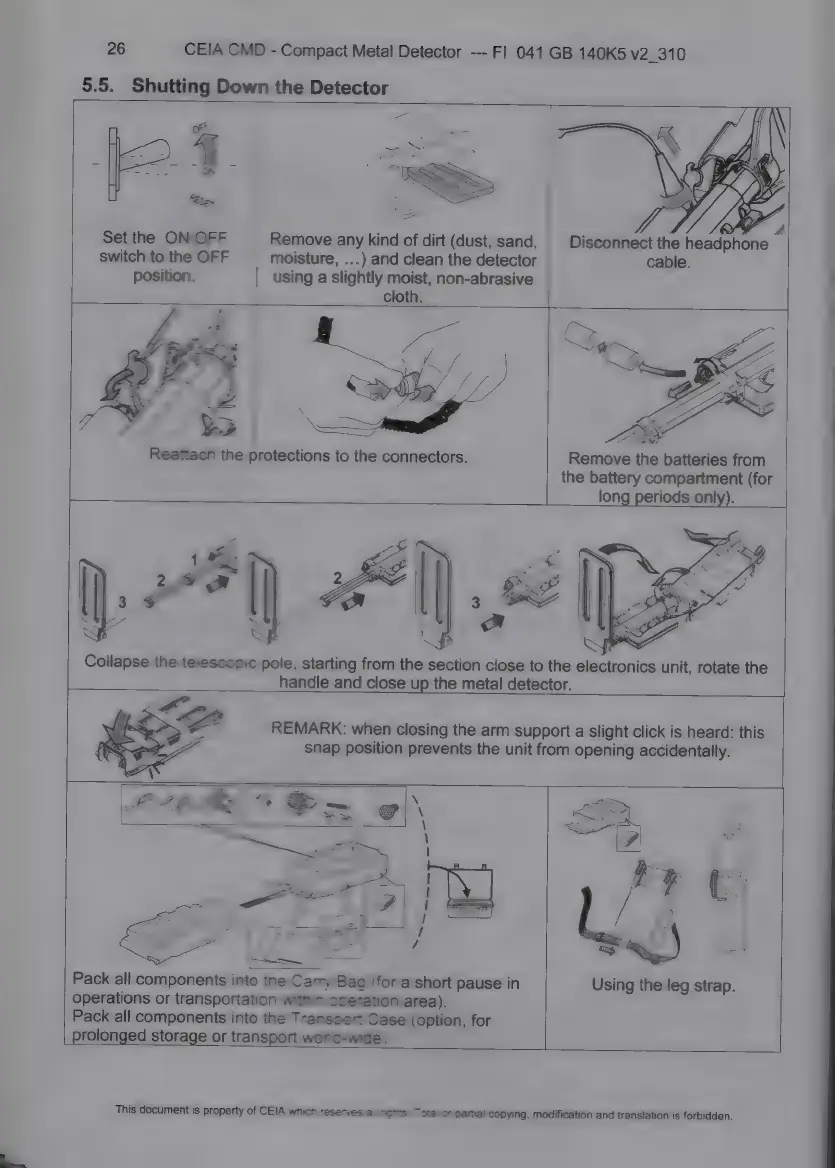
5.5.
Shutting
Down
the
Detector
*
©
й
Disconnect
the
headphone
cable.
Set
the
ON/OFF
Remove
any
kind
of
dirt
(dust,
sand,
moisture,
...)
and
clean
the
detector
switch
to
the
OFF
position.
using
a
slightly
moist,
non-abrasive
cloth.
Remove
the
batteries
from
the
battery
compartment
(for
long
periods
only).
SP
й
i
Ux
cs
unit,
rotate
the
à
y
Collapse
the
telescopic
pole,
starting
from
the
section
close
to
the
electroni
handle
and
close
up
the
metal
detector.
REMARK:
when
closing
the
arm
support
a
slight
click
is
heard:
this
snap
position
prevents
the
unit
from
opening
accidentally.
Using
the
leg
strap.
Pack
all
components
into
the
Carry
Bag
(for
a
short
pause
in
operations
or
transportation
within
operation
area).
Pack
all
components
into
the
Transport
Case
(option,
for
|
prolonged
storage
or
transport
world-wide).
This
document
is
property
of
CEIA
which
reserves
all
Nights.
Total
or
partial
copying,
modification
and
translation
is
forbidden.

Related product manuals