EasyManua.ls Logo

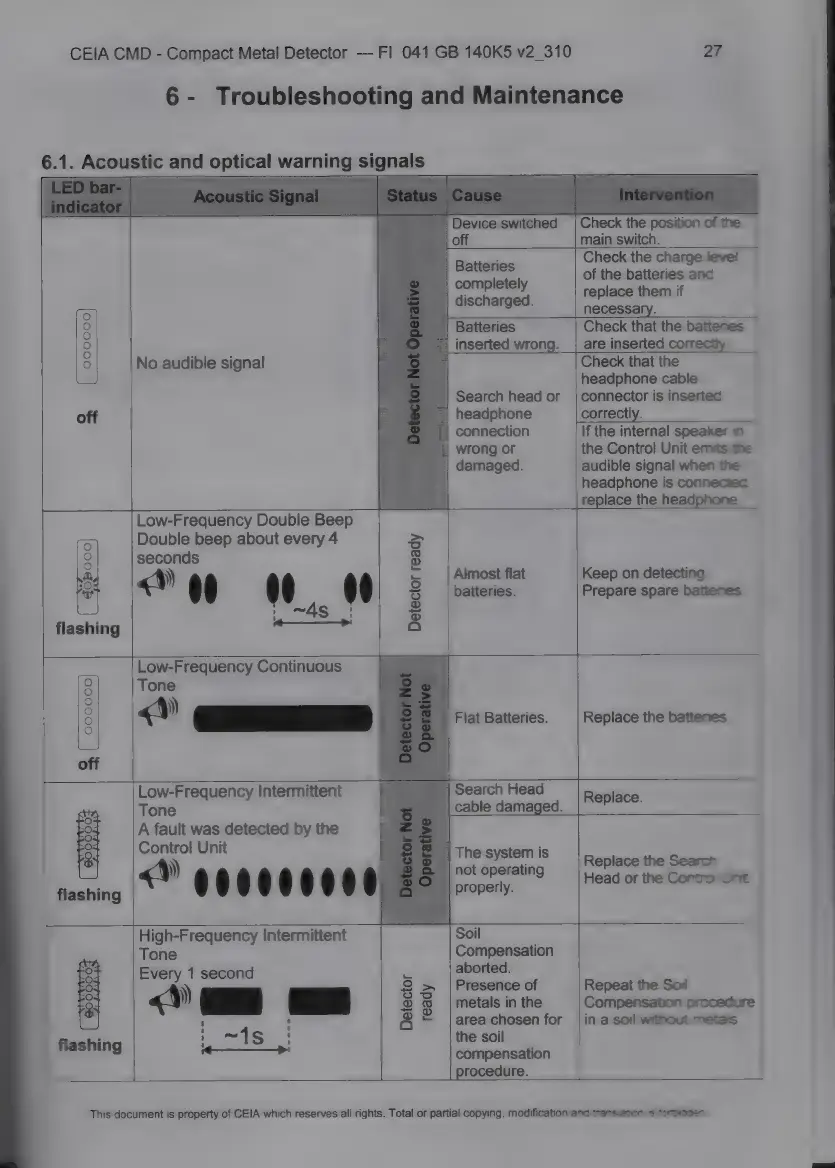
Ceia CMD - Troubleshooting and Maintenance; Acoustic. and Optical Warming Signals

Ceia CMD
34 pages
Print Icon
To Next Page IconTo Next Page
To Previous Page IconTo Previous Page
Loading...
CEIA
CMD
-
Compact
Metal
Detector
Fl
041
GB
140К5
v2
310
6.1.
Acoustic
and
optical
warning
signals
27
6-
Troubleshooting
and
Maintenance
Check
the
position
of
the
main
switch.
Check
the
charge
leve!
of
the
batteries
and
replace
them
if
necessary.
Check
that
the
battenes
are
inserted
correctly.
Check
that
the
headphone
cable
connector
is
inserted
correctly.
If
the
internal
speaker
im
the
Control
Unit
emits
the
audible
signal
when
the
headphone
is
connectec.
replace
the
headphone.
Keep
on
detecting.
Prepare
spare
battenes.
Replace
the
batteries
Batteries
completely
discharged.
:
2,
inserted
wrong.
о
No
audible
signal
Search
head
or
off
headphone
|
connection
|
wrong
or
damaged.
P
Low-Frequency
Double
Beep
T
Double
beep
about
every
4
>
9
seconds
E
à
)
x
|Almost
flat
^
«»
<
0
0.
_
8
batteries.
flashing
47.
а
Low-Frequency
Continuous
9
Топе
о
27
ЕЕС
off
Low-Frequency
Intermittent
|
Search
Head
Tone
cable
damaged.
A
fault
was
detected
by
the
-
Control
Unit
_
|
The
system
is
«M
i $ 5
Ë
a
$
¢
і
й
-|
not
operating
|
flashing
E
properly.
High-Frequency
Intermittent
Soil
Tone
Compensation
222
Every
1
second
5
:
205
)
S
g
|Presence
o
P
«o
M
EE
E
$
өле
ЖЕРІК
а
leet
e
Mashing
аныя
compensation
procedure.
Replace.
Replace
the
Search
Head
or
the
Сопёої
Unit
Repeat
the Sof
Compensation
procedure
in
a
soil
without
metals.
This
document
is
property
of
CEIA
which
reserves
all
rights.
Total
or
partial
copying,
modification
and
transiston
=
fortudaec

Related product manuals