EasyManua.ls Logo

Ceia CMD - Soil Compensation Successful

Ceia CMD
34 pages
Print Icon
To Next Page IconTo Next Page
To Previous Page IconTo Previous Page
Loading...
CEIA
CMD
-
Compact
Metal
Detector
--
Fl
041
GB
140K5
v2
310
5.2.2.
Soil
Compensation
Successful
17
STEP
1
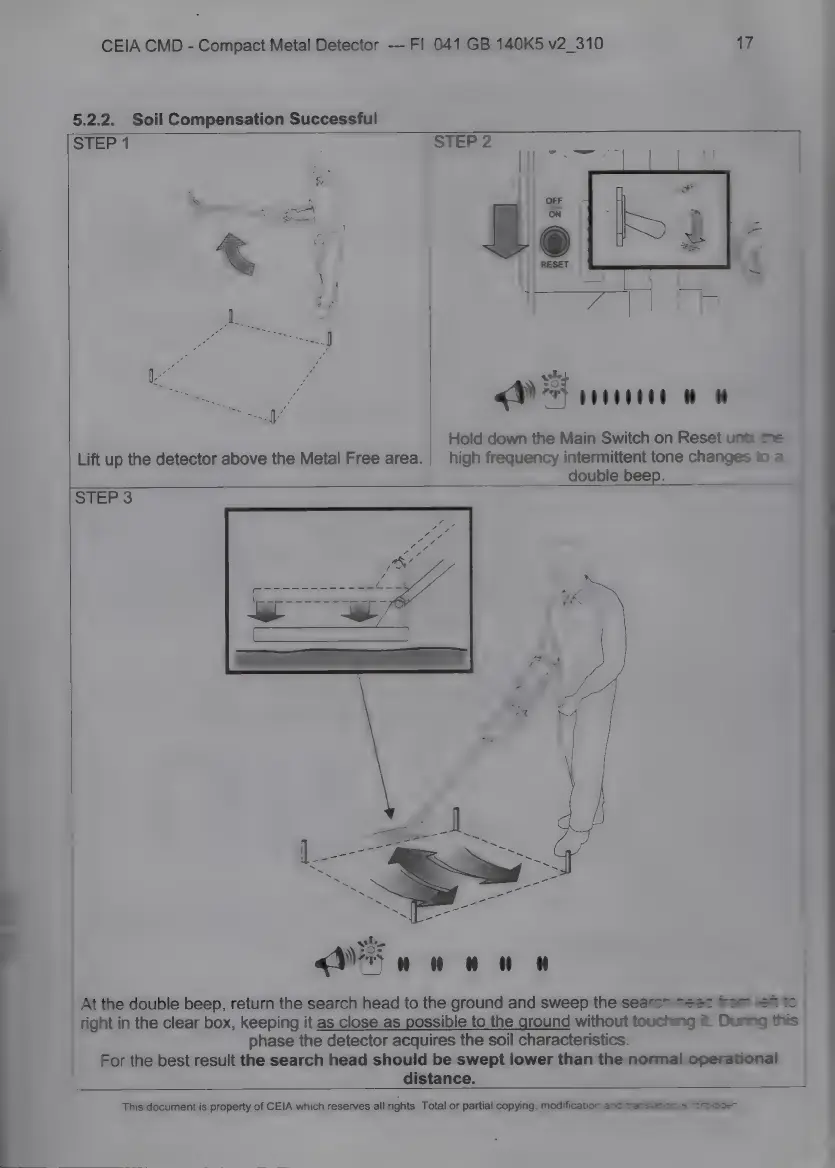
Lift
up
the
detector
above
the
Metal
Free
area.
STEP
2
ы
4
|
«9%
ІШПЕ
Hold
down
the
Main
Switch
on
Reset
unt
he
high
frequency
intermittent
tone
changes
t
=
double
beep.
STEP
3
At
the
double
beep,
return
the
search
head
to
the
ground
and
sweep
the
search
head
fom
ей
to
right
in
the
clear
box,
keeping
it
as
close
as
ssible
to
the
ground
without
touching
it.
During
this
phase
the
detector
acquires
the
soil
characteristics.
For
the
best
result
the
search
head
should
be
swept
lower
than
the
norma!
operational
distance.
This
document
is
property
of
CEIA
which
reserves
all
rights.
Total
or
partial
copying,
modification
and
transistioe
=
*nracd=n

Related product manuals