EasyManua.ls Logo

Ceia CMD - Wonccenesseneesnmaaenton Н А

Ceia CMD
34 pages
Print Icon
To Next Page IconTo Next Page
To Previous Page IconTo Previous Page
Loading...
28
CEIA
CMD
-
Compact
Metal
Detector
--
Fl
041
GB
140K5
v2
310
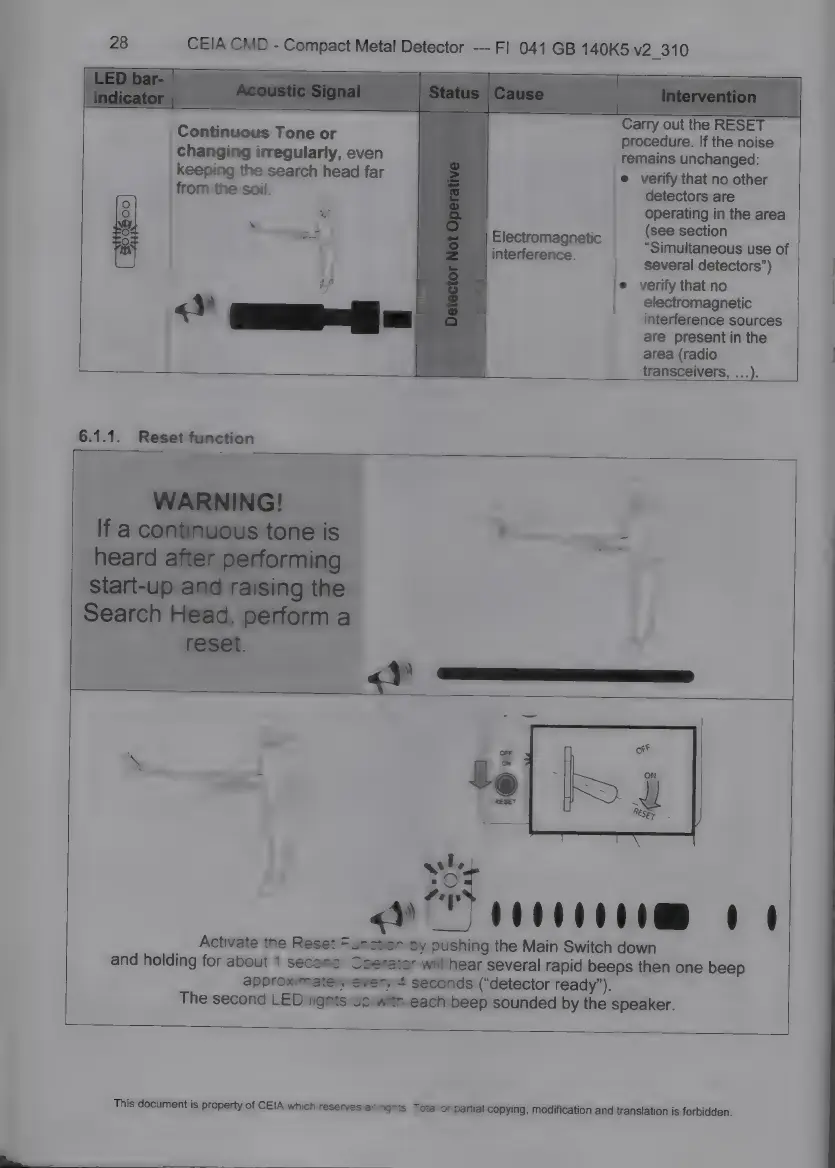
Carry
out
the
RESET
procedure.
If
the
noise
remains
unchanged:
*
verify
that
no
other
detectors
are
operating
in
the
area
(see
section
"Simultaneous
use
of
|!
several
detectors")
:
if
*
verify
that
no
:
5
electromagnetic
<
E
cr
interference
sources
are
present
in
the
area
(radio
transceivers,
...)..
Continuous
Tone
or
changing
irregularly,
even
keeping
the
search
head
far
from
the
soil.
Electromagnetic
interference.
7
0000000088
1
1
Activate
the
Reset
Function
by
pushing
the
Main
Switch
down
and
holding
for
about
1
second.
Operator
will
hear
several
rapid
beeps
then
one
beep
approximately
every
4
seconds
(“detector
ready").
The
second
LED
lights
up
with
each
beep
sounded
by
the
speaker.
This
document
is
property
of
CEIA
which
reserves
ail
rights.
Total
or
partial
copying,
modification
and
translation
is
forbidden.

Related product manuals