Operator Manual Industrial Metal Detector THS/21
30 FI 028 GB 2K8 v2
3.6.3 - Printing the Events list
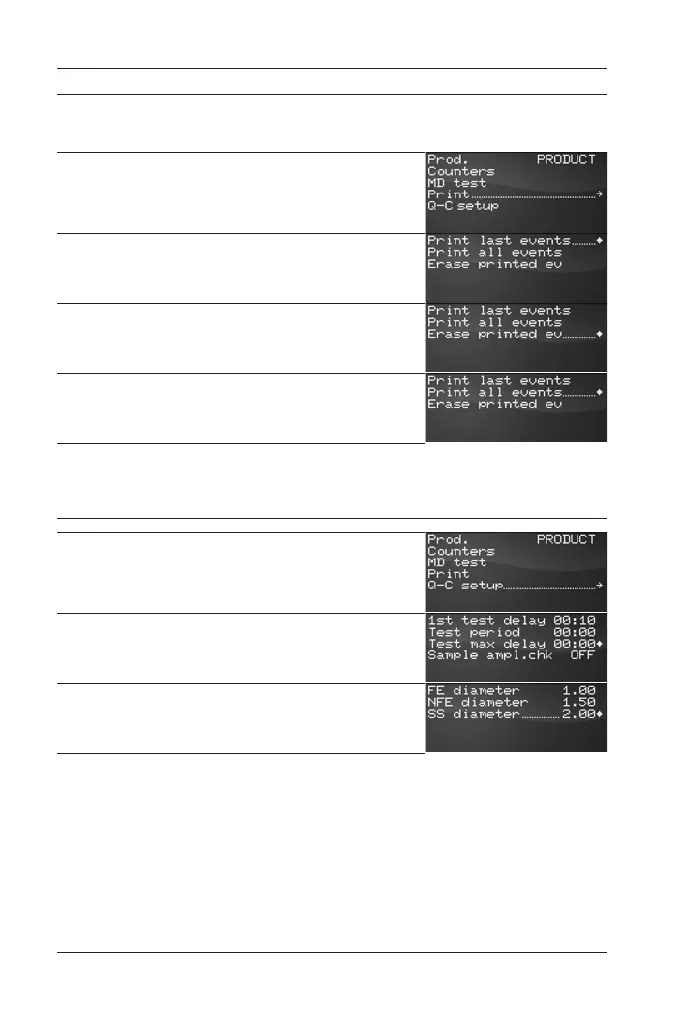
The Last Events list can be easily printed, following the steps illustrated
here below:
Access as Administrator or as Head of Quality control and select the
Print menu.
In the picture beside, the programming menu of the Head of Quality
control, is shown.
To print all events occurred since the last print, select Print last
events .
When the print is successfully completed, select the command Erase
printed ev.
To print all events occurred, select Print all events .
The THS stores in memory the last 1000 events.
3.6.4 - Configuration of Quality Control parameters
Access as Administrator or as Head of Quality control and select the
Q-C setup menu.
In the picture beside, the programming menu of the Head of Quality
control, is shown.
All parameters adjustable by the Head of Quality control, are now
available. Refers to the Programming Manual for their meaning and
use.
Inside the Test samples menu, it is possible to set the samples
values that will be shown inside reports and prints.


 To Next Page