Bluetooth Feature
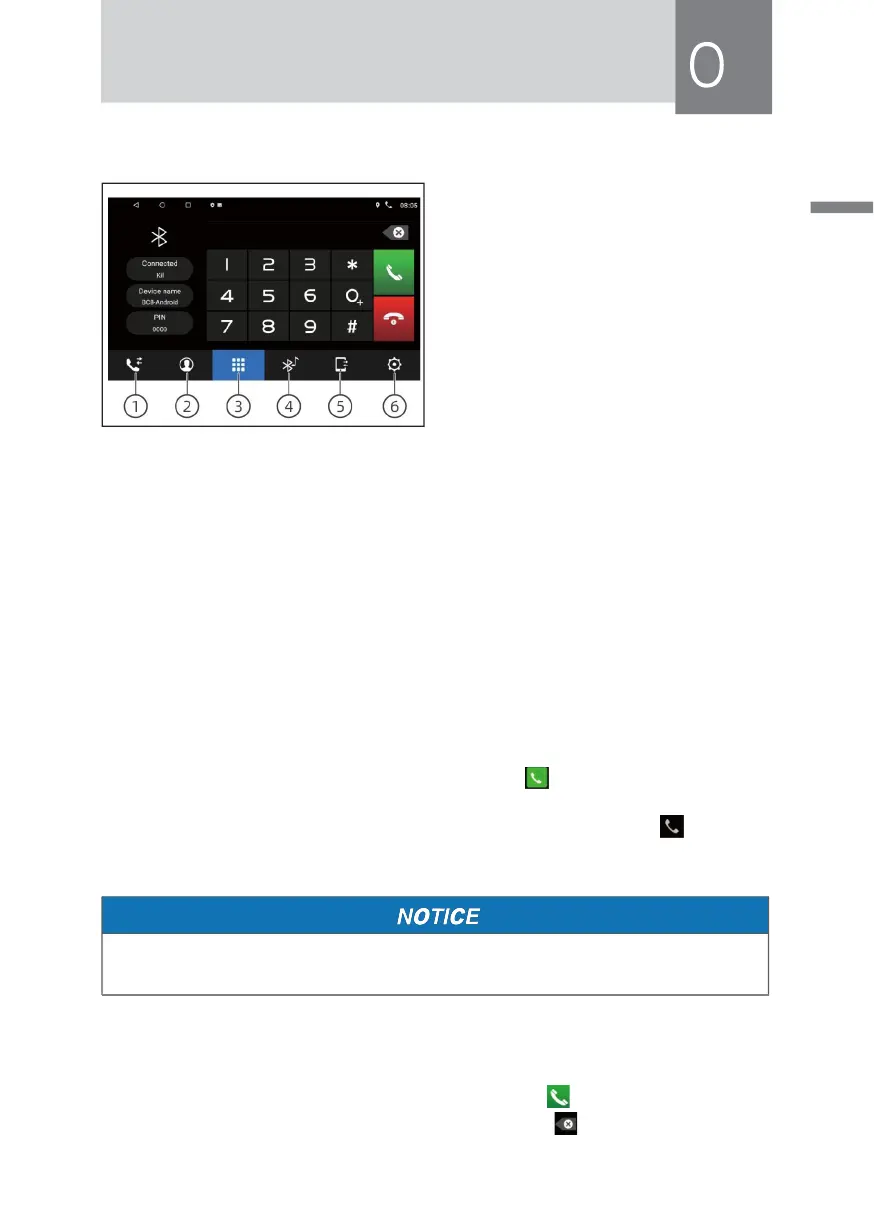
In the[main interface] touch [Blue-
tooth ] icon to enter the following
interface:
① Call History
② Phone book
③ Dial Interface
④ Bluetooth Music
⑤ Bluetooth Connect Device
⑥ Bluetooth Setting
· Pair and connect
» When the phone is paired with host for the first time,shall look at the steps:
Open the phone's Bluetooth feature.
» Search by mobile Bluetooth device or search for Bluetooth devices through the
host,and connect.
» Is displayed on the phone's screen a message,enter the password(0000) on
your phone,then press(ENT).
» After pairing, to enter the following interface:[ ]Bluetooth system after re-
energized,it will automatically connect to the last phone disconnected.After
successful pairing,the connection state upper right corner [ ] icon will
display.
• Must open the phone's Bluetooth, turn off all nearby Bluetooth devices, you
can search for hosts to mobile devices.
· Dial
» When the phone is connected to the host is successful,enter the phone number
Via the keypad on the touch screen,then touch [ ] icon to make a call. In
the dial-up process,if input wrong number,touch [ ] icon deletes by single



 To Next Page