page 28 www.centsys.com
OPERATOR INSTALLATIONSECTION 7
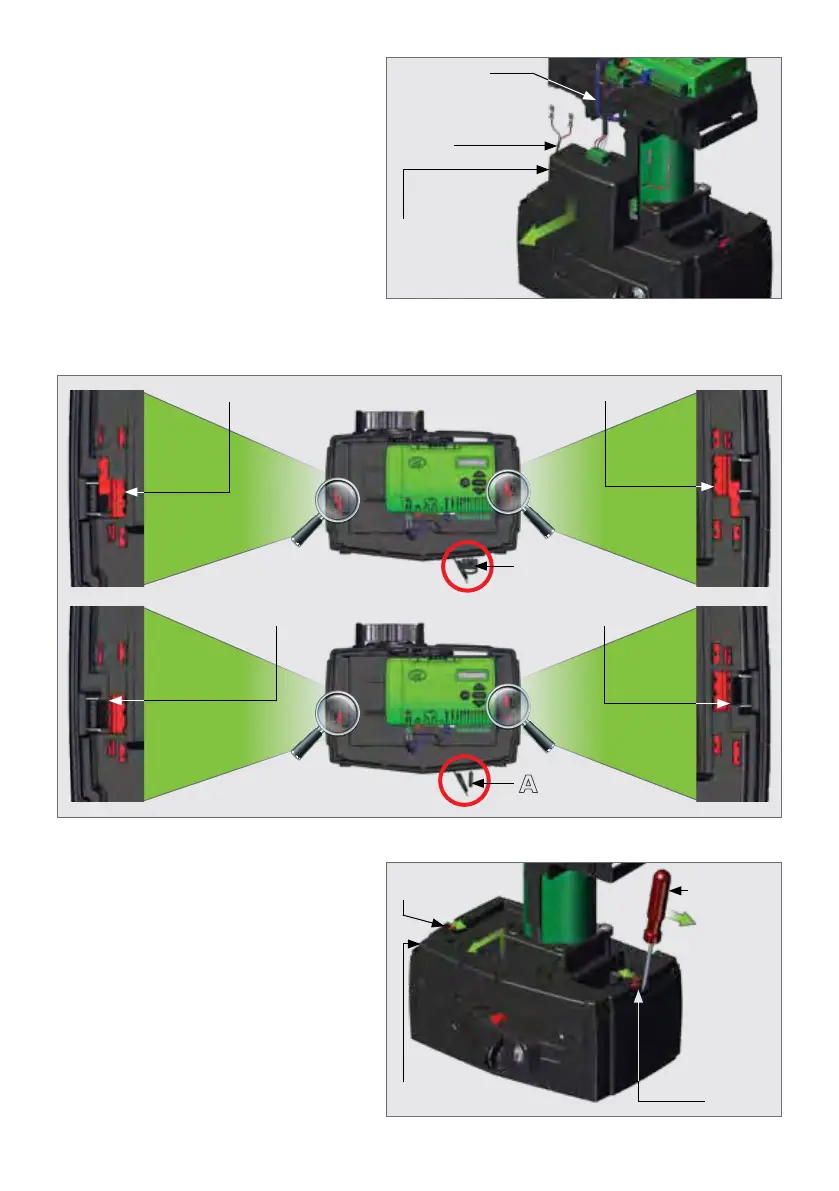
FIGURE 29
Remove the Charger from the lower
battery tray by gently pushing the
Charger slightly down whilst pulling
it towards the front of the
D5 SMART. It should slide forward
andowithease.
Charger
Battery
Harness
Power Supply
Harness
FIGURE 30
Locked Locked
Unlocked
Locked
Unlocked
Unlocked
A
7.4.2. Removing the Lower Battery Tray
FIGURE 31
To remove the Lower Battery Tray,
rstlyensurethattheCamlockisin
the "unlocked" position (Figure 30
marked as "A"). Open the release
handle until the Camlock Cam is
visible.
Usingaatscrewdriver,leverthe
left and right Tabs inward, lift the
Lower Battery Tray up, and then out
towards the front of the D5 SMART.
Left
Tab
Lower
Battery Tray
Right Tab
Flat
Screwdriver



 To Next Page