page 44 www.centsys.com
OPERATOR INSTALLATIONSECTION 7
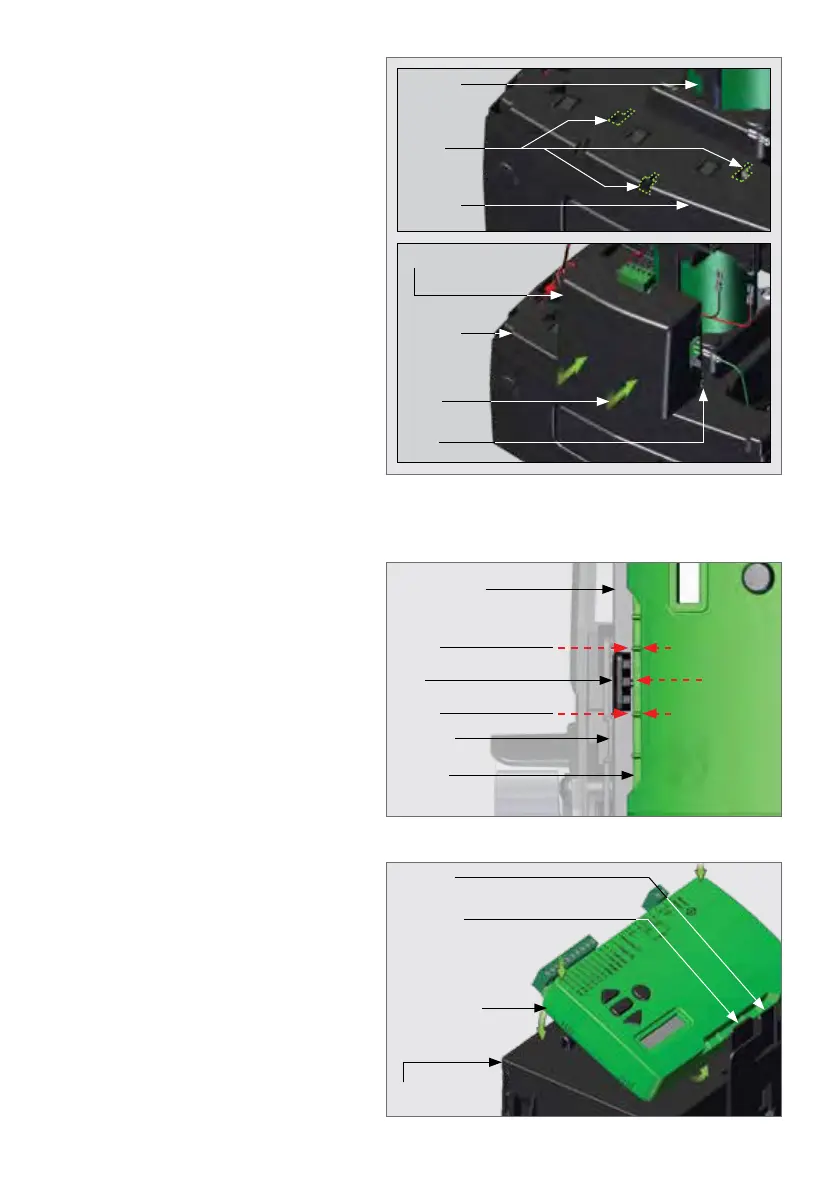
FIGURE 72. CHARGER PLACEMENT
Place the Charger back into position
by aligning the three feet at the
bottom of the Charger with the three
slots found on top of the Lower
Battery Tray.
Place the studs of the Charger into
the three holes on the Lower Battery
Tray. Firmly press the Charger down,
and push it toward the Electric
Motor, sliding it along the slots.
Tilt the control card and align the
wider gap with the clips shown in
Figure 73.
Once aligned, hinge the Control Card
underthetab'slip,andrmlypress
downward on both sides in front of
the Control Card.
This will engage the Control Card
into the hinges at the front of the
Control Card Support Tray.
A click from both sides will be heard
if this is done correctly.
7.10.4. Placing the Control Card back into Position
Electric
Motor
Slots
Charger
Stud
Slot
Lower
Battery
Tray
Lower
Battery
Tray
FIGURE 74
FIGURE 73
Clip Wider gap
Control
Card
Ridge
Ridge
Left Tab
Control Card
Support Tray
Control Card
Support Tray
Right Tab
Control Card
Left Tab



 To Next Page