page 46 www.centsys.com
8. Completing the Installation
COMPLETING THE INSTALLATIONSECTION 8
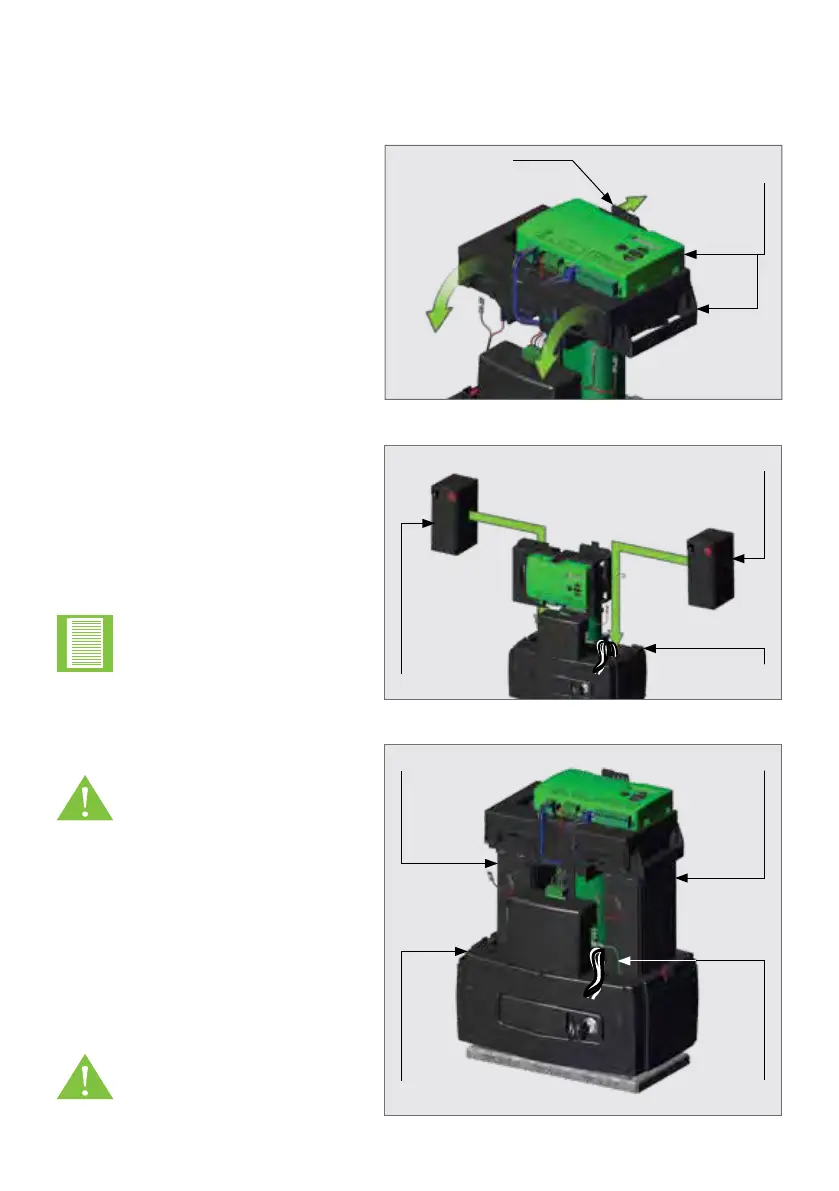
FIGURE 78
FIGURE 79
FIGURE 80
Gently push the left tab behind the
Control Card backwards. This will
allow the entire upper assembly to
hinge forward.
8.1. Fitting the Batteries
Push the left tab
backwards
Swing the upper
assembly forward
Battery
Battery
Lower
Battery Tray
Lower
Battery Tray
Earth
Harness
Battery
Battery
Swing the upper assembly back into
position over the batteries.
A click should be heard if this is done
correctly.
Place a Battery into the designated
area found on top of the Lower
Battery Tray on the left. Route the
Power and Signal cables between
the right Battery compartment and
the Electric Motor then place the
remaining Battery in it's designated
area on the right.
Note the orientation of
the two Batteries. Ensure
that the Battery Terminals
always face the direction of
the Charger.
Take extra care not to
pinch the Earth Harness
when placing the Battery
on the right. The Earth
Harness must be routed
under this Battery and
out the gap found in front
of the Battery once in
position.
Failure to properly click
the control card and
upper assembly into
place will result in erratic
behavior of the gate
motor.



 To Next Page