page 29 www.centsys.com
OPERATOR INSTALLATIONSECTION 7
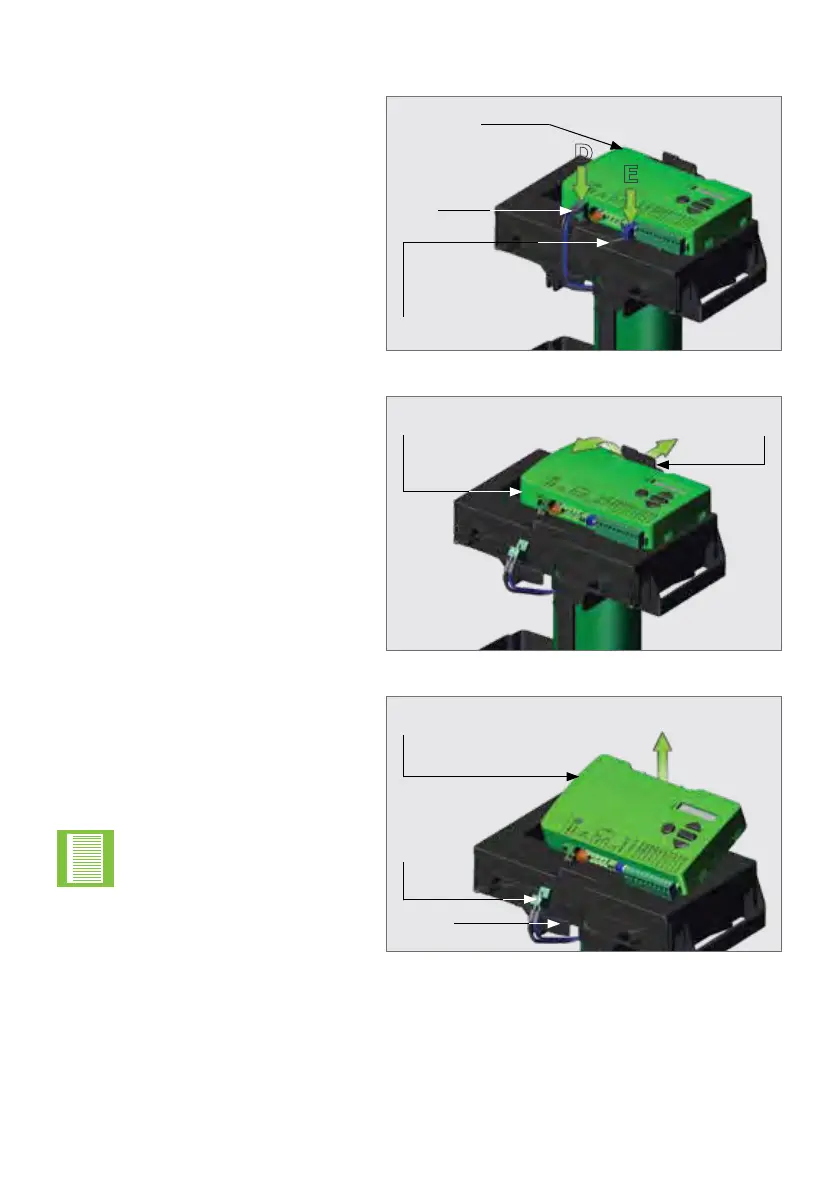
FIGURE 32
FIGURE 33
FIGURE 34
Remove the Control Card by pushing
the right tab behind the Control Card
backwards.
This will allow the Control Card to
hinge forward.
Disconnect the Motor Wires at
Point "D" and the Override Sensor
Harness at Point "E" from the Control
Card as Shown in Figure 32.
7.4.3. Removing the Control Card
E
D
Lift the Control Card upwards and
away form the D5 SMART, which
will unhinge it from the hinge tabs
found on the sides of the Control
Card.
Store the Control Card in a safe
place.
The D5 SMART is now ready to be
mounted onto the foundation plate.
Take care not to snag the
remaining harnesses in the
harness retainers when
removing the Control Card
from the platform.
Override Sensor
Harness
Motor
Wires
Harnesses
Harness
Retainer
D5 SMART
Control Card
Push the right tab
backwards
Hinge the Control
Card forward
D5 SMART
Control Card



 To Next Page