page 33 www.centsys.com
OPERATOR INSTALLATIONSECTION 7
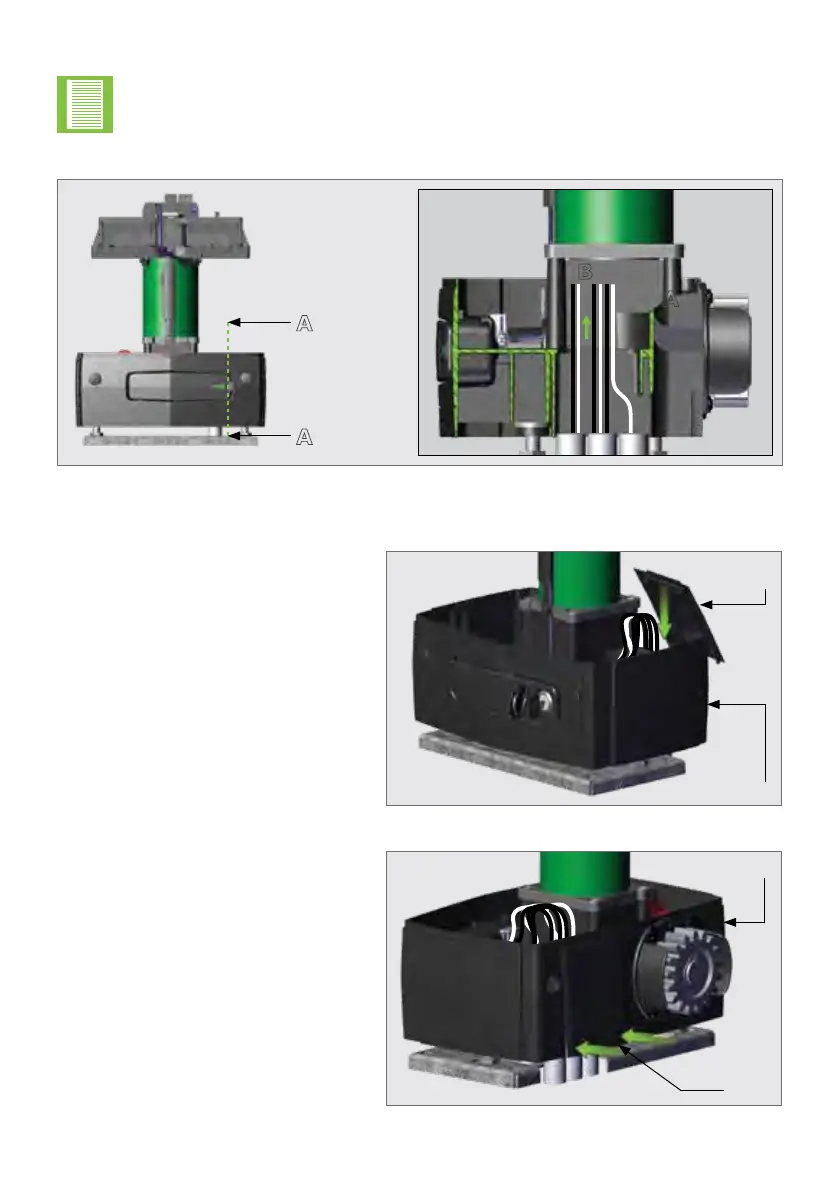
FIGURE 45
FIGURE 46
Cable
Shield
Gearbox
Gearbox
Cable
Shield
FIGURE 44. CABLE ROUTING FOR RETRO-FITS WITH SHORTER CABLES
A
A
Section View A-A
A
B
Shouldtheexistingcablesforaretro-tinstallationbetooshorttoroute
through "Point A" as shown in Figure 43 on the previous page, they can be
routed directly through "Point B" to accommodate the shorter length. Note that
routing the cables through "Point B" as shown in Figure 44, may make it more
challenging to remove the D5 SMART for whatever reason at a later stage.
Replacing the Cable Shield onto the Gearbox
Tilt the top of the Cable Shield
towards the Gearbox, and slide it
down so that the top of the Cable
Shieldisushwiththetopedgeof
the Gearbox.
From the other side of the gate,
rmlypushthebottomsidesofthe
Cable Shield inward, towards the
gearbox.
Two clicks will be heard (one from
each side of the Cable Shield) if the
Cable Shield has engaged with the
gearbox correctly.



 To Next Page