13
2. Navigator Control
The ProPilot 700 can be interfaced to a navigation device such as a
GPS, Loran or Plotter using the Industry Standard NMEA 0183
Format.
Once a waypoint or a waypoint within a route has been selected as
your target and the navigation device is providing Navigator Data to
the target the ProPilot 700 may be engaged under Navigator
Control. It is advisable to steer the boat on to the desired heading
to minimise any Cross Track Error before engaging navigator
control, to avoid an immediate course change.
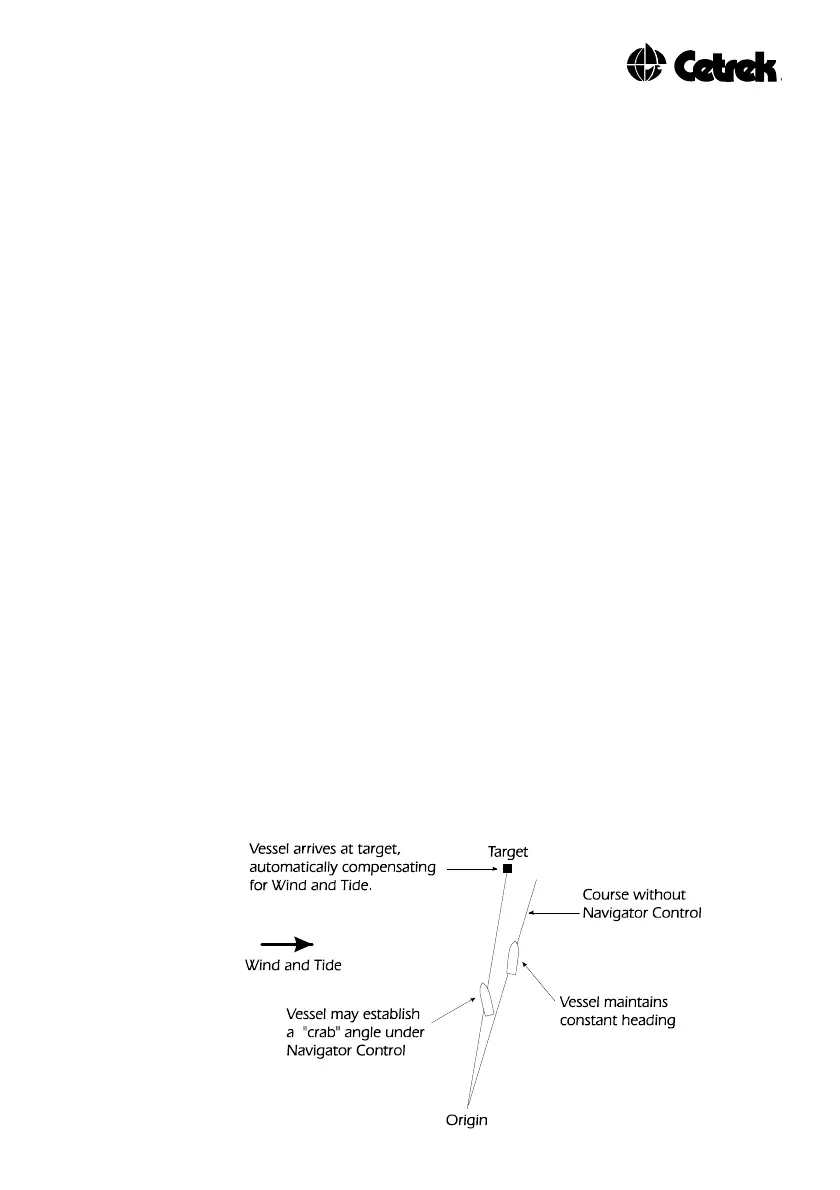
As soon as Navigator Control is selected the ProPilot 700 will read
the magnetic bearing to the target from the navigator (if magnetic
bearings are not available, the Pilot Computer will automatically use
true bearings) and turn the vessel onto that course. The ProPilot
700 constantly monitors the Cross Track Error and applies Navigator
Gain to maintain a direct Course Over Ground to the target. Note
the vessel may establish a “crab” angle to compensate for wind and
tide as it steers to the waypoint.
If a route or a new waypoint is selected, in the navigator, the
ProPilot 700 will be triggered by a change of waypoint identifier to
automatically turn the vessel onto the next course to the new
waypoint if Automatic Waypoint Sequence is selected. The system
may be programmed for Manual Waypoint Sequence, if preferred,
this is described later, see section 7.5.
While under Navigator Control, both the arrow keys and Course
Select Knob still operate.
Figure 3 - Navigator Control



 To Next Page